# Title and meta description — writing for the result page
> The title tag and meta description are the only parts of your page most people see before they click. This guide covers the lengths Google actually shows, how to write both for a click, why Google rewrites them, and how to set them per template in WordPress, Shopify and static sites.
Updated 2026-09-25 · Technical SEO · HTML version: https://getreport.app/guides/titles-and-descriptions-for-the-result-page
The result page is where a search becomes a visit, and the only things on it you control are the title and the description. Google shows about 60 characters of the title and about 155 of the description on mobile, rewrites either when it decides yours is not helpful, and uses the title as a ranking hint. This guide covers what to write, how long, how the SERP preview in the checker helps, and where to set both in each CMS.
## Quick answer
- **Title**: 30–60 characters, the page's topic first, the brand last, one topic per page, unique across the site.
- **Description**: 70–160 characters, a sentence that says what the page offers and why to click, with the topic's words in it (Google bolds them).
- Every page has exactly one `` and one `<meta name="description">`; the H1 can differ from the title.
- Google rewrites titles that are too long, keyword-stuffed, identical across pages, or missing; the fix is a better title, not a trick.
- Run the [meta tags checker](https://getreport.app/tools/meta-tags-checker) to see both with a SERP preview.
## Why titles and descriptions matter
The title is a ranking factor (a small one) and the biggest click factor. Two pages with the same content and different titles get different traffic, because the title tells the searcher whether the page answers their question. The description is not a ranking factor at all, but it is the text under the title on most results, and a good one raises the click-through rate for the same position.
Missing either means Google writes its own from the page's content. Sometimes that is fine; often it is the first sentence of the cookie notice.
## How getReport checks it
> **Free tool:** [Meta tags checker](https://getreport.app/tools/meta-tags-checker): See the title, meta description, canonical, robots, viewport and language tags of any page, with lengths, and what Google will do with each of them.
The checker reads the `<title>`, the meta description, the H1 and the Open Graph tags of the page, measures the lengths, and shows a SERP preview the way Google renders them on mobile.
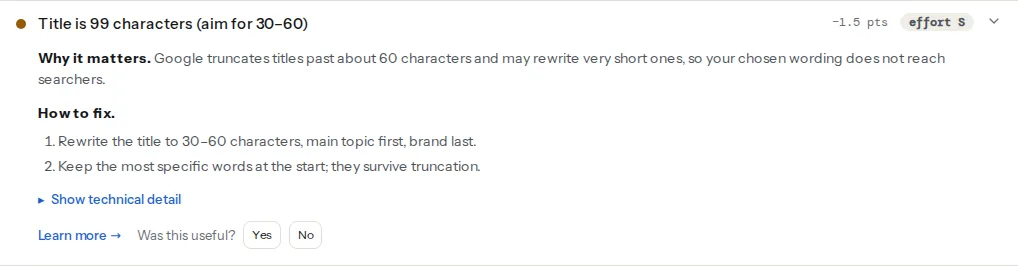
> **Check: Title length.** Google truncates titles past about 60 characters and may rewrite very short ones, so your chosen wording does not reach searchers.
>
> 1. Rewrite the title to 30–60 characters, main topic first, brand last.
> 2. Keep the most specific words at the start; they survive truncation.
> **Check: Meta description length.** Descriptions past about 160 characters are cut off mid-sentence in search results; under 70 they waste the space.
>
> 1. Shorten the description to 70–160 characters and end it with a reason to click.
> **Check: Title and H1 are different.** The title competes in search results; the H1 greets visitors already on the page. Using the same words for both wastes the chance to cover a second phrasing searchers use.
>
> 1. Keep the H1 as the on-page headline and rewrite the title for search, for example adding the key benefit or the brand.
## Writing the title
A title is a promise: "this page is about X". Write it for the person who typed the query.
| Page type | Pattern | Example |
| --- | --- | --- |
| Product | Product name, key attribute · Brand | Alpina Pro trekking shoe, waterproof · Outdoor Shop |
| Category | Category, what is in it · Brand | Trekking shoes for women, 120 models · Outdoor Shop |
| Article | The question or the claim | How to waterproof leather boots (and what ruins them) |
| Home page | Brand: what it does, where | Outdoor Shop Zagreb: hiking gear, 24 h delivery |
| Local service | Service in place · Brand | Emergency dentist in Portland · Riverside Dental |
Rules that hold up:
- **Topic first.** Google truncates from the end; the brand can be cut, the topic cannot.
- **One topic.** "Shoes, jackets, backpacks and more" ranks for nothing in particular.
- **Unique.** Two pages with the same title compete with each other; Google picks one.
- **Numbers and specifics** ("120 models", "24 h delivery") earn clicks; "best", "top", "ultimate" do not.
- **Sentence case**, no ALL CAPS, no `|||` decoration, no keyword repeated three times.
Length: Google shows a pixel width (about 600 px), which is 55–65 characters in most languages. The checker warns under 30 (too vague) and over 60 (truncated). Croatian and German titles with long words run out of space sooner.
## Writing the description
The description is an advertisement for the click, written in the page's voice. One or two sentences, 70–160 characters, containing the words the searcher used (Google bolds matches), ending with what they get.
- Product: "Waterproof trekking shoe with Vibram sole, sizes 36–47. Free delivery over €60, 30-day returns."
- Article: "Why leather boots leak, the three products that actually work, and the wax that ruins them. Tested over two winters."
- Home: "Family dentistry on the Portland riverside since 2009. Evening appointments, same-day emergencies, most insurance accepted. Book online in two minutes."
Avoid: the first paragraph copied, a list of keywords, a description that is the title again, and anything that promises what the page does not deliver (the bounce hurts more than the click helps).
## Why Google rewrites them
Google replaces the title in roughly one result in three, and the description more often. The triggers it has documented: the title is too long, stuffed with keywords, repeated across pages, missing, or does not match the query as well as the H1 or the anchor text of links to the page. The rewrite is usually the H1 or a heading. The way to stop it is to write titles that do not trigger it: unique, descriptive, close to the H1 without being identical.
For descriptions, Google picks a passage from the page when yours does not contain the query words; there is no way to force yours, only to make it the best match.
## Step by step
### 1. Run the checker on one page per template
Home, a category, a product or article. The SERP preview shows truncation; the findings show missing and duplicate tags.
### 2. Fix the template, then the exceptions
Most sites generate titles from a pattern (`%title% · %sitename%`). Fix the pattern once, then hand-write the titles for the top 20 pages by traffic; those deserve a human sentence.
### 3. Set them where the CMS expects
**WordPress**: Yoast SEO or Rank Math add a "SEO title" and "meta description" field to every post and page, with site-wide templates under the plugin's Search Appearance settings. Without a plugin, WordPress prints `Page name – Site name` and no description.
**Shopify**: each product, collection and page has a "Search engine listing" section at the bottom of its editor; the theme prints them. The store-wide pattern is in Online Store → Preferences.
**Static sites**: front matter (`title:`, `description:`) rendered by the layout into `<title>` and the meta tag. Do not fall back to the site name when the page's description is empty; leave the tag out instead, or the same description appears on every page.
```html
<head>
<title>Alpina Pro trekking shoe, waterproof · Outdoor Shop
```
### 4. Keep Open Graph in sync, but shorter
`og:title` and `og:description` are what social networks and chat apps show. They can be shorter and punchier than the search versions, but they should describe the same page. See [Link previews: Open Graph and Twitter cards](https://getreport.app/guides/link-previews-open-graph).
## Verify
- The checker shows both tags present, within length, and the preview reads well.
- Search Console → Performance, filter by page: click-through rate should rise over a few weeks at the same position.
- Search for the page's topic; if Google shows a rewritten title, compare with the H1 and adjust the title towards it.
## Common mistakes
- **Site name first.** "Outdoor Shop – Trekking shoes" gets cut to "Outdoor Shop – Trekking…" on mobile.
- **Same description everywhere** from a site-wide fallback. Google ignores it and picks a passage.
- **Titles written for the CMS, not the searcher**: "Product 4412", "Untitled page", "Home".
- **Emojis and special characters** to stand out. Google strips most of them.
- **Changing titles weekly** to chase rankings. Give a change four to six weeks to show in Search Console.