# Text compression: gzip and Brotli explained (with configs)
> Gzip and Brotli shrink HTML, CSS and JavaScript by 70–80 % before they leave your server. See what to compress, which to pick, and configs for nginx, Apache, Caddy and Cloudflare.
Updated 2026-09-25 · Best practices · HTML version: https://getreport.app/guides/text-compression-gzip-brotli
Text compression is the cheapest speed win on the web. The server squeezes HTML, CSS and JavaScript before sending them, the browser unpacks them on arrival, and the visitor downloads a quarter of the bytes. Every browser has supported it for decades, most servers need one setting to turn it on, and yet uncompressed pages still turn up in every batch of reports. This guide shows how to check your site, what to compress and what to leave alone, and the configuration for each common server. Allow about 15 minutes.
## Quick answer
- Compress **text**: HTML, CSS, JavaScript, JSON, XML, SVG, plain text and old font formats (TTF, OTF). Expect **70–80 % smaller** files.
- Do **not** compress images, video, PDFs, ZIPs or WOFF2 fonts: they are compressed already.
- Use **Brotli** where you can (typically 15–20 % smaller than gzip), with **gzip as the fallback**. Level **4–6** for on-the-fly compression, **11** for files compressed in advance.
- Send **`Vary: Accept-Encoding`** so caches keep the compressed and uncompressed versions apart.
- **Cloudflare** and most managed hosts compress for you; check it is not turned off at the origin or bypassed.
- Verify with the [HTTP/2 test](https://getreport.app/tools/http2-test) or `curl -H "Accept-Encoding: br, gzip"` and look for `Content-Encoding`.
## Why text compression matters
A typical page ships 50–100 KB of HTML, a few hundred KB of CSS and often over a megabyte of JavaScript. Text is repetitive (the same tag names, class names and keywords over and over), which is exactly what compression algorithms are good at. A 400 KB JavaScript bundle becomes roughly 100 KB with gzip and a little less with Brotli.
On a fast office connection the difference is hard to feel. On a phone with a weak signal, 300 KB saved on the render-blocking CSS and scripts is often a second or more before the first paint. It also costs visitors less data, and it costs you less bandwidth. The server spends a few milliseconds of CPU per response to compress; for static files compressed in advance, it spends nothing at all.
The browser asks for it with a request header, `Accept-Encoding: gzip, deflate, br, zstd`, and the server answers with `Content-Encoding: br` (or `gzip`) when it compressed the response. No header in the response means the file travelled uncompressed.
## How getReport checks it
> **Free tool:** [HTTP/2 and HTTP/3 test](https://getreport.app/tools/http2-test): Check whether a site negotiates HTTP/2 during the TLS handshake and advertises HTTP/3, which protocol every file on the page actually used, plus compression, caching and CDN detection.
The HTTP/2 test loads the page in Chromium and looks at every response: the page itself, its stylesheets and scripts, JSON requests, the manifest and SVG images. Each text response without a `Content-Encoding` of `br`, `gzip`, `deflate` or `zstd` is counted, and the list names each file with its size. Responses served from the browser's cache and failed requests are skipped.
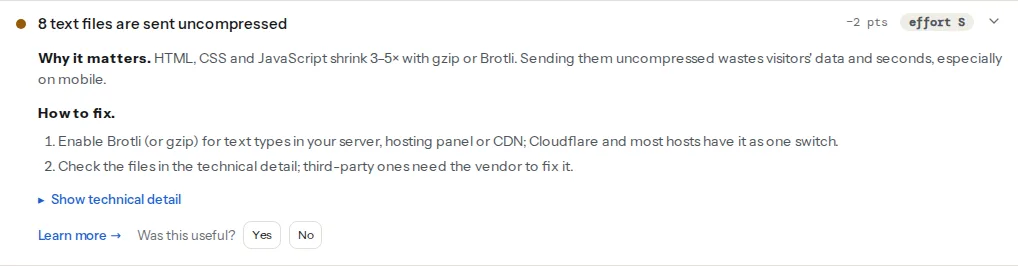
> **Check: Text files are compressed.** HTML, CSS and JavaScript shrink by 70–90% with gzip or Brotli. Sending them uncompressed wastes visitors' data and seconds, especially on mobile.
>
> 1. Enable Brotli (or gzip) for text types in your server, hosting panel or CDN; Cloudflare and most hosts have it as one switch.
> 2. Check the files in the technical detail; third-party ones need the vendor to fix it.
Read the list before fixing anything. If the page's own HTML, CSS and scripts are listed, compression is off on your server or CDN. If only third-party files are listed (a chat widget, a font service, a tracking script), your server is fine and the vendor needs to fix theirs.
The full report's speed module adds Lighthouse's view, which estimates the bytes and time compression would save and only lists files where it would make a meaningful difference:
> **Check: Text files are compressed.** HTML, CSS and JavaScript shrink by 70–90 % with Brotli or gzip. Without it every visitor downloads several times more than needed.
>
> 1. Turn on Brotli or gzip on the server or CDN (Cloudflare does it automatically; Apache mod_deflate/brotli; nginx gzip on).
> 2. Check that your CDN or plugin is not serving already-compressed assets without the Content-Encoding header.
Cache headers are in the same panel because they are set in the same place in your server configuration:
> **Check: Static files have a cache lifetime.** Without a cache lifetime, every visit downloads the same logo, CSS and scripts again. Returning visitors should get them from their browser in 0 ms.
>
> 1. Send Cache-Control: public, max-age=31536000, immutable for versioned images, CSS, JS and fonts.
> 2. Most caching plugins and CDNs set this for you; check the "browser cache" or "edge TTL" setting.
What to cache and for how long is covered in [Cache-Control for humans](https://getreport.app/guides/cache-control-for-humans).
## What to compress, and what not
| Compress | Leave alone |
| --- | --- |
| HTML | JPEG, PNG, GIF, WebP, AVIF |
| CSS | Video and audio |
| JavaScript, including JSON and source maps | WOFF2 fonts (Brotli inside already) |
| SVG, XML, RSS | WOFF fonts (zlib inside already) |
| Plain text, `robots.txt`, web manifests | PDF, ZIP, other archives |
| TTF, OTF and ICO files | |
Compressing an already compressed file wastes CPU and can make it slightly larger. Very small responses (under about 1 KB) gain little, which is why most servers have a minimum size setting.
## gzip or Brotli?
Both are supported by every current browser. The differences:
- **Brotli** produces smaller files: for typical HTML, CSS and JavaScript, around 15–20 % smaller than gzip at comparable speed. Browsers only offer it over HTTPS.
- **gzip** is universal, built into every web server, and still a good result. It is the fallback for any client that does not ask for Brotli.
- **Compression levels** trade CPU for size. Brotli goes from 0 to 11: levels 4–6 are fast enough to compress every response on the fly, while 11 is slow and meant for files compressed once at build time. gzip goes from 1 to 9; level 5 or 6 is the usual sweet spot.
- **zstd** (Zstandard) is newer, supported by Chrome and Firefox and by Cloudflare and Caddy. It compresses about as well as Brotli at mid levels and faster; it counts as compressed in our check too.
The practical answer: turn on Brotli and gzip together, and let the server pick whichever the browser asks for.
## Step by step
### 1. Check what the server sends today
Run the HTTP/2 test on your home page and on a typical inner page. From a terminal, one request shows the answer for the HTML:
```bash
curl -sI -H "Accept-Encoding: br, gzip" https://example.com/ | grep -i -E "content-encoding|vary"
```
`-I` sends a `HEAD` request, which is quick but some servers treat differently. For a certain answer, make a normal `GET` and throw the body away:
```bash
curl -s -o /dev/null -D - -H "Accept-Encoding: br, gzip" https://example.com/ | grep -i -E "content-encoding|vary"
```
Expect `content-encoding: br` (or `gzip`) and `vary: Accept-Encoding`. Repeat for a CSS and a JS file from the page.
### 2. nginx
gzip is built into nginx. Many distributions ship with `gzip on;`, but nginx only compresses `text/html` unless you list the other types. In the `http` block of `/etc/nginx/nginx.conf` (or a file in `conf.d/`):
```nginx
# /etc/nginx/conf.d/compression.conf
gzip on;
gzip_vary on; # sends Vary: Accept-Encoding
gzip_comp_level 5;
gzip_min_length 1024;
gzip_proxied any; # also compress responses to requests via a proxy/CDN
gzip_types
text/css text/plain text/xml text/javascript
application/javascript application/json application/ld+json
application/xml application/rss+xml application/manifest+json
image/svg+xml font/ttf font/otf image/x-icon;
# text/html is always compressed; listing it again only produces a warning
```
Brotli needs the `ngx_brotli` module. On Debian and Ubuntu it is packaged as `libnginx-mod-http-brotli-filter` and `libnginx-mod-http-brotli-static`; other systems build it as a dynamic module. With the module installed:
```nginx
# /etc/nginx/conf.d/brotli.conf
brotli on;
brotli_comp_level 5;
brotli_min_length 1024;
brotli_static on; # serve pre-compressed .br files when they exist
brotli_types
text/css text/plain text/xml text/javascript
application/javascript application/json application/ld+json
application/xml application/rss+xml application/manifest+json
image/svg+xml font/ttf font/otf image/x-icon;
```
Test and reload: `sudo nginx -t && sudo systemctl reload nginx`.
### 3. Apache
`mod_deflate` provides gzip and is enabled on most installs; `mod_brotli` is included since Apache 2.4.26. On Debian and Ubuntu, enable them with `sudo a2enmod deflate brotli` and restart. Then, in the virtual host or in `.htaccess` at the site root:
```apache
# Brotli for browsers that ask for it, gzip (DEFLATE) for the rest
AddOutputFilterByType BROTLI_COMPRESS;DEFLATE text/html text/plain text/css text/xml text/javascript application/javascript application/json application/ld+json application/xml application/rss+xml application/manifest+json image/svg+xml font/ttf font/otf image/x-icon
# Servers without mod_brotli: gzip only
AddOutputFilterByType DEFLATE text/html text/plain text/css text/xml text/javascript application/javascript application/json application/ld+json application/xml application/rss+xml application/manifest+json image/svg+xml font/ttf font/otf image/x-icon
```
Both modules add `Vary: Accept-Encoding` themselves. The default Brotli quality in `mod_brotli` is 5, which suits on-the-fly compression.
### 4. Caddy
Caddy compresses with one directive. zstd and gzip are built in; Brotli is not compressed on the fly, but Caddy can serve Brotli files you compressed in advance. In the `Caddyfile`:
```caddy
example.com {
encode zstd gzip
# Static site: also serve pre-compressed .br / .zst / .gz files when present
root * /srv/site
file_server {
precompressed br zstd gzip
}
}
```
For a reverse proxy, `encode zstd gzip` above `reverse_proxy app:3000` is all it takes; it is exactly what getreport.app runs.
### 5. Cloudflare and other CDNs
Cloudflare compresses text responses to visitors with Brotli or gzip by default, whether or not your origin compressed them. Nothing to turn on. Two things can stop it: a `Cache-Control: no-transform` header from the origin, which tells every proxy not to modify the response, and Compression Rules that someone changed. If the HTTP/2 test shows your HTML uncompressed behind Cloudflare, check those first.
Other CDNs vary: some compress at the edge, some only pass through what the origin sends. If yours passes through, compression has to be on at the origin.
### 6. Pre-compress static files at build time
For CSS and JavaScript that change only on deploy, compress them once at the highest level and let the server send the ready-made file. After your build:
```bash
# Creates app.js.br and app.js.gz next to each file (brotli and gzip CLIs)
find dist -type f \( -name '*.js' -o -name '*.css' -o -name '*.svg' -o -name '*.html' \) \
-exec brotli -f -q 11 {} \; -exec gzip -k -f -9 {} \;
```
nginx's `brotli_static on;` and `gzip_static on;`, and Caddy's `precompressed`, then serve `app.js.br` whenever the browser asks for `app.js` with Brotli support. The server does no compression work, and you get level 11 for free.
## Platform notes
### WordPress
WordPress itself does not compress; the web server or CDN does. Most managed WordPress hosts have it on already. If the test shows your HTML uncompressed:
- On Apache hosting, caching plugins such as WP Rocket add `mod_deflate` rules to `.htaccess`, and W3 Total Cache has a compression setting under Browser Cache. Use one of them, not both.
- Keep one layer of compression, the server's. PHP's `zlib.output_compression` or a separate "gzip" plugin on top adds CPU work to every request and one more place to debug when a page comes out wrong.
- If your host is on nginx and you have no access to its configuration, ask support to enable gzip for all text types, not just HTML. Cloudflare's free plan in front of the site also solves it.
### Shopify
Shopify's CDN compresses storefront HTML, CSS and JavaScript automatically. If the check lists files, they come from apps or third-party scripts; the vendor has to fix those.
### Static hosts
Netlify, Vercel, GitHub Pages and Cloudflare Pages compress for you. Nothing to configure; if the test shows a problem, it is usually a file served from another domain.
## Verify
- Re-run the HTTP/2 test: the finding should read "Text files are compressed", or list only third-party files you cannot control.
- `curl -s -o /dev/null -D - -H "Accept-Encoding: br, gzip" https://example.com/` shows `content-encoding` and `vary: Accept-Encoding`.
- Compare sizes: `curl -s -o /dev/null -w '%{size_download}\n' -H "Accept-Encoding: br" https://example.com/app.css` against the same command without the header. The first number should be about a quarter of the second.
- In Chrome DevTools, Network panel, with large request rows turned on, the "Size" column shows the transferred size above the resource size; for text files the first should be much smaller.
## Common mistakes
- **Compressing images and fonts.** Symptom: higher server CPU, no smaller files. Fix: list only text types; JPEG, PNG, WebP, AVIF and WOFF2 are compressed already.
- **No `Vary: Accept-Encoding`.** Symptom: a cache or CDN occasionally serves a compressed file to a client that did not ask for it, or an uncompressed one to everyone. Fix: `gzip_vary on;` in nginx; Apache's modules add it automatically.
- **Compression off at the origin behind a CDN that only passes through.** Symptom: the site looks fine from the server, uncompressed from outside. Fix: test from outside with `curl`, and enable compression at the origin or at the edge.
- **Pre-compressed files without the header.** Symptom: the browser shows gibberish or a download instead of the page, or the check lists `.js` files that are actually compressed. Fix: serve `.br`/`.gz` files through `brotli_static`/`gzip_static` or `precompressed`, which set `Content-Encoding` correctly.
- **Compressing pages that echo secrets back.** Symptom: none visible; it is a security concern. The BREACH attack can guess a secret (a CSRF token) in a compressed HTTPS response if the same response also reflects text an attacker controls. Fix: use frameworks that mask tokens per request, as most do today, and do not reflect query parameters on pages that contain secrets. Turning compression off everywhere is not necessary.
> **Note:**
> Compression reduces what travels over the network; it does not reduce the work the browser does after unpacking. A 1 MB JavaScript bundle compressed to 250 KB still has to be parsed and run as 1 MB. [HTTP/2 and HTTP/3](https://getreport.app/guides/http2-and-http3) covers the other half of the transfer story; the [compression learn page](https://getreport.app/learn/compression) has the short version.