# Static sites (Hugo, Astro, Next.js): headers and caching done right

> A static site has no server think time and every file can be cached, so what is left is response headers and cache lifetimes. Where they live on each host, with a complete headers file to paste.

Updated 2026-09-25 · Other platforms · HTML version: https://getreport.app/guides/static-sites-hugo-astro-nextjs-headers-and-caching

A static site is the easiest kind to make fast and secure: there is no database to wait for, no PHP to run, and every file can be served from a CDN and cached for a year. The build tool does its half; the host does compression and HTTP/2 without being asked. What nobody does for you is the response headers and the cache lifetimes, and that is why a freshly deployed Hugo or Astro site often scores B on Security and shows "static files have no cache lifetime" in Best practices. This guide gives you a complete headers file, shows where it goes on each host, and sets caching by file type so you never have to think about it again. Allow 30 minutes.

## Quick answer

- Security headers and `Cache-Control` are set by the host, not the framework. Put them in the host's headers file: `_headers` on Netlify and Cloudflare Pages, `vercel.json` (or `next.config.js`) on Vercel, a response headers policy on CloudFront, `nginx.conf` or the Caddyfile when you host yourself.
- GitHub Pages cannot set headers at all; put Cloudflare in front and set them there.
- Cache hashed assets (`/_astro/*`, `/_next/static/*`, fingerprinted Hugo resources) for a year with `immutable`; keep HTML at `no-cache` so a deploy shows immediately; give fonts and images without a hash a day or a week.
- Content-Security-Policy on a static site uses hashes or `'self'`, not nonces: there is no server to mint one per request.
- Brotli, gzip, HTTP/2 and HTTP/3 come with every hosted CDN; on your own nginx or Caddy, switch them on once.
- Check the result with the [security headers checker](https://getreport.app/tools/security-headers) and the HTTP/2 test.

## Why headers and caching matter on a static site

The speed side is about returning visitors. A static site's HTML is small and fast, but the CSS, JavaScript, fonts and images that go with it are the same on every page. With a cache lifetime, a visitor downloads them once and reads the rest of the site from their device; without one, the browser asks the server about every file on every page, and each of those asks is a round trip on a phone. Most hosts default to "always revalidate", which is safe and slow.

The security side is about the browser's defaults. Without headers, any site can frame yours, the browser will sniff file types, and an injected script (from a compromised third-party widget, say) runs freely. A static site has no login and no database, so the damage an attacker can do is smaller, but the headers still cost nothing and every scanner grades them first. What each header does is covered in [security headers from zero to A](https://getreport.app/guides/security-headers-from-zero); this guide is about where to put them when there is no server to configure.

## How getReport checks it

> **Free tool:** [Security headers checker](https://getreport.app/tools/security-headers): Check HSTS, CSP, X-Frame-Options, Referrer-Policy, Permissions-Policy and cookie flags on any site. Free, no signup, with a fix for every missing header.

The checker fetches the page like a browser and grades the response headers, then the rest of the report loads the page in Chromium and looks at every file it requested. The security panel shows one finding per header with the fix, and a table of the headers it received:
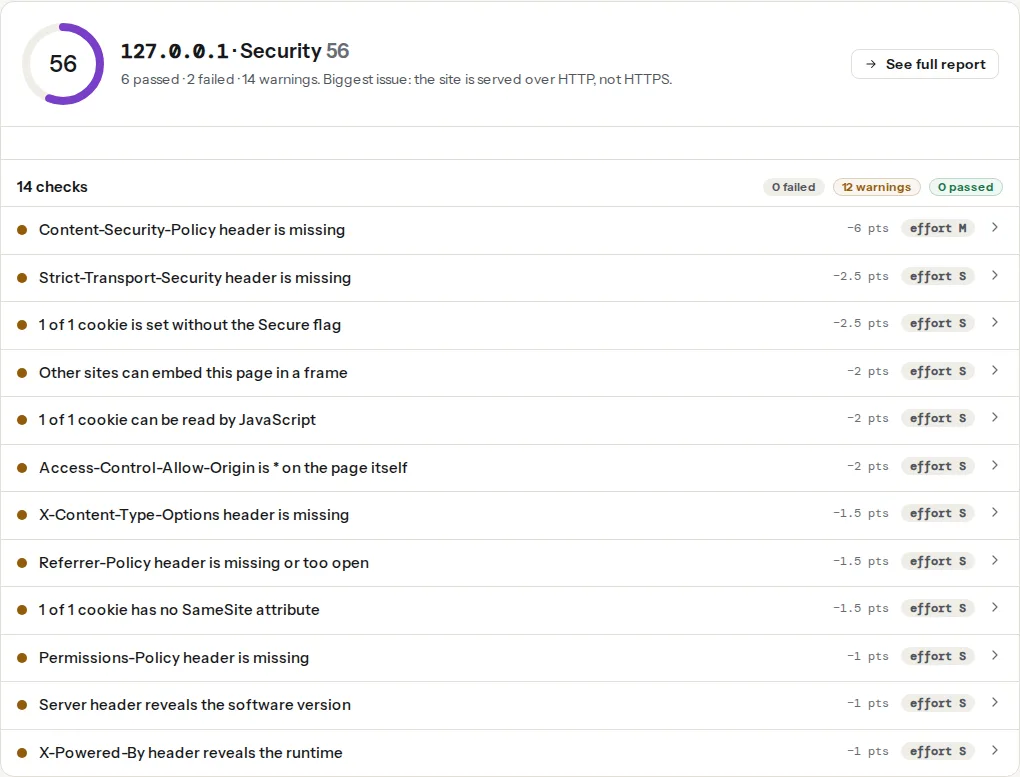
![The security headers panel of a static site on a CDN host: the header table shows Strict-Transport-Security and X-Content-Type-Options present, Content-Security-Policy and Permissions-Policy missing, and a passed cookie section because the site sets none](https://getreport.app/guides/img/static-sites-hugo-astro-nextjs-headers-and-caching/headers.webp "The header table lists exactly what the edge sent; a static site with no cookies passes the cookie checks by default.")

The four findings below are the ones a static site usually opens with. Two are headers, two are what the page load revealed:

> **Check: Strict-Transport-Security header is set.** HSTS tells browsers to always use HTTPS for your site, so after the first visit a typed address or an old http:// link never starts on an unencrypted connection. Only the preload list covers the very first visit.
>
> 1. Send the header: Strict-Transport-Security: max-age=31536000; includeSubDomains.
> 2. Start with a shorter max-age (e.g. 86400) if you are not sure every subdomain supports HTTPS.

> **Check: Content-Security-Policy header is set.** A CSP blocks most cross-site scripting attacks by listing where scripts may load from. Without one, a single injected script can steal sessions or card data.
>
> 1. Start in report-only mode with Content-Security-Policy-Report-Only to see what would break.
> 2. Move to an enforcing policy once the report is quiet; keep "unsafe-inline" out of script-src.

The CSP finding also passes with a `Content-Security-Policy-Report-Only` header, and the technical detail says so, which lets you roll it out safely.

> **Check: Static files have a cache lifetime.** Without a cache lifetime, every visit downloads the same logo, CSS and scripts again. Returning visitors should get them from their browser in 0 ms.
>
> 1. Send Cache-Control: public, max-age=31536000, immutable for versioned images, CSS, JS and fonts.
> 2. Most caching plugins and CDNs set this for you; check the "browser cache" or "edge TTL" setting.

The check counts scripts, stylesheets, images and fonts the page loaded and warns when more than 20 % of them have no positive `max-age` (or carry `no-store`). The technical detail lists the files with the `Cache-Control` value each one came with, so you can see which rule is missing.

> **Check: Text files are compressed.** HTML, CSS and JavaScript shrink by 70–90% with gzip or Brotli. Sending them uncompressed wastes visitors' data and seconds, especially on mobile.
>
> 1. Enable Brotli (or gzip) for text types in your server, hosting panel or CDN; Cloudflare and most hosts have it as one switch.
> 2. Check the files in the technical detail; third-party ones need the vendor to fix it.

Every hosted CDN compresses text for you, so on Netlify, Vercel or Cloudflare Pages this finding usually passes on day one. It opens on self-hosted nginx without the `gzip`/`brotli` block, and when a third-party script is served uncompressed by its vendor.

## Step by step

### 1. Decide the three cache policies

Every file on a static site falls into one of three groups:

| Files | Policy | Header |
| --- | --- | --- |
| HTML pages | Always check for a new version | `Cache-Control: no-cache` |
| Assets with a hash in the name (`/_astro/index.a1b2c3.css`, `/_next/static/…`, `style.min.3f9a1c.css`) | Keep for a year, never ask | `Cache-Control: public, max-age=31536000, immutable` |
| Fonts, images and files without a hash (`/fonts/inter.woff2`, `/images/team.jpg`, `/favicon.ico`) | Keep a day to a week, then check | `Cache-Control: public, max-age=604800` |

`no-cache` does not mean "do not cache": it means "store it, but ask before using it". The host answers with a `304 Not Modified` from the `ETag` when nothing changed, which costs a round trip but no bytes, and a deploy shows up on the next visit. The longer story is in [Cache-Control for humans](https://getreport.app/guides/cache-control-for-humans).

The hashed group is safe to cache for a year because a rebuild changes the hash, so the URL changes and the old file is simply never requested again. Astro (`/_astro/`), Next.js (`/_next/static/`) and Hugo with `resources.Fingerprint` all do this; plain Hugo without fingerprinting does not, so treat its CSS as the third group or add fingerprinting:

```html
{{/* layouts/partials/head.html: fingerprint the stylesheet so its URL changes on every edit */}}
{{ $css := resources.Get "css/main.css" | minify | fingerprint }}
<link rel="stylesheet" href="{{ $css.RelPermalink }}">
```

### 2. Write the headers file

The same six security headers as on any site, minus the parts a static site cannot do. This version is for Netlify and Cloudflare Pages, whose `_headers` file goes in the publish directory (Hugo: `static/_headers`; Astro: `public/_headers`; Next.js static export: `public/_headers`):

```text
/*
  Strict-Transport-Security: max-age=31536000; includeSubDomains
  Content-Security-Policy: default-src 'self'; script-src 'self'; style-src 'self' 'unsafe-inline'; img-src 'self' data: https:; font-src 'self'; connect-src 'self'; frame-ancestors 'none'; base-uri 'self'; form-action 'self'; object-src 'none'
  X-Content-Type-Options: nosniff
  X-Frame-Options: DENY
  Referrer-Policy: strict-origin-when-cross-origin
  Permissions-Policy: camera=(), microphone=(), geolocation=(), payment=()
  Cache-Control: no-cache

/_astro/*
  Cache-Control: public, max-age=31536000, immutable

/_next/static/*
  Cache-Control: public, max-age=31536000, immutable

/fonts/*
  Cache-Control: public, max-age=604800

/images/*
  Cache-Control: public, max-age=604800
```

Keep the paths that match your build and delete the rest. Later, more specific rules override the `/*` block for `Cache-Control`, which is what makes the layering work.

### 3. CSP without a server: hashes, not nonces

On a dynamic site, the recommended CSP gives each inline script a nonce that changes per request. A static page is the same bytes for everyone, so a nonce would be the same for everyone and protect nothing. Two options that do work:

- **No inline scripts.** Move every `<script>` block into a file under your own origin and allow `script-src 'self'`. Astro and Next.js already emit their runtime as files; Hugo templates with inline snippets need a small edit.
- **Hashes.** For inline scripts you cannot move (a theme toggle that must run before paint, a tag manager snippet), allow them by their SHA-256 hash. The browser's console prints the hash it expected when it blocks one:

```text
Refused to execute inline script because it violates the following Content Security Policy directive … Either the 'unsafe-inline' keyword, a hash ('sha256-abc123…'), or a nonce is required.
```

Copy the hash into `script-src 'self' 'sha256-abc123…'`. The hash changes whenever the script's text changes, so generate it in the build if the snippet is templated. Start with `Content-Security-Policy-Report-Only`, watch the console for a week, then rename it to `Content-Security-Policy`; [the rollout guide](https://getreport.app/guides/content-security-policy-rollout) has the full procedure. Third-party widgets (analytics, comments, embedded maps) each add a host to `script-src`, `connect-src` or `frame-src`; the console tells you which.

### 4. Put it on your host

**Netlify.** Either the `_headers` file above, or `netlify.toml` at the repository root:

```text
[[headers]]
  for = "/*"
  [headers.values]
    Strict-Transport-Security = "max-age=31536000; includeSubDomains"
    X-Content-Type-Options = "nosniff"
    X-Frame-Options = "DENY"
    Referrer-Policy = "strict-origin-when-cross-origin"
    Permissions-Policy = "camera=(), microphone=(), geolocation=(), payment=()"
    Cache-Control = "no-cache"

[[headers]]
  for = "/_astro/*"
  [headers.values]
    Cache-Control = "public, max-age=31536000, immutable"
```

**Vercel.** `vercel.json` at the project root, for any framework:

```json
{
  "headers": [
    {
      "source": "/(.*)",
      "headers": [
        { "key": "Strict-Transport-Security", "value": "max-age=31536000; includeSubDomains" },
        { "key": "X-Content-Type-Options", "value": "nosniff" },
        { "key": "X-Frame-Options", "value": "DENY" },
        { "key": "Referrer-Policy", "value": "strict-origin-when-cross-origin" },
        { "key": "Permissions-Policy", "value": "camera=(), microphone=(), geolocation=(), payment=()" }
      ]
    },
    {
      "source": "/fonts/(.*)",
      "headers": [{ "key": "Cache-Control", "value": "public, max-age=604800" }]
    }
  ]
}
```

Vercel already serves `/_next/static/*` with a one-year immutable lifetime, so that rule is not needed for Next.js. For a Next.js app you can keep the headers in `next.config.js` instead, with the same effect:

```js
// next.config.js
module.exports = {
  async headers() {
    return [
      {
        source: '/(.*)',
        headers: [
          { key: 'Strict-Transport-Security', value: 'max-age=31536000; includeSubDomains' },
          { key: 'X-Content-Type-Options', value: 'nosniff' },
          { key: 'X-Frame-Options', value: 'DENY' },
          { key: 'Referrer-Policy', value: 'strict-origin-when-cross-origin' },
        ],
      },
    ];
  },
};
```

`headers()` needs a server or Vercel to apply it; with `output: 'export'` the files are plain HTML and the host you upload them to must set the headers itself.

**Cloudflare Pages.** The `_headers` file from step 2, in the output directory, same syntax as Netlify. Cloudflare's edge adds Brotli and HTTP/3 on its own.

**GitHub Pages.** There is no way to set headers; every file is served with a fixed ten-minute cache and nothing else. Put the site behind Cloudflare (free plan, proxied DNS record) and add the headers under Rules → Transform Rules → Modify Response Header, and the cache lifetimes under Rules → Cache Rules by path.

**S3 + CloudFront.** Security headers go in a CloudFront *response headers policy* attached to the distribution's behaviour; the managed "SecurityHeadersPolicy" covers HSTS, nosniff, framing and referrer, and a custom policy adds CSP and Permissions-Policy. `Cache-Control` is object metadata on S3, set at upload:

```bash
# Hashed assets: a year, immutable
aws s3 sync ./dist/_astro s3://example-site/_astro \
  --cache-control "public, max-age=31536000, immutable"
# HTML: always revalidate
aws s3 sync ./dist s3://example-site --exclude "_astro/*" \
  --cache-control "no-cache"
```

**Self-hosted nginx.** In the `server` block; `always` so error pages carry the headers too:

```nginx
add_header Strict-Transport-Security "max-age=31536000; includeSubDomains" always;
add_header X-Content-Type-Options "nosniff" always;
add_header X-Frame-Options "DENY" always;
add_header Referrer-Policy "strict-origin-when-cross-origin" always;
add_header Permissions-Policy "camera=(), microphone=(), geolocation=(), payment=()" always;

gzip on;
gzip_types text/css application/javascript application/json image/svg+xml;
# brotli on;  brotli_types ...;   (needs the ngx_brotli module)

location ~* \.html$ { add_header Cache-Control "no-cache" always; }
location ^~ /_astro/ { add_header Cache-Control "public, max-age=31536000, immutable" always; }
location ~* \.(woff2|jpg|jpeg|png|webp|avif|svg)$ { add_header Cache-Control "public, max-age=604800" always; }
```

Note that an `add_header` inside a `location` replaces the ones inherited from `server`, so repeat the security headers in each location or use an `include` file.

**Self-hosted Caddy.** HTTPS, HTTP/2, HTTP/3 and compression are on by default; only the headers and caching are yours:

```caddy
example.com {
    root * /srv/site
    encode zstd br gzip
    header {
        Strict-Transport-Security "max-age=31536000; includeSubDomains"
        X-Content-Type-Options "nosniff"
        X-Frame-Options "DENY"
        Referrer-Policy "strict-origin-when-cross-origin"
        Permissions-Policy "camera=(), microphone=(), geolocation=(), payment=()"
        -Server
    }
    @hashed path /_astro/* /_next/static/*
    header @hashed Cache-Control "public, max-age=31536000, immutable"
    @html path *.html /
    header @html Cache-Control "no-cache"
    file_server
}
```

### 5. Let the framework handle images, sitemap and canonical

These three are build-time and the same on every host.

**Images.** Astro's `<Image />` from `astro:assets` resizes, converts to WebP and writes `width` and `height`; Hugo's image processing (`.Resize "800x webp"`) does the same in templates; Next.js `next/image` needs a server for on-demand resizing, so a static export must set `images.unoptimized: true` or use a `loader` that points at an image CDN.

**Sitemap.** Hugo generates `/sitemap.xml` by default. Astro needs `@astrojs/sitemap` and a `site` value in `astro.config.mjs`. Next.js takes an `app/sitemap.ts` (and `app/robots.ts`) that returns the list. Then declare it in `robots.txt` (`Sitemap: https://example.com/sitemap.xml`) and check it with [XML sitemap validation](https://getreport.app/guides/xml-sitemap-validation).

**Canonical.** Hugo: `<link rel="canonical" href="{{ .Permalink }}">` in the head partial, with `baseURL` set to the live domain. Astro: `new URL(Astro.url.pathname, Astro.site)`. Next.js: `alternates.canonical` in the page's `metadata`. A canonical that still says `http://localhost:4321/` after a deploy is a common finding; the SEO module's canonical checks catch it.

## Verify

- The [security headers checker](https://getreport.app/tools/security-headers) shows HSTS, CSP (or report-only), `nosniff`, framing, Referrer-Policy and Permissions-Policy as passed, and the header table shows each value once.
- The [HTTP/2 test](https://getreport.app/tools/http2-test) reports h2 negotiated, compression on every text file, and "Static files have a cache lifetime". Open its technical detail: every hashed file should say `max-age=31536000, immutable`.
- `curl -sI https://example.com/ | grep -i cache-control` prints `no-cache`; the same on a hashed asset prints the one-year value.
- After a deploy, the changed page shows the new content on a normal reload without clearing the cache.

## Common mistakes

- **`max-age=31536000` on HTML.** Visitors keep the old page for a year. HTML gets `no-cache` (or a few minutes); only files whose name changes get a year.
- **A year on un-hashed files.** `style.css` cached for a year cannot be updated until every visitor's cache expires. Either fingerprint it in the build or give it a week.
- **Headers in the framework, site on a host that ignores them.** `headers()` in `next.config.js` does nothing for a static export uploaded to S3 or GitHub Pages. Set them where the files are served.
- **CSP with nonces on a static page.** The nonce is the same for everyone, so it is no protection, and a build that changes it breaks cached copies. Use `'self'` and hashes.
- **`add_header` in an nginx `location` without the security headers.** The block's own header replaces the inherited set. Repeat them or `include` a shared file.
- **Reading the report while the CDN cache is cold.** The first request after a deploy is a miss on every file. Load the page once, wait a minute, then re-run.
