# Staging sites: testing changes before they go live
> How to test a theme, plugin or redesign on a staging copy without Google indexing it, what getReport can and cannot check there, and how to go live without carrying noindex to production.
Updated 2026-09-25 · Workflows & checklists · HTML version: https://getreport.app/guides/staging-sites-testing-changes-before-they-go-live
A staging site is a copy of your site where you try things first: the theme update, the new plugin, the redesign, the move to another host. It earns its keep only if two things hold. Nothing on it leaks into Google, and nothing from it leaks into production on the day you go live. This guide covers both, with the checks to run before and after every change. Setting it up takes an hour; the per-change routine takes ten minutes.
## Quick answer
- Put staging behind HTTP basic auth or an IP allow-list. It is the only option where nothing is public.
- If staging must be reachable without a password, send `X-Robots-Tag: noindex` on every response of the staging host. Do not rely on robots.txt alone: a blocked URL can still be indexed, and Google cannot see a noindex on a page it is not allowed to fetch.
- Run the [SEO audit](https://getreport.app/tools/seo-audit) on production before a change, on staging after it, and on production again after deploying. Compare findings, not only scores.
- After going live, confirm the indexability finding on production reads "The page can be indexed". A noindex copied from staging is the most common way a finished site vanishes from search.
- getReport tests public URLs only. A password-protected or private-network staging site cannot be fetched; the workarounds are below.
## Why staging matters
### What it is for
Every change to a live site is an experiment on real visitors. A theme update that breaks the checkout button, a caching plugin that serves one customer's basket to another, a redesign that pushes the hero image to 4 s: on production, the first person to notice is a visitor, and the second is your sales chart. On staging, the first person to notice is you.
Staging is also where you measure. The same page, before and after a change, on the same hosting, is the cleanest speed comparison you will get. A plugin that adds 300 ms to the server response shows up on staging before it costs an order.
### The two leaks
The first leak runs from staging to Google. A public copy of your site competes with the original: duplicate titles and content, visitors from search landing on last month's prices, and in the worst case Google choosing the staging copy as the canonical version. Staging also tends to run older code, with debugging switched on and test accounts in place, which is why the [staging sites](https://getreport.app/learn/staging-sites) check treats a public copy as a security matter, not only an SEO one.
The second leak runs from staging to production. Settings that were right for staging travel with the database when you push to live: the WordPress "Discourage search engines" box, a noindex added by an SEO plugin, canonical and Open Graph URLs that still point at `staging.example.com`, a sitemap listing staging addresses. The site looks finished, and search traffic drifts to zero over the following weeks.
## How getReport checks it
> **Free tool:** [Free SEO audit](https://getreport.app/tools/seo-audit): Every on-page and technical SEO check in one run: title and description, headings, canonical, robots and sitemaps, indexability, links, images and mobile readiness — each with a fix.
The audit reads the `robots` and `googlebot` meta tags and the `X-Robots-Tag` response header for `noindex` (or `none`), tests the URL against robots.txt for Googlebot and for `*`, and combines both with the HTTP status into one verdict. The evidence line names where the directive was found, so a header set by the host and a tag added by a plugin are told apart.
> **Check: The page is not set to noindex.** A noindex directive tells Google to drop this page from search results. Unless that is intended, every visit from search is lost.
>
> 1. Remove noindex from the robots meta tag and from the X-Robots-Tag header, unless the page should stay out of search.
> 2. In WordPress, untick Settings → Reading → "Discourage search engines" and check the page's SEO plugin settings.
> **Check: robots.txt allows this page.** A Disallow rule stops search engines from crawling this page, so they cannot read its content or see any updates. The page can still appear in results as a bare URL with no description.
>
> 1. Remove or narrow the Disallow rule in robots.txt so this URL is allowed for all crawlers.
> 2. If the page should stay out of search, allow crawling and use a noindex tag instead; a blocked page cannot be de-indexed.
> **Check: The page can be indexed.** To appear in search, a page must return HTTP 200, carry no noindex directive and be allowed in robots.txt. If any of the three fails, the page is invisible to searchers.
>
> 1. Open the technical detail to see which condition fails, then fix that one; the individual findings above have the steps.
> 2. After the fix, request indexing in Google Search Console to speed things up.
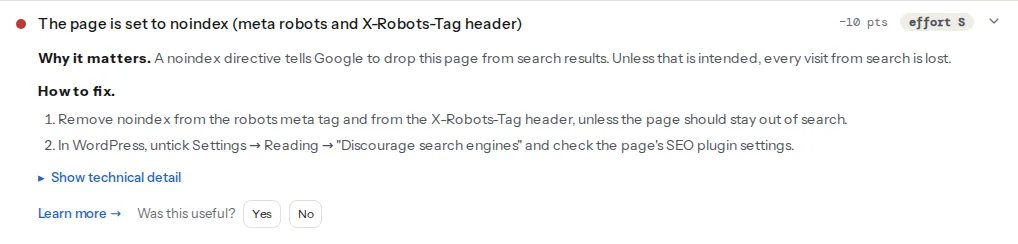
On staging, these three findings are supposed to fail. They are your proof that the copy is hidden. The same three findings on production are the ones to check first after every deploy.
### Where the report cannot run
The report fetches the URL from our servers like a normal visitor, so it needs a public address:
- **Private addresses and localhost** (`127.0.0.1`, `10.x`, `192.168.x`, `staging.local`, anything that resolves to a private range) are refused before any request is made. The report page says "That address is not allowed". This is deliberate: the same rule stops the tool being used to probe internal networks.
- **HTTP basic auth** returns a 401 "authorisation required" answer instead of your page. The report describes that answer, not your site: the indexability finding fails with the HTTP status, and the other modules see an almost empty document.
The practical workaround is a public staging hostname (`staging.example.com`) that sends `X-Robots-Tag: noindex` on every response, with the password lifted only for the minutes you test and put back afterwards. For a site that must stay private throughout, the same checks can be done by hand: view source for the robots tag and canonical, the browser's Network panel for the response headers and the request waterfall, and the Lighthouse tab of DevTools for the lab metrics.
## Three ways to keep staging out of Google
### 1. A password or an IP allow-list (best)
Nothing is public, so nothing can be indexed, scraped or found by accident. Crawlers that ignore robots directives are locked out too.
**nginx**, in the staging `server` block:
```nginx
server {
server_name staging.example.com;
auth_basic "Staging";
auth_basic_user_file /etc/nginx/.htpasswd;
# … the rest of the site config
}
```
**Apache**, in `.htaccess` at the staging document root or in the virtual host:
```apache
AuthType Basic
AuthName "Staging"
AuthUserFile /etc/apache2/.htpasswd
Require valid-user
```
Create the password file once with `htpasswd -c /etc/nginx/.htpasswd yourname` (the `htpasswd` tool ships with Apache and works for nginx too). To allow your office without a password instead, nginx uses `allow 203.0.113.0/24; deny all;` in the same block, and Apache `Require ip 203.0.113.0/24`.
### 2. noindex on the whole host (acceptable)
If people outside the team need to see staging without a password (a client, a translator, a payment provider's test), add a `noindex` header to every response of the staging host. A header covers PDFs, images and cached pages that a meta tag would miss.
**nginx**:
```nginx
server {
server_name staging.example.com;
add_header X-Robots-Tag "noindex, nofollow" always;
# …
}
```
**Apache**:
```apache
Header set X-Robots-Tag "noindex, nofollow"
```
Two conditions. The staging robots.txt must still allow crawling, because Google has to fetch a page to see the header. And the site is still public: anyone with the link can read it, and every crawler that ignores robots directives can copy it. The [noindex reference](https://getreport.app/guides/noindex-nofollow-complete-reference) has the exact syntax for both the tag and the header.
### 3. robots.txt alone (wrong)
`Disallow: /` in robots.txt stops well-behaved crawlers from *reading* the pages. It does not stop them from *listing* the URLs. A staging link on a public page, a shared document or a Slack preview is enough for the address to appear in results as a bare URL with no description, and because Google is not allowed to fetch it, it cannot see a noindex either. The finding text says the same: a blocked page cannot be de-indexed. Use robots.txt for crawl control, never for privacy.
> **Watch out:**
> Do not combine a password with a robots.txt block and forget the second one. When the password comes off at launch, or the robots.txt is copied to production, the block stays, and it hides the live site while looking harmless.
## Step by step
The routine for one change, from "let's try the new theme" to "it's live".
### 1. Take a baseline on production
Run the report on the page the change affects most (the home page for a theme, a product page for a WooCommerce plugin, the blog for a builder update). Keep the report link. Note the module scores and the LCP element; the point is to have something to compare against, not a perfect result.
### 2. Apply the change on staging
Use the host's staging feature where there is one, or your own copy. Make the change and nothing else, so a difference in the report has one cause.
### 3. Run the same page on staging
If staging is behind a password, lift it for the test and keep the `X-Robots-Tag: noindex` header in place. Run the same page on the staging hostname. Expect the three indexability findings to fail; that is correct. Compare everything else:
- Module scores per module, not the overall number.
- New findings that did not exist on production, and findings that disappeared.
- The speed module's LCP element and the lab metrics. A theme that changes the hero from an `![]() ` to a CSS background often moves LCP by a second.
- **The staging hostname in absolute URLs**: canonical tag, hreflang, `og:url`, `og:image`, JSON-LD `url` and `image` properties, the sitemap. The canonical finding's technical detail shows the canonical URL it found next to the page URL, and the social module's og:url finding compares the two, so a `staging.` prefix is easy to spot.
Put the password back.
### 4. Deploy, then search and replace
For WordPress, the database holds the hostname in thousands of places (post content, options, serialized theme settings). Replace it properly with WP-CLI, which handles serialized data, rather than a raw SQL query, which corrupts it:
```bash
# Dry run first: counts the replacements per table without changing anything
wp search-replace 'https://staging.example.com' 'https://example.com' --all-tables --skip-columns=guid --dry-run
# Then for real
wp search-replace 'https://staging.example.com' 'https://example.com' --all-tables --skip-columns=guid
```
`--skip-columns=guid` leaves the post GUIDs alone, which WordPress uses as permanent identifiers rather than links. Migration plugins (Duplicator, WP Migrate, All-in-One WP Migration) run the same replacement for you; the one thing they do not do is untick "Discourage search engines" if it was ticked on staging.
### 5. Flush every cache
The page cache, the object cache, the CDN. A cached page keeps the staging canonical or the noindex tag for as long as its TTL, sometimes a day, and the report will show the cached version.
### 6. Run the report on production again
Same page as the baseline. Three things must be true: the indexability finding passes, the canonical tag names the live hostname, and no finding mentions `staging.` anywhere. Then compare the rest against the baseline: this is the before/after that tells you whether the change was worth it.
### 7. If staging did get indexed
Search `site:staging.example.com` in Google. If pages appear:
1. Add the `X-Robots-Tag: noindex` header (section 2 above) and make sure robots.txt allows crawling, so Google can see it.
2. In Search Console, verify the staging host and use Removals → New request → "Remove all URLs with this prefix" with the staging origin. Removal is temporary (about six months) and buys time while the noindex takes effect.
3. Once the pages have dropped out, put the password on. Doing the password first leaves the URLs in the index with no way for Google to learn they are gone.
## Platform notes
### WordPress
Settings → Reading → "Discourage search engines from indexing this site" writes `noindex, nofollow` into every page and is stored in the database as `blog_public`, so it travels with every migration. It is worth its own check after each deploy: `wp option get blog_public` must print `1` on production. The [discourage search engines guide](https://getreport.app/guides/wordpress-discourage-search-engines) covers the recovery in detail. Managed hosts' staging tools (a "push to live" button) usually copy the database wholesale; run step 6 every time.
### Preview deployments
Vercel, Netlify and similar hosts build a preview per branch or pull request. These are not staging in the sense above: they are short-lived and public by URL. Vercel adds `X-Robots-Tag: noindex` to preview deployments automatically; check any host with one command:
```bash
curl -sI https://my-branch-abc123.vercel.app/ | grep -i x-robots-tag
# x-robots-tag: noindex
```
No output means the preview is indexable and needs a header from your own config.
### Static sites and custom builds
Absolute URLs are baked in at build time, so build production from the production hostname (an environment variable such as `SITE_URL`), never from a copy of the staging build. A local build on `localhost:3000` cannot be reported on; deploy it to a preview URL first.
### Local development
`localhost` and `*.local` are private by definition and refused by the tool. Nothing needs hiding there, and the checks in step 3 work in DevTools.
## Verify
- On staging: the audit shows the noindex finding failing with the evidence line quoting your header or tag, and robots.txt allowing the page. The `site:staging.example.com` search returns nothing after a few weeks.
- On production after deploy: "The page can be indexed", the canonical tag matches the live URL, `curl -sI https://example.com/ | grep -i x-robots-tag` prints nothing.
- The [robots.txt tester](https://getreport.app/tools/robots-txt-tester) on production shows no `Disallow: /` copied over from staging.
- Search Console's Pages report does not start listing "Excluded by noindex tag" for pages that were indexed before.
## Common mistakes
- **Staging hidden by robots.txt only.** Symptom: staging URLs in search results as bare links. Fix: allow crawling, add the noindex header, request removal, then password-protect.
- **noindex pushed to production with the database.** Symptom: the site is live, nothing looks wrong, search traffic falls week by week. Fix: untick "Discourage search engines" (or remove the header), purge caches, request indexing in Search Console.
- **Canonical and Open Graph tags still pointing at staging.** Symptom: link previews show the staging address; Google indexes the live page under the staging URL or ignores it. Fix: search-replace the hostname, purge caches, re-run the audit.
- **Testing a different page than the baseline.** Symptom: the before/after says the change helped or hurt when only the page differed. Fix: same URL, same device setting, both runs.
- **Forgetting to put the password back.** Symptom: staging is public for months. Fix: make "restore auth" the last item of the routine, and check `curl -sI` returns `401` when you are done.
` to a CSS background often moves LCP by a second.
- **The staging hostname in absolute URLs**: canonical tag, hreflang, `og:url`, `og:image`, JSON-LD `url` and `image` properties, the sitemap. The canonical finding's technical detail shows the canonical URL it found next to the page URL, and the social module's og:url finding compares the two, so a `staging.` prefix is easy to spot.
Put the password back.
### 4. Deploy, then search and replace
For WordPress, the database holds the hostname in thousands of places (post content, options, serialized theme settings). Replace it properly with WP-CLI, which handles serialized data, rather than a raw SQL query, which corrupts it:
```bash
# Dry run first: counts the replacements per table without changing anything
wp search-replace 'https://staging.example.com' 'https://example.com' --all-tables --skip-columns=guid --dry-run
# Then for real
wp search-replace 'https://staging.example.com' 'https://example.com' --all-tables --skip-columns=guid
```
`--skip-columns=guid` leaves the post GUIDs alone, which WordPress uses as permanent identifiers rather than links. Migration plugins (Duplicator, WP Migrate, All-in-One WP Migration) run the same replacement for you; the one thing they do not do is untick "Discourage search engines" if it was ticked on staging.
### 5. Flush every cache
The page cache, the object cache, the CDN. A cached page keeps the staging canonical or the noindex tag for as long as its TTL, sometimes a day, and the report will show the cached version.
### 6. Run the report on production again
Same page as the baseline. Three things must be true: the indexability finding passes, the canonical tag names the live hostname, and no finding mentions `staging.` anywhere. Then compare the rest against the baseline: this is the before/after that tells you whether the change was worth it.
### 7. If staging did get indexed
Search `site:staging.example.com` in Google. If pages appear:
1. Add the `X-Robots-Tag: noindex` header (section 2 above) and make sure robots.txt allows crawling, so Google can see it.
2. In Search Console, verify the staging host and use Removals → New request → "Remove all URLs with this prefix" with the staging origin. Removal is temporary (about six months) and buys time while the noindex takes effect.
3. Once the pages have dropped out, put the password on. Doing the password first leaves the URLs in the index with no way for Google to learn they are gone.
## Platform notes
### WordPress
Settings → Reading → "Discourage search engines from indexing this site" writes `noindex, nofollow` into every page and is stored in the database as `blog_public`, so it travels with every migration. It is worth its own check after each deploy: `wp option get blog_public` must print `1` on production. The [discourage search engines guide](https://getreport.app/guides/wordpress-discourage-search-engines) covers the recovery in detail. Managed hosts' staging tools (a "push to live" button) usually copy the database wholesale; run step 6 every time.
### Preview deployments
Vercel, Netlify and similar hosts build a preview per branch or pull request. These are not staging in the sense above: they are short-lived and public by URL. Vercel adds `X-Robots-Tag: noindex` to preview deployments automatically; check any host with one command:
```bash
curl -sI https://my-branch-abc123.vercel.app/ | grep -i x-robots-tag
# x-robots-tag: noindex
```
No output means the preview is indexable and needs a header from your own config.
### Static sites and custom builds
Absolute URLs are baked in at build time, so build production from the production hostname (an environment variable such as `SITE_URL`), never from a copy of the staging build. A local build on `localhost:3000` cannot be reported on; deploy it to a preview URL first.
### Local development
`localhost` and `*.local` are private by definition and refused by the tool. Nothing needs hiding there, and the checks in step 3 work in DevTools.
## Verify
- On staging: the audit shows the noindex finding failing with the evidence line quoting your header or tag, and robots.txt allowing the page. The `site:staging.example.com` search returns nothing after a few weeks.
- On production after deploy: "The page can be indexed", the canonical tag matches the live URL, `curl -sI https://example.com/ | grep -i x-robots-tag` prints nothing.
- The [robots.txt tester](https://getreport.app/tools/robots-txt-tester) on production shows no `Disallow: /` copied over from staging.
- Search Console's Pages report does not start listing "Excluded by noindex tag" for pages that were indexed before.
## Common mistakes
- **Staging hidden by robots.txt only.** Symptom: staging URLs in search results as bare links. Fix: allow crawling, add the noindex header, request removal, then password-protect.
- **noindex pushed to production with the database.** Symptom: the site is live, nothing looks wrong, search traffic falls week by week. Fix: untick "Discourage search engines" (or remove the header), purge caches, request indexing in Search Console.
- **Canonical and Open Graph tags still pointing at staging.** Symptom: link previews show the staging address; Google indexes the live page under the staging URL or ignores it. Fix: search-replace the hostname, purge caches, re-run the audit.
- **Testing a different page than the baseline.** Symptom: the before/after says the change helped or hurt when only the page differed. Fix: same URL, same device setting, both runs.
- **Forgetting to put the password back.** Symptom: staging is public for months. Fix: make "restore auth" the last item of the routine, and check `curl -sI` returns `401` when you are done.