# Shopify SEO: the complete guide
> Shopify writes the canonicals, the sitemap and robots.txt for every store; the rest of Shopify SEO is yours. What is built in, what you control and how to check each part.
Updated 2026-11-01 · Other platforms · HTML version: https://getreport.app/guides/shopify-seo
Shopify SEO is the work of getting a Shopify store's products, collections and articles found in search, and about half of it is done for you: every store gets canonical tags, an automatic sitemap, a sensible robots.txt, HTTPS and a fast CDN without lifting a finger. The other half is yours: the words on every page, the title and description of each product and collection, image alt text, internal links, redirects when URLs change, and the apps that slow the store down. This page is the map of both halves, with a short summary and a link to each of our detailed Shopify guides, starting with the sorted list of [what you can and cannot fix on Shopify](https://getreport.app/guides/shopify-what-you-can-and-cannot-fix).
## Quick answer
- **Built in:** canonical tags, `/sitemap.xml`, a default robots.txt, HTTPS, the CDN, and a 301 redirect offer when you change a URL handle.
- **Yours:** product and collection copy, the title and meta description in each item's **Search engine listing**, image alt text, menus and internal links, and redirects for deleted products.
- **Fixed by Shopify:** the `/products/`, `/collections/`, `/pages/` and `/blogs/` prefixes, response headers and the checkout. Do not spend time on them.
- **The duplicate URL problem is solved,** but your product cards may still link to `/collections/name/products/handle`. Point them at `/products/handle`.
- **Apps cost you twice:** extra scripts slow every page, and SEO and review apps often print a second Product schema next to the theme's.
- **Check it** with the free [SEO audit](https://getreport.app/tools/seo-audit) on a product page and a collection page, not only the home page.
## Is Shopify good for SEO?
Yes, for most stores the platform is not what holds rankings back. Shopify generates the technical basics that self-hosted shops have to configure by hand: a canonical tag on every page, a sitemap index that updates itself, robots.txt rules that keep crawlers out of the cart, checkout and sorted collection copies, and HTTPS on every domain. A new store on a current theme with a handful of products is technically clean on day one.
What Shopify cannot do is write for you, and it limits a few things that some SEO teams want to control: the URL prefixes, the server's response headers, and parts of the sitemap. Those limits are real, but they rarely decide rankings. The stores that struggle in search almost always have thin product copy, empty collection descriptions, default titles, missing alt text, and a stack of apps, all of which are in your hands.
So Shopify gives you a good floor and a firm ceiling, and most stores are far below the ceiling.
## What Shopify handles and what you must do
This is the whole job on one screen. The left column is what the platform does for every store as of October 2026; the right is what nobody will do unless you do it.
| Area | What Shopify handles | What you must do |
| --- | --- | --- |
| URL structure | Fixed prefixes: `/products/`, `/collections/`, `/pages/`, `/blogs/{blog}/` | Choose short, readable handles; keep them once they rank |
| Duplicate product URLs | Canonical from collection-scoped and variant URLs to `/products/handle` | Make product cards link to `/products/handle` |
| Titles and descriptions | Falls back to the product title and the start of the description | Write the Search engine listing for every collection, key products and pages |
| Image alt text | Stores it per media item and prints it through the theme | Write it for every product image and section image |
| robots.txt | Generates sensible defaults; `robots.txt.liquid` lets you extend them | Leave the defaults alone unless you have a reason; test every edit |
| Sitemap | Builds `/sitemap.xml` with product, collection, page and blog sitemaps | Hide what should not be indexed; submit it in Search Console |
| Redirects | Offers a 301 when you change a handle; serves your redirects as 301 | Add redirects for deleted products and old URLs after a migration |
| Structured data | Themes print Product (or ProductGroup) and Article JSON-LD | Remove duplicates from apps; add what the theme lacks, such as reviews |
| International | Markets adds hreflang tags and translated URLs automatically | Translate properly; publish only markets you really serve |
| Speed and hosting | CDN, HTTP/2 and newer, compression, image resizing, TLS | Remove unused apps, size images, keep the hero image eager |
| Blog | Article pages, tags and an Article schema in current themes | Write posts that answer questions and link to collections |
| Headers, checkout | Shopify's, for every store | Nothing; note the findings and move on |
The rest of this page walks through each row in the order that usually pays off, and links to the detailed guide wherever one exists.
## How Shopify's URL structure works
Every Shopify URL has a fixed folder in front of the part you choose. Products live at `/products/{handle}`, collections at `/collections/{handle}`, pages at `/pages/{handle}`, and blog posts at `/blogs/{blog-handle}/{article-handle}`; the default blog is called News, which is why so many stores have `/blogs/news/`. You cannot remove or rename those prefixes on a standard Online Store theme. Only a headless storefront, built on Shopify's Storefront API, controls its own URLs.
The prefixes are not a ranking problem. Google reads them as words in a path, and a store that sells sneakers at `/products/sava-low` competes on the same terms as one that sells them at `/sava-low`. What matters is the handle: short, lower case, the product's real name, no stop words, no SKU unless people search for it. You set it in the **URL handle** field of the item's Search engine listing.
Change a handle only with a reason. When you do, Shopify shows a **Create a URL redirect** checkbox for the old address; leave it ticked so links and rankings follow the page.
## How Shopify handles duplicate product URLs
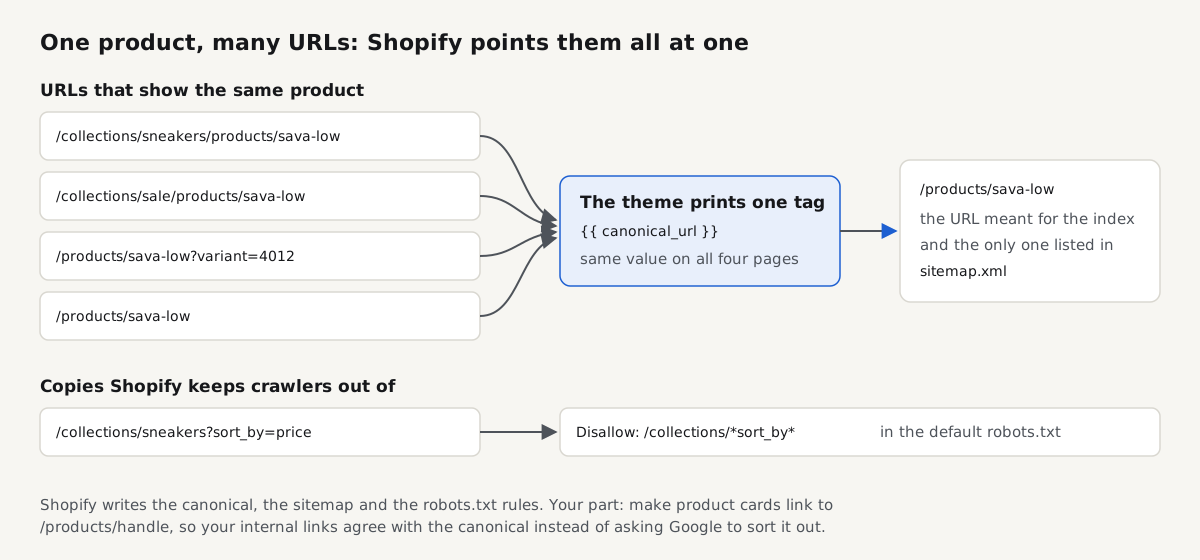
This is the most written-about Shopify SEO issue, and most of it is out of date. A product appears on several URLs: its own `/products/sava-low`, and once inside each collection that contains it, such as `/collections/sneakers/products/sava-low` and `/collections/sale/products/sava-low`. Variant links add a `?variant=` parameter. The page is the same on all of them.
Shopify's answer is the canonical tag. Every Theme Store theme prints `` in `layout/theme.liquid`, and Shopify builds `canonical_url` so that collection-scoped and variant URLs point at `/products/sava-low` on the primary domain. Google treats a canonical as a strong hint, not an order, so the duplicates rarely compete; in Search Console they show up as alternate pages with a proper canonical tag, which is expected.
The remaining issue is your own links. Many themes build product cards with `product.url | within: collection`, so every link from a collection page points at a URL that is not the canonical one. Google's guidance on duplicate URLs is to link to the canonical version, so change that filter to `product.url` in the product card snippet, after checking whether your theme uses the collection path for breadcrumbs.
[How to add a canonical tag in WordPress and Shopify](https://getreport.app/guides/canonical-tags-wordpress-shopify) covers the Shopify side in detail: where `canonical_url` comes from, why the primary domain in Settings → Domains decides every canonical, how to change the product card link, and how to override the canonical for one product with a URL metafield when you really need to. The [canonical tags fix page](https://getreport.app/learn/canonical-tags) explains the tag itself.
## How to edit titles and meta descriptions on Shopify
Every product, collection, page and blog post has a **Search engine listing** section at the bottom of its edit screen. Click **Edit** to see three fields: page title, meta description and URL handle. The home page has the same two text fields under Online Store → Preferences.
Left empty, Shopify fills the title from the item's name and the meta description from the start of its description. For products with a good name that is acceptable. For collections it is usually poor, because the collection description is often empty or decorative, and collections are the pages that rank for category searches such as "white leather sneakers".
Write by hand, in this order: collections, the home page, your best-selling products, then the pages people land on from search (size guide, shipping, about). Most current themes add a separator and the store name to the end of every title unless the name is already in it, so you do not need to type it. Put the words people search first; Google shortens long titles by width on the results page. The rules that apply on every platform are in [title and meta description: writing for the result page](https://getreport.app/guides/meta-tags-for-seo) and on the [page title fix page](https://getreport.app/learn/page-title).
## How to add alt text to Shopify images
Alt text is set per image. On a product, open the product, click an image in the **Media** section and choose **Add alt text**. For images in sections (banners, collection images, image-with-text blocks), the field is in the theme editor's image picker. The theme prints what you write in the `alt` attribute.
Write what the image shows, in one sentence, the way you would describe it on the phone: "White leather low-top sneaker, side view, with a natural rubber sole". The product name belongs in it when it helps, the same phrase on every image does not. Decorative images get an empty alt. Shopify's bulk editor and product CSV do not handle image alt text well, so large catalogues usually need an app or the Admin API; that is one of the few SEO jobs where an app saves real time. [Image alt text for SEO and accessibility](https://getreport.app/guides/image-alt-text-for-seo-and-accessibility) has examples for products.
## What Shopify's robots.txt does, and when to touch it
Shopify generates robots.txt for every store. The defaults keep crawlers out of the admin, cart, checkout, orders, accounts, internal search, collection URLs sorted with `sort_by`, collections filtered by several tags at once, and theme previews, and they repeat those rules for market and language prefixes. The file names your sitemap on a `Sitemap:` line.
Since 2021 you can change it by adding a `robots.txt.liquid` template to your theme (Online Store → Themes → Edit code → Add a new template → robots). The template prints Shopify's defaults through a Liquid loop over `robots.default_groups`, and your own rules go inside or after it. Shopify's help centre recommends keeping the defaults and warns that a wrong rule can cost you traffic. Good reasons to edit are narrow: blocking AI training crawlers if that is your policy, or blocking URL patterns a filter app creates. Hiding products is not one; use a `noindex` instead.
[Shopify robots.txt: how to edit robots.txt.liquid safely](https://getreport.app/guides/shopify-robots-txt) has the default template, the exact Liquid to add a rule, remove a default rule and add a crawler group, the changes worth making, and how to reset the file by deleting the template.
## How the Shopify sitemap works
Every domain of a Shopify store has a sitemap at `/sitemap.xml`. It is an index that links to child sitemaps for products, collections, pages and blog posts; each product entry carries its main image, and a new child file starts when one passes 5,000 URLs. It updates by itself whenever you publish, change or remove something. You cannot edit the file.
You control it through visibility instead. Unpublish an item from the Online Store channel, set a product to **Unlisted**, or give a product, page or article the `seo.hidden` metafield with the value `1`, which removes it from the sitemap and adds a `noindex` tag while it stays visible to shoppers. A password-protected store, including one still in setup, shows search engines only the password page, so the sitemap cannot be read until you remove the password under Online Store → Preferences.
[Shopify sitemap: where it is, what it lists and how to fix errors](https://getreport.app/guides/shopify-sitemap) covers submitting it in Search Console, international domains, and the fixes for "Couldn't fetch", "Indexed, not submitted in sitemap" and missing products.
## How URL redirects work on Shopify
Shopify's redirect tool lives at Online Store → Navigation → **URL redirects**. Each redirect has a **Redirect from** path and a **Redirect to** target, and Shopify serves them as 301 permanent redirects. You can add them one at a time or import a CSV, which is how most migrations bring their old URLs across.
Two rules surprise people. First, according to Shopify's help centre, a redirect only fires from a URL that has no live page: if a product still exists at the old address, the page wins and the redirect is ignored. Second, some paths cannot be redirected at all, such as `/products`, `/collections`, `/collections/all` and system prefixes like `/cart` and `/apps`.
When you delete a product that had traffic or links, redirect it to its closest successor or its collection; let the others return 404. The [301 redirect guide](https://getreport.app/guides/301-redirects) and the [redirects fix page](https://getreport.app/learn/redirects) cover the general rules.
## What structured data Shopify themes print
Current Shopify themes print product schema with Shopify's `structured_data` Liquid filter, placed in the product template as `{{ product | structured_data }}` inside a JSON-LD script tag. According to shopify.dev, the filter outputs a schema.org Product for a product without variants and a ProductGroup with its variants for one with options, a change Shopify made in July 2024 to follow Google's product variant markup. Each variant carries an Offer with price, currency and availability from your product data, so the markup stays in step with the store. The same filter turns an article into Article markup.
What usually goes wrong is not missing schema but extra schema. Review apps and "SEO schema" apps often print a second Product block with their own rating, so the page carries two products with different properties. Pick one source per entity: either let the review app extend the theme's Product, or switch the theme's off and let the app print the full Product with the offer and the rating.
[Product schema: price, availability and reviews](https://getreport.app/guides/product-schema-price-availability-reviews) explains which properties Google wants for product snippets and merchant listings, and has its own Shopify section on review apps.
## How Shopify Markets handles international SEO
Shopify Markets lets one store sell in several countries and languages, each market on a subfolder (`/en-de/`, `/fr/`), a subdomain or its own domain. Shopify's help centre recommends subfolders for most stores, because they share the authority of the primary domain and need no extra domains.
For every market with its own URL and language, Shopify adds hreflang tags automatically, with an `x-default` that points at the primary domain, and adds the translated URLs to the sitemaps. The automatic tags are on by default; you can turn them off under Online Store → Preferences if a theme or app prints a complete set instead. Running both produces conflicting sets, so pick one.
Your part is quality: translate the titles, descriptions and handles, not just the body text, and publish only the markets you really serve, because every market adds another version to each page's hreflang set. The [hreflang tags guide](https://getreport.app/guides/hreflang-tags) explains return links and language codes; check your own set with the hreflang checker below.
## Apps, themes and speed
Apps are the biggest source of problems a Shopify store creates for itself: each one that touches the storefront typically adds a script, often a stylesheet and requests to its own servers, on every page. The usual cleanup is the same everywhere: turn off unused **App embeds** in the theme editor, uninstall apps nobody uses, then search the theme code for snippets that older apps left behind.
The rest of the speed work is images and the theme: upload hero images at a sensible size, never lazy-load the first image, keep product images on the `image_url` and `image_tag` filters so phones get small files, and move tracking pixels into Customer events. Shopify's own **Web performance** report on the Themes page shows your real-visitor Core Web Vitals.
[Shopify speed optimization](https://getreport.app/guides/shopify-speed-optimization) gives these steps in the order that pays off, with how to measure before and after and which "speed booster" apps to avoid. [Third-party scripts](https://getreport.app/learn/third-party-scripts) explains why each script costs time.
## Using the Shopify blog for SEO
The built-in blog is an ordinary set of pages at `/blogs/{blog}/{handle}`, with its own Search engine listing per article, tags, a featured image and, in current themes, Article markup. It is good enough for most stores; there is no need to move the blog to a subdomain or another CMS.
Write posts that answer what your customers ask before they buy (sizing, care, comparisons, how something is made) and link from each one to the collection or product it is about. That turns the blog from a news feed into internal links that tell Google which pages matter. Avoid creating dozens of near-empty tag pages; one or two tags per post is plenty.
## What you cannot change on Shopify
Some findings in any SEO tool describe the platform, not your work.:
- **URL prefixes** (`/products/`, `/collections/`, `/pages/`, `/blogs/`) and the absence of trailing slashes.
- **Response headers.** HSTS and the rest are Shopify's; you cannot add a Content-Security-Policy or a custom header from the theme.
- **Server, CDN and caching.** No page cache to configure; a slow first byte on one template usually comes from heavy Liquid, not the server.
- **The sitemap's structure and its `` values.** You control only what is in it.
- **The checkout.** Hosted by Shopify, outside your theme and outside SEO.
- **`/collections/all`,** which exists on every store; give it a sensible title or link a real "shop all" collection instead.
[Shopify: what you can fix, what you cannot, and what to ignore](https://getreport.app/guides/shopify-what-you-can-and-cannot-fix) sorts every finding in a full report into those three piles, shows where each fix lives in the admin, and lists the findings that are safe to ignore on Shopify.
## How to tell a store runs on Shopify, and which theme
Before you audit a store you did not build, confirm what it runs on: Shopify storefronts load assets from `/cdn/shop/` or `cdn.shopify.com` and expose a `Shopify` object in the browser console, where `Shopify.theme` shows the theme's real `schema_name`. The theme decides the canonical, the title format, the JSON-LD and the image code, so knowing it tells you most of what the templates print. [What Shopify theme is this?](https://getreport.app/guides/what-shopify-theme-is-this) explains each field and covers headless stores. The free CMS detector confirms the platform:
> **Free tool:** [CMS detector: free website technology checker](https://getreport.app/tools/tech-stack): Free CMS detector: see what any website is built with, from CMS and framework to JavaScript libraries, CDN and server, plus known vulnerabilities per version.
## Test it yourself: five curl checks (run on our fixture)
We ran these five checks on 16 October 2026 against our own fixture of the example-shop.hr store, served locally at `http://localhost:4101`. Read the label carefully: this fixture is **not** a Shopify store. Its code (`fixtures/src/demo-shop.ts`) models a WordPress and WooCommerce shop, with product pages under `/shop/`. That is why it is useful here: it shows what a store has to set up by hand that Shopify writes for you, and the same commands, pointed at your own domain, show what Shopify actually serves.
**1. robots.txt.** On the fixture, one rule:
```bash
$ curl -s http://localhost:4101/robots.txt
User-agent: *
Disallow: /cart/
Sitemap: http://localhost:4101/sitemap_index.xml
```
A Shopify store answers with dozens of lines: admin, cart, checkout, account, search, `sort_by` and multi-tag collection rules, repeated for each market prefix, then named groups for a few crawlers.
**2. Sitemap address.** The fixture uses a WordPress-style index name; Shopify always uses `/sitemap.xml`:
```bash
$ curl -s -o /dev/null -w '%{http_code}\n' http://localhost:4101/sitemap.xml
404
$ curl -s -o /dev/null -w '%{http_code}\n' http://localhost:4101/sitemap_index.xml
200
```
The fixture's index lists three child sitemaps (12 pages, 4 products, 4 posts). On Shopify, the index lists product, collection, page and blog files.
**3. Canonical on a duplicate URL.** The fixture's sorted shop page canonicalises to the unsorted one because its code says so explicitly:
```bash
$ curl -s "http://localhost:4101/shop/?sort=price" | grep -o ']*>'
```
On your Shopify store, run the same command on `/collections/{any}/products/{any}` and on `/products/{any}?variant={id}`. Both should print `/products/{handle}` on your primary domain. If either prints itself, the theme's head was edited.
**4. Product schema.** The fixture's product page carries no JSON-LD at all:
```bash
$ curl -s http://localhost:4101/shop/sava-low/ | grep -c 'application/ld+json'
0
```
That is the gap a WooCommerce store fills with a plugin. On a Shopify product page, count the types instead, with `curl -s https://yourstore.com/products/{handle} | grep -o '"@type": *"[A-Za-z]*"' | sort | uniq -c`. A product without options should show one Product with its Offer. A product with options shows one ProductGroup, with a Product and an Offer per variant inside it. Two separate blocks that each describe the same product usually mean an app is printing its own.
**5. A redirect.** The fixture's old journal address is a permanent redirect:
```bash
$ curl -sI http://localhost:4101/old-journal/ | grep -iE '^HTTP|^location'
HTTP/1.1 301 Moved Permanently
location: /blog/
```
On Shopify, test a handle you changed or a product you deleted and redirected: you want `301` and a `location` header pointing at the new URL, in one hop.
## How to check your Shopify store's SEO
Run the full audit on two pages: one product page and one collection page. They carry the templates that most visitors and most crawlers see, and problems in a template repeat on every page built from it.
> **Free tool:** [Free SEO audit and SEO checker for any page](https://getreport.app/tools/seo-audit): Free SEO audit of any page: titles, headings, canonical, robots.txt, sitemaps, indexability and broken links, each with a plain-language fix. No sign-up.
The audit reads the title, description, headings, canonical, robots directives and hreflang of the page, fetches robots.txt and the sitemap, and follows redirects, with every finding ordered by how many points it costs. On a Shopify store, these are the findings to read first:
> **Check: Canonical tag points to a valid URL.** The canonical tag asks Google to index that URL instead of this one. If it points to another site, appears twice or leads to an error page, your ranking signals are given away or ignored.
>
> 1. Point the canonical at this page's own clean URL (same scheme and host, no tracking parameters), and make sure it returns 200.
> 2. Keep exactly one canonical tag; if a plugin and the theme both add one, disable one of them.
> **Check: Title length.** Google truncates titles past about 60 characters and may rewrite very short ones, so your chosen wording does not reach searchers.
>
> 1. Rewrite the title to 30-60 characters, main topic first, brand last.
> 2. Keep the most specific words at the start; they survive truncation.
> **Check: Meta description is present.** The description is the two-line preview under your result. Without it, Google picks a random sentence from the page.
>
> 1. Add with 70-160 characters that say what the page offers.
> 2. In WordPress, most SEO plugins add a field for it on every page.
> **Check: Every image has alternative text.** Alt text is what screen readers speak and what appears when an image does not load. Without it, product photos and infographics are silent for blind visitors and invisible to image search.
>
> 1. Add alt="…" describing what the image shows, in one sentence, to every informative image.
> 2. Use alt="" (empty) for purely decorative images so screen readers skip them.
For a single concern, use the matching tool. The [canonical checker](https://getreport.app/tools/canonical-checker) finds a second canonical injected by an app; the [robots.txt tester](https://getreport.app/tools/robots-txt-tester) confirms a product and a collection stay allowed after a `robots.txt.liquid` edit; the [sitemap checker](https://getreport.app/tools/sitemap-validator) samples listed URLs for redirects and 404s; and the [hreflang checker](https://getreport.app/tools/hreflang-checker) fetches every Markets alternate to confirm it links back.
For structured data, the schema validator lists every JSON-LD block, so a duplicate Product from an app shows up as two items:
> **Free tool:** [Free schema markup validator and rich results test](https://getreport.app/tools/schema-validator): Free schema markup validator: find every JSON-LD block on a page, see which rich results it qualifies for and which required property is missing. No sign-up.
> **Check: Structured data types.** These are the entities the page declares. Google can only show rich results for the types it documents, so the list tells you what you can earn from this page.
>
> 1. Compare the list with the rich-result types Google supports (Product, Article, Event, BreadcrumbList, LocalBusiness…) and add the one that fits this page.
## Verify: what a healthy Shopify store looks like
- The canonical on a collection-scoped product URL and on a variant URL is `/products/{handle}` on your primary domain, and there is exactly one canonical tag on each.
- Product cards on collection pages link to `/products/{handle}`.
- Every collection, the home page and your top products have a hand-written title and meta description; the meta description finding passes on a sample of them.
- The schema validator shows one Product or ProductGroup per product page, with price and availability, and no duplicate.
- `/robots.txt` still contains Shopify's default rules, and the robots.txt tester says a product, a collection and the home page are allowed.
- `/sitemap.xml` answers 200 and the sample of listed URLs answers 200 without redirects.
- If you use Markets, every alternate in the hreflang set answers 200 and links back.
## How we tested
The getReport team wrote and tested this page on 16 October 2026. The five curl checks ran with curl 8.5.0 against our fixture server at `http://localhost:4101`, the example-shop.hr demo shop in the getReport repository (`fixtures/src/demo-shop.ts`); every output block is copied from that run. The fixture models a WordPress and WooCommerce shop, not Shopify.
The Shopify behaviour described here (canonicals, the sitemap, robots.txt.liquid, URL redirects, the `structured_data` filter and Markets hreflang) comes from Shopify's Help Center and shopify.dev documentation as of October 2026, and from our detailed Shopify guides linked above. We did not run these commands against a live Shopify store for this page, did not test Shopify Plus features, headless Hydrogen storefronts, or third-party SEO and review apps, and did not measure rankings. Shopify changes its defaults over time, so treat your own store's live output as the reference.
## Questions people ask
### Do I need an SEO app for my Shopify store?
Usually not for the basics. Shopify already prints canonical tags, builds the sitemap, writes robots.txt and lets you edit every title, meta description and alt text by hand. An app earns its place when it saves real time on a large catalogue, such as bulk alt text or bulk metadata edits. Avoid apps that add their own Product schema next to the theme's, which creates duplicates.
### Can I remove /products/ and /collections/ from Shopify URLs?
No, not on a standard Online Store theme. The prefixes `/products/`, `/collections/`, `/pages/` and `/blogs/` are fixed by Shopify, and only the handle after them is yours to edit. A headless storefront built on the Storefront API can use any URL structure, but that is a rebuild, not a setting. The prefixes do not hurt rankings, so the handle is where your effort belongs.
### Does Shopify add product schema automatically?
Yes, through the theme. Current Shopify themes print product markup with the `structured_data` Liquid filter, which outputs a Product, or a ProductGroup with variants, including price, currency and availability. Older or custom themes may hand-write their JSON-LD or leave it out. Check one product page with a schema validator; you want exactly one Product or ProductGroup and no second copy from an app.
### Are Shopify collection pages good for SEO?
Yes, they are often the pages that rank for category searches such as "leather sneakers", because they match a broad query with many products. Give each important collection a hand-written title, a meta description and a short, useful paragraph of copy above or below the grid. Leave sorted and multi-tag filtered versions to Shopify's robots.txt and canonical, which keep those copies out of the index.
### Should I use the built-in Shopify blog or a separate blog?
Use the built-in blog for most stores. It lives on your own domain, gives each article its own title, meta description and handle, and current themes print Article markup for it. A separate blog on a subdomain or another platform splits your links and adds maintenance without an SEO gain. Write articles that answer buyers' questions and link each one to the matching collection or product.
### Why is my new Shopify store not showing up on Google?
Most often because the store is still password-protected, so Google sees only the password page. Remove the password under Online Store → Preferences, verify your domain in Google Search Console, and submit `/sitemap.xml`. A brand-new domain can still take days to weeks before pages appear. Use URL Inspection on the home page to see whether Google can fetch it and whether it is indexed yet.
## Sources
- [Shopify Help Center: Editing robots.txt.liquid](https://help.shopify.com/docs/themes/seo/robots-txt) (accessed October 2026)
- [Shopify Help Center: URL redirects](https://help.shopify.com/en/manual/online-store/menus-and-links/url-redirect) (accessed October 2026)
- [Shopify Help Center: International SEO for markets](https://help.shopify.com/en/manual/markets/seo) (accessed October 2026)
- [shopify.dev: structured_data Liquid filter](https://shopify.dev/docs/api/liquid/filters/structured_data) (accessed October 2026)
- [shopify.dev changelog: structured_data filter supports ProductGroup](https://shopify.dev/changelog/liquid-structured_data-filter-supports-productgroup) (July 2024)
- [Google Search Central: How to specify a canonical URL](https://developers.google.com/search/docs/crawling-indexing/consolidate-duplicate-urls) (accessed October 2026)
- [Google Search Central: Product variant structured data](https://developers.google.com/search/docs/appearance/structured-data/product-variants) (February 2024, accessed October 2026)