# Query parameters and canonicals for tracking links (utm, gclid)
> Tracking parameters make a new URL for every campaign click. Keep them out of the index and the cache without breaking analytics, with canonical rules, cache configs and a per-parameter table.
Updated 2026-09-25 · Technical SEO · HTML version: https://getreport.app/guides/query-parameters-and-canonicals-for-tracking-links
Every email, ad and social post you send out points at your page with a tail: `?utm_source=newsletter&utm_campaign=spring`, or a `fbclid` the platform appended without asking. Each tail is, to a crawler and a cache, a new URL. This guide shows how to make those URLs harmless: one canonical for all of them, a cache that ignores them, analytics that still sees them, and nothing in robots.txt. It takes about an hour to set up on most sites, and most CMSs already do half of it.
## Quick answer
- The canonical of `/page/?utm_source=x` must be `/page/`: the clean URL, self-referencing. WordPress with Yoast or Rank Math, Shopify, Squarespace and Webflow do this by default; a hand-built site needs one line of code.
- Never block parameters in robots.txt: Google then cannot read the canonical and the URLs stay as bare duplicates.
- Make the page cache and the CDN ignore tracking parameters so a campaign click hits the cached page, not the server.
- Leave the parameters in the address until the analytics script has read them; optionally tidy the address bar afterwards with `history.replaceState`.
- Never put `utm` parameters on links between your own pages.
- Search Console's URL Parameters tool was retired in 2022; canonicals and clean linking are the whole toolkit now.
## Why tracking parameters matter
Parameters arrive from four places. You add `utm_source`, `utm_medium`, `utm_campaign` (and `utm_term`, `utm_content`) to links in emails and ads so analytics can attribute the visit. Ad platforms append their own click identifiers on the way through: `gclid` from Google Ads, `fbclid` from Facebook and Instagram, `msclkid` from Microsoft Ads, `ttclid` from TikTok. Partners and affiliates add `ref=` or `via=`. And older systems add session identifiers. (Sort and filter parameters are a different problem, with different answers; see [faceted navigation and parameter URLs](https://getreport.app/guides/faceted-navigation-and-parameter-urls).)
Left alone, four things go wrong. Google crawls the variants, and sometimes indexes one, so a search result carries `?utm_source=newsletter` and every click from it is attributed to a newsletter that did not send it. Analytics splits one landing page into dozens of rows. Anyone who copies the address from the bar and shares it passes the campaign tag along forever. And every variant misses the page cache, so a campaign that sends 10,000 clicks in an hour sends 10,000 uncached requests to the server, which is exactly the hour the server should be at its fastest.
## How getReport checks it
> **Free tool:** [Canonical tag checker](https://getreport.app/tools/canonical-checker): See which URL a page declares as its canonical, whether that URL answers 200, and whether redirects, the www version and the trailing slash agree with it. Duplicate content, solved in one look.
Before any report runs, getReport normalises the address you paste: it removes `utm_*`, the ad click identifiers (`gclid`, `fbclid`, `msclkid`, `ttclid`, `dclid`, `twclid`, `igshid`, `yclid`, `wbraid`, `gbraid`), the email and CRM tags (`mc_cid`, `mc_eid`, `_hsenc`, `_hsmi`) and `ref`, `source`, `_ga` and `_gl`, then checks the clean URL. That keeps one report per page in the cache, and it means pasting a link with `utm` parameters tests the page, not the parameter. To see how your site treats a parameter it does not know, add one, such as `?campaign-test=1`, which is kept.
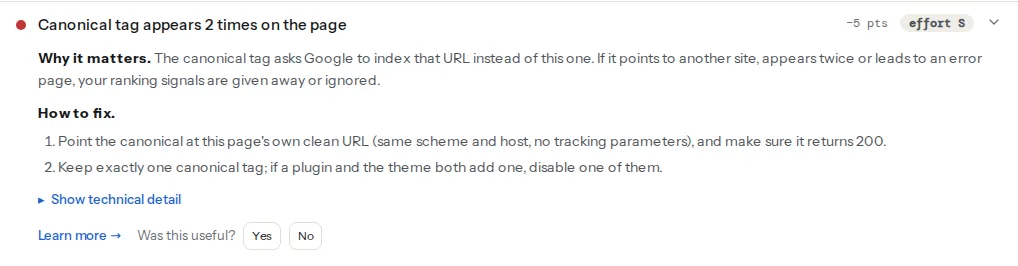
> **Check: Canonical tag points to a valid URL.** The canonical tag asks Google to index that URL instead of this one. If it points to another site, appears twice or leads to an error page, your ranking signals are given away or ignored.
>
> 1. Point the canonical at this page's own clean URL (same scheme and host, no tracking parameters), and make sure it returns 200.
> 2. Keep exactly one canonical tag; if a plugin and the theme both add one, disable one of them.
> **Check: The page can be indexed.** To appear in search, a page must return HTTP 200, carry no noindex directive and be allowed in robots.txt. If any of the three fails, the page is invisible to searchers.
>
> 1. Open the technical detail to see which condition fails, then fix that one; the individual findings above have the steps.
> 2. After the fix, request indexing in Google Search Console to speed things up.
> **Check: URL length.** Long URLs are cut off in search results and hard to share by hand. Short, readable URLs get more clicks and fewer typos.
>
> 1. Shorten the slug to 3–5 meaningful words and drop tracking or session parameters from the canonical URL.
The canonical check reads the tag and compares it with the final URL. When the tag equals the URL, the chain table shows "self-referencing"; when it points elsewhere on the same host, the target is requested and a 200 passes. A canonical that carries the test parameter is self-referencing too, so the tool cannot tell a correct clean canonical from a wrong one that echoes the parameter; that is why the "Canonical tag" row in the chain table is the row to read yourself:
The [URL-length](https://getreport.app/learn/url-structure) finding warns above 100 characters, measured on the URL the report ran on, so the stripped tracking parameters never trigger it here; Google, which sees the full address, is less forgiving. The indexable-status finding confirms the page answers 200 without `noindex` and is allowed in robots.txt, which is what a parameter variant must also do for its canonical to be read at all.
## Step by step
### 1. Make sure the canonical is the clean URL
Open the page with a parameter and view the source. The canonical must not contain the query string:
```html
```
Yoast and Rank Math build the canonical from the post's permalink, not from the request, so parameters never appear. Shopify, Squarespace and Webflow do the same. A hand-built template that uses the current request URL needs the query string removed:
```php
```
The same rule applies to `og:url`; the social module's check warns when it differs from the canonical, and a template that prints the request URL into `og:url` splits share counts across every campaign. [og:url and canonical: keeping them in sync](https://getreport.app/guides/og-url-and-canonical-keeping-them-in-sync) has the details.
### 2. Do not touch robots.txt
The reflex is `Disallow: /*?utm_`. Resist it. A blocked URL is never fetched, so Google never sees the canonical on it, and the URL can still be indexed from the links pointing at it, as a bare address with no title. The parameter variants must stay crawlable so the canonical can do its work. Google's former URL Parameters tool, which let you declare parameters as "does not change content", was removed in April 2022; the canonical tag is what replaced it.
### 3. Teach the cache to ignore the parameters
A page cache keys by URL, so `?utm_campaign=spring` and `?utm_campaign=summer` are two entries, both cold. Tell it that tracking parameters do not change the page:
**WP Rocket** ignores the common tracking parameters out of the box and serves the cached page for them; the Advanced Rules → "Cache Query String(s)" box is the opposite setting, for parameters that *should* get their own cached copy, and tracking parameters do not belong in it.
**LiteSpeed Cache** has Cache → Cache → "Drop Query String", one parameter per line, which removes the named parameters from the cache key:
```text
utm_*
fbclid
gclid
msclkid
ttclid
```
**nginx** with FastCGI or proxy caching can use a `map` that drops the query string from the cache key when it consists only of tracking parameters:
```nginx
# nginx.conf, http block: a cache key without tracking-only query strings
map $args $cache_args {
default $args;
~^(utm_\w+|fbclid|gclid|msclkid|ttclid)=[^&]*(&(utm_\w+|fbclid|gclid|msclkid|ttclid)=[^&]*)*$ "";
}
# server or location block
fastcgi_cache_key "$scheme$request_method$host$uri?$cache_args";
```
A request for `/shoes/?utm_source=newsletter` then shares the cache entry of `/shoes/`, while `/shoes/?size=42` keeps its own. Mixed query strings (a real parameter plus a tracking one) keep the full key; that is rare on campaign links.
**Cloudflare** does not cache HTML by default on the free plan, so the origin's cache is where the parameter question is settled; on plans with Cache Rules, a custom cache key that ignores the named query parameters does the same at the edge.
### 4. Keep analytics working
Analytics reads the parameters from the address at page load. GA4 records `utm_*` on the page view and stores `gclid` for Google Ads attribution; the Meta pixel reads `fbclid` and writes it into its `_fbc` cookie. Anything that removes the parameters before those scripts run breaks attribution, which is why a server-side redirect from the parameter URL to the clean one is the worst fix on this page: the browser arrives clean, and the campaign is invisible.
If you want a tidy address bar, so that copied links are clean, clean it *after* load, without a navigation:
```js
// After the analytics scripts have read the URL, remove tracking parameters from the address bar
window.addEventListener('load', () => {
const url = new URL(window.location.href);
const tracking = [...url.searchParams.keys()].filter((k) =>
/^(utm_|fbclid$|gclid$|msclkid$|ttclid$)/.test(k),
);
if (tracking.length === 0) return;
tracking.forEach((k) => url.searchParams.delete(k));
window.history.replaceState(window.history.state, '', url.toString());
});
```
`replaceState` changes the address without reloading, so the analytics scripts have already fired and the page keeps its state. Test it with the campaign report open: the visit should still show the source. If a script on the page reads the URL later than `load` (some A/B tools do), leave the cleanup out; a clean address bar is worth less than a correct report.
### 5. Never tag internal links
`utm_campaign=homepage-banner` on a link from your home page to your product page makes the visit look like it arrived from a campaign called "homepage-banner". The real source (the search result, the email) is overwritten in the reports, and in older analytics it split one visit into two sessions. Track internal promotions with events (a click event on the banner), and keep `utm` for links that start outside the site.
### 6. What to do with each parameter
| Parameter | Who adds it | Canonical | Cache | Strip after load? |
| --- | --- | --- | --- | --- |
| `utm_source`, `utm_medium`, `utm_campaign`, `utm_term`, `utm_content` | You, on outbound links | Clean URL | Ignore | Optional |
| `gclid`, `wbraid`, `gbraid` | Google Ads auto-tagging | Clean URL | Ignore | Optional, after GA4 and Ads scripts have run |
| `fbclid` | Facebook, Instagram | Clean URL | Ignore | Optional, after the Meta pixel has run |
| `msclkid`, `ttclid`, `twclid`, `yclid` | Microsoft, TikTok, X, Yandex ads | Clean URL | Ignore | Optional, after their scripts |
| `mc_cid`, `mc_eid`, `_hsenc`, `_hsmi` | Mailchimp, HubSpot email links | Clean URL | Ignore | Optional |
| `ref`, `via`, affiliate ids | Partners | Clean URL | Ignore unless the page changes (a partner banner) | Only after the affiliate script has stored it |
| `sessionid`, `PHPSESSID` in the URL | Old frameworks | Clean URL | Never cache | Fix the framework: sessions belong in a cookie |
| `sort`, `page`, `color` | Your own filters | See the faceted navigation guide | Separate entries | No |
## Platform notes
### WordPress
Yoast and Rank Math handle the canonical. WP Rocket and LiteSpeed Cache ignore the common tracking parameters by default, and you only add the ones your email or affiliate tool uses; W3 Total Cache's query-string settings (Page Cache → Advanced) decide whether parameter URLs are cached at all, so check them. WooCommerce's `?add-to-cart=` is not a tracking parameter and must never be cached; the caching plugins know this.
### Shopify
Canonicals are clean and the CDN cache ignores tracking parameters. Nothing to do beyond step 5.
### Static sites and custom builds
The canonical comes from the build, so it is always clean. Caching is at the host: Netlify and Vercel serve static files from the edge regardless of query string; a custom nginx or Caddy setup needs the cache key from step 3.
## Verify
- Open the page with `?campaign-test=1`, view the source: the canonical and `og:url` have no query string.
- Run the canonical checker on the clean URL: one canonical tag, "self-referencing", the URL-length finding under 100 characters.
- `curl -sI "https://example.com/shoes/?utm_source=test" | grep -i -E "x-cache|cf-cache-status|x-litespeed-cache"` reports a hit on the second request.
- Send yourself a campaign link, click it, and confirm the visit appears under the campaign in analytics.
- In Search Console → Pages, the "Duplicate, Google chose different canonical than user" and "Alternate page with proper canonical tag" rows contain parameter URLs only, and their count stops growing.
## Common mistakes
- **A canonical that echoes the parameter.** A template built from the request URL prints `/shoes/?utm_source=x` as the canonical of that variant. Build the canonical from the permalink or the path.
- **JavaScript that strips parameters before analytics fires.** The address is clean and the campaign report is empty. Run cleanup on `load` or not at all.
- **Blocking parameters in robots.txt.** The canonical becomes invisible and the variants can still be indexed as bare URLs.
- **A 302 to the clean URL that drops the parameters.** The server "fixes" the URL and the visit loses its source. If you must redirect (a domain or slug change), keep the query string: `return 301 https://example.com/new/$is_args$args;` in nginx.
- **`utm` on internal links.** The visit's real source is overwritten. Use events.
- **Session ids in URLs.** Every visitor is a new URL; nothing can be cached or canonicalised sensibly. Move sessions to a cookie.