# Open Graph title, description and type: the fields previews use
> What og:title, og:description and og:type do on Facebook, LinkedIn, X, Slack and WhatsApp, the fallbacks when they are missing, how to write them differently from your SEO title, and a complete head.
Updated 2026-09-25 · Social previews · HTML version: https://getreport.app/guides/open-graph-title-description-and-type
The image gets the attention, but the words decide whether anyone taps. The headline and the line under a shared link come from two tags, `og:title` and `og:description`, and a third, `og:type`, tells the platform what kind of thing the page is. When they are missing, the platform improvises: the page `` with your brand name tacked on, or a sentence scraped from the navigation. This guide covers what each platform reads, how long each field can be, how to write them for a feed rather than a search result, and the `og:type` values that actually do something.
## Quick answer
- **og:title**: the headline of the card. Under 60 characters, no brand suffix, written as a reason to tap.
- **og:description**: one or two sentences, under 200 characters, with the most important words first because it is often cut or hidden.
- **og:type**: `website` on the home page and general pages, `article` on posts (with `article:published_time`), `product` on product pages.
- Add `twitter:card` (`summary_large_image`) or X shows plain text; X reads the Open Graph title and description when its own tags are absent.
- One set of tags per page. Two plugins printing them means the first one wins, whichever it is.
- Check the result with the [link preview checker](https://getreport.app/tools/link-preview).
## Why these three fields matter
Search results and feeds are read differently. In a search result, the reader asked a question and scans for the page that answers it; the SEO title carries the keyword and the brand. In a feed or a chat, nobody asked. The card competes with photos from friends and messages from colleagues, and the headline has one glance to earn a tap. "Winter boots 2026 | Best waterproof boots | Example Shop" works for Google and reads like a spreadsheet in WhatsApp.
The fallbacks make it worse. Without `og:title`, platforms use the `<title>`, brand suffix and all. Without `og:description`, some use the meta description, and some take the first text they find on the page, which on many sites is "Skip to content", a cookie notice or the menu. The card then advertises your navigation.
`og:type` matters less for looks and more for meaning. It tells Facebook and LinkedIn whether the link is a website, an article or a product. `article` carries the publish date, author and section with it; `product` pairs with price tags that shopping surfaces read.
### What each platform reads
The order in which platforms look for each field, first match wins:
| Field | Read in this order | When nothing is found |
| --- | --- | --- |
| Title | `twitter:title` (X only) → `og:title` → `<title>` | The bare URL |
| Description | `twitter:description` (X only) → `og:description` → meta description | Text from the page, or nothing |
| Type | `og:type` | Treated as `website` |
| Site name | `og:site_name` | The domain |
X reads its own tags first and falls back to Open Graph for the text and the image, but shows a card at all only when `twitter:card` has a valid value. Slack's unfurler reads Open Graph and Twitter tags and then plain HTML; WhatsApp, LinkedIn and iMessage read Open Graph and fall back to the `<title>`. The short references are the learn pages on [Open Graph tags](https://getreport.app/learn/open-graph) and [X cards](https://getreport.app/learn/twitter-cards).
### How much of it is shown
No platform publishes a character limit, and every limit depends on the device width, the card size and the language. As a rule of thumb from how the cards render on a phone:
- **Titles** are cut after roughly 60–90 characters on Facebook and Slack, and earlier (around 60–70) on LinkedIn, X and WhatsApp. Under 60 is safe everywhere.
- **Descriptions** get one or two lines at most, and several apps hide them on phones or on large-image cards altogether. Treat the description as a bonus: the title and the image must work without it.
## How getReport checks it
> **Free tool:** [Link preview checker (Open Graph)](https://getreport.app/tools/link-preview): See how your page looks when shared on Facebook, LinkedIn, X, Slack and WhatsApp: Open Graph and Twitter card tags, image size and reachability, canonical match.
The link preview checker reads the tags the way Facebook's crawler does: by `property` or `name`, first occurrence wins, and an empty `content=""` counts as missing. Each field that passes shows its value and its length in characters in the technical detail, so you can see exactly what a platform will use without opening the source.
> **Check: Open Graph title is present.** og:title is the headline of the card Facebook, LinkedIn, Slack and WhatsApp show for a shared link. Without it they fall back to the page <title>, or show the bare URL.
>
> 1. Add <meta property="og:title" content="…"> with the page's headline in under 60 characters.
> 2. In WordPress, Yoast and Rank Math set it under the page's Social tab.
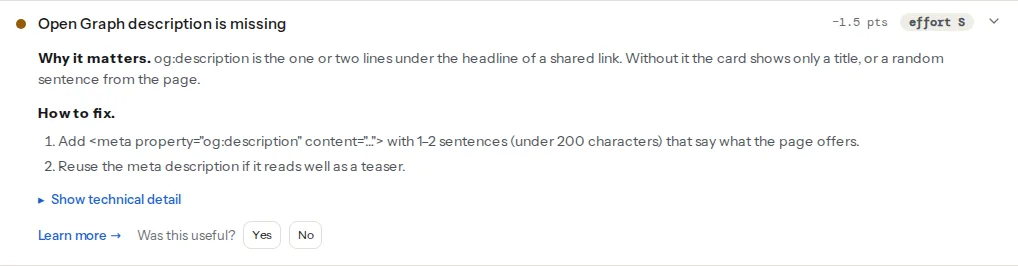
> **Check: Open Graph description is present.** og:description is the one or two lines under the headline of a shared link. Without it the card shows only a title, or a random sentence from the page.
>
> 1. Add <meta property="og:description" content="…"> with 1–2 sentences (under 200 characters) that say what the page offers.
> 2. Reuse the meta description if it reads well as a teaser.
> **Check: og:type is set.** og:type tells Facebook and LinkedIn whether the link is a website, an article or a product, which changes how the card is laid out. Without it they assume "website" for every page.
>
> 1. Add <meta property="og:type" content="website"> on the home page, "article" on posts and "product" on product pages.
> **Check: Twitter card type is valid.** X (Twitter) shows a preview card only when twitter:card has a valid type. Without it a shared link is plain text, even with Open Graph tags in place.
>
> 1. Add <meta name="twitter:card" content="summary_large_image"> to show the share image at full width.
> 2. Use "summary" instead for a small square thumbnail beside the text.
Two things the findings do not judge: whether the text is good, and whether the tag appears twice. The technical detail reports how many tags of each kind were found; a count of 2 means two sources print it, and only the first one counts.
## Step by step
### 1. Write the social title
Start from what the page gives the reader, not from the keyword:
| Page | SEO title | og:title |
| --- | --- | --- |
| Category | Waterproof winter boots for women – Example Shop | Winter boots that stay dry at −20 °C |
| Blog post | How to wax a snowboard: step-by-step guide (2026) | Wax your snowboard at home in 20 minutes |
| Service | Emergency plumber Zagreb 24/7 – Example Plumbing | A plumber at your door within the hour, day or night |
Rules that hold across platforms: no brand suffix (the domain and `og:site_name` already say who you are), no pipes or keyword lists, a number with a unit where it is true, and under 60 characters. For the search version, see [page titles that rank and get clicked](https://getreport.app/guides/page-titles-that-rank-and-get-clicked).
### 2. Write the description
One or two sentences, under 200 characters, most important words first. It can be the same as the meta description when that reads as a sentence to a person; the two jobs overlap more than the titles do. [Meta descriptions: length, wording and Google rewrites](https://getreport.app/guides/meta-descriptions-length-wording-and-google-rewrites) covers the search side. What does not work is a keyword list or a truncated first paragraph ("In this article we will look at…").
### 3. Pick the type
Use one of the values the Open Graph protocol defines, plus `product` where it applies:
| og:type | Use on | Extra tags worth adding |
| --- | --- | --- |
| `website` | Home page, category, landing and service pages | none |
| `article` | Blog posts, news, guides | `article:published_time`, `article:modified_time`, `article:author`, `article:section`, `article:tag` |
| `product` | Product pages | `product:price:amount`, `product:price:currency` (some themes print `og:price:amount` instead) |
| `profile` | A person's page | `profile:first_name`, `profile:last_name` |
| `video.other`, `video.movie` | A page whose main content is one video | `og:video` |
| `book` | A page about one book | `book:author`, `book:isbn` |
The `music.*` types exist too and are rarely worth it. Dates are ISO 8601 (`2026-09-25T08:00:00+02:00`).
### 4. Add site name and locale
`og:site_name` is your brand, once, so it does not need to be in the title. `og:locale` (`en_GB`, `de_DE`, `hr_HR`) tells platforms the language of the text; add it on multilingual sites.
### 5. Put it together
A complete head for a blog post, with the Open Graph and X tags side by side:
```html
<head>
<title>How to wax a snowboard: step-by-step guide (2026) – Example Shop
```
`twitter:title` and `twitter:description` are left out on purpose: X falls back to the Open Graph values. Add them only when you want different text on X. The choice between the two card types is in [X cards: summary vs summary_large_image](https://getreport.app/guides/twitter-x-cards-summary-vs-summary-large-image).
## Platform notes
### WordPress
Yoast SEO and Rank Math each have a **Social** tab in the post editor with a social title, description and image per post, falling back to the SEO title and description when left empty. That fallback is why many WordPress cards carry the brand suffix: the SEO title template adds it, and the social title inherits it. Fill the social title on posts you expect to be shared. Themes that print their own Open Graph tags alongside the plugin produce duplicates; turn the theme's option off.
### Shopify
Shopify's own themes print the Open Graph tags from a head snippet, taking the title and description from each product's or page's search engine listing fields, and `og:type` is `product` on product pages with the price tags included. To change the social text, edit the search engine listing; to change the tags themselves, edit the theme's meta-tags snippet in the code editor.
### Webflow and Wix
Webflow has Open Graph fields per page and per CMS collection template in the page settings, with an option to reuse the SEO title and description. Wix has a social share tab in each page's SEO settings. On any hosted builder, check what the tags say with the checker after changing the fields; the builder decides the fallbacks.
### Static sites / custom
Generate the tags from the same front matter as the page, with separate optional fields for the social title and description that fall back to the SEO ones.
## Verify
- The link preview checker shows the Open Graph title, description and type and the Twitter card type as passed. Open the technical detail of each and read the value: it should be the text you wrote, not a fallback.
- `curl -s https://example.com/blog/wax-a-snowboard/ | grep -c 'property="og:title"'` prints `1`.
- The Facebook Sharing Debugger and LinkedIn Post Inspector show your headline, not the SEO title.
## Common mistakes
- **og:title copied from a keyword-stuffed SEO title.** Symptom: the card reads "Boots | Winter boots | Women's boots – Shop". Write a separate social title.
- **An empty description field in the CMS.** Symptom: the card shows "Skip to content" or menu text under the headline. Fill the description, or make the plugin fall back to the meta description.
- **og:type product with no price.** Symptom: shopping surfaces ignore the product. Add `product:price:amount` and `product:price:currency`, or use `website`.
- **article on the home page.** Symptom: the home page card carries a stale publish date. Use `website` there.
- **Duplicate og:title tags from theme and plugin.** Symptom: edits in the plugin do nothing because the theme's tag comes first. Turn one source off; the tag count in the technical detail should read 1.