# noindex, nofollow and friends: the robots directives reference
> Every robots meta and X-Robots-Tag directive Google supports, how they differ from robots.txt and rel="nofollow", which one to use for staging, thank-you, search and filter pages, and how to check.
Updated 2026-09-25 · Technical SEO · HTML version: https://getreport.app/guides/noindex-nofollow-complete-reference
Three different tools decide what search engines do with your pages: the robots meta tag (and its header twin, X-Robots-Tag), the robots.txt file, and the `rel` attribute on individual links. They look alike and they are often mixed up, which is how a shop ends up with its checkout in Google and its new product range missing. This page lists every directive, what it does, and which one to use for the common cases, with the WordPress settings that control them.
## Quick answer
| You want | Use | Not |
| --- | --- | --- |
| A page out of search results | `` or `X-Robots-Tag: noindex`, crawlable | A robots.txt `Disallow` |
| A PDF or image file out of search results | `X-Robots-Tag: noindex` header | A meta tag (files have no ``) |
| Crawlers to skip a large set of URLs | robots.txt `Disallow` | `noindex` (still crawled) |
| A paid or affiliate link marked | `rel="sponsored"` | Nothing |
| Comment and forum links marked | `rel="ugc"` | Nothing |
| A staging site kept private | A password, plus `X-Robots-Tag: noindex` | robots.txt alone |
Check a page with the [robots.txt tester](https://getreport.app/tools/robots-txt-tester): it reports noindex from the meta tag and the header, whether robots.txt blocks the URL, and the final verdict.
## Why robots directives matter
A `noindex` is the most powerful line in SEO: one tag, and the page leaves Google within days of the next crawl, taking every visit from search with it. That is exactly right for a thank-you page and a disaster on a category page. The classic accident is a staging site built with "Discourage search engines" switched on, copied to production with the switch still on. Nothing looks wrong in the browser; traffic just drains over the following weeks.
The opposite mistake is quieter. Pages you never meant to be found (internal search results, filter combinations, order confirmations) get indexed, compete with your real pages and show thin or private content to searchers.
## How getReport checks it
> **Free tool:** [robots.txt tester](https://getreport.app/tools/robots-txt-tester): Fetch and parse the robots.txt of any site, check whether it blocks the page for Googlebot, whether a sitemap is declared and reachable, and whether the page can be indexed.
The tester reads the HTML exactly as the server sends it, plus the response headers and your `/robots.txt`:
- **Meta tags** named `robots` and `googlebot`, looking for `noindex` or `none`.
- **The X-Robots-Tag header**, including values aimed at one crawler such as `googlebot: noindex`.
- **robots.txt**, parsed with the same matching rules Google uses and tested for Googlebot and for all crawlers (`*`).
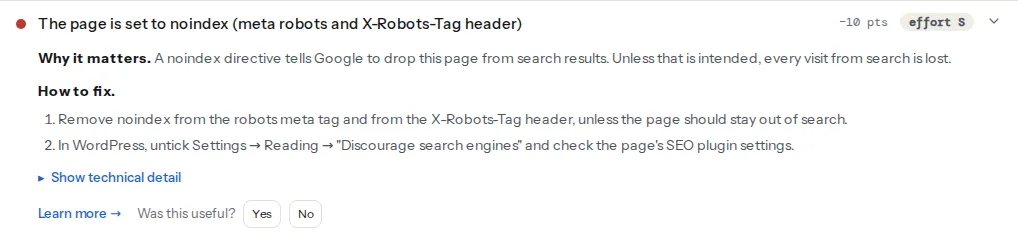
> **Check: The page is not set to noindex.** A noindex directive tells Google to drop this page from search results. Unless that is intended, every visit from search is lost.
>
> 1. Remove noindex from the robots meta tag and from the X-Robots-Tag header, unless the page should stay out of search.
> 2. In WordPress, untick Settings → Reading → "Discourage search engines" and check the page's SEO plugin settings.
> **Check: robots.txt allows this page.** A Disallow rule stops search engines from crawling this page, so they cannot read its content or see any updates. The page can still appear in results as a bare URL with no description.
>
> 1. Remove or narrow the Disallow rule in robots.txt so this URL is allowed for all crawlers.
> 2. If the page should stay out of search, allow crawling and use a noindex tag instead; a blocked page cannot be de-indexed.
> **Check: The page can be indexed.** To appear in search, a page must return HTTP 200, carry no noindex directive and be allowed in robots.txt. If any of the three fails, the page is invisible to searchers.
>
> 1. Open the technical detail to see which condition fails, then fix that one; the individual findings above have the steps.
> 2. After the fix, request indexing in Google Search Console to speed things up.
`indexable-status` is the summary: HTTP 200, no noindex, and allowed in robots.txt. Its evidence line shows all three, so one glance tells you which one fails.
The SEO module of the full report also counts link attributes:
> **Check: Nofollow external links.** rel="nofollow" tells search engines not to pass trust to a link. It is right for paid or user-submitted links and wrong for links to partners or sources you vouch for.
>
> 1. Keep nofollow (or "sponsored" / "ugc") on paid and user-generated links; remove it from links you would recommend.
It is information only and costs no points. It counts links whose `rel` contains `nofollow`; a link marked only `sponsored` or `ugc` is not counted.
Because the tester reads the served HTML, a `noindex` that JavaScript removes after load still shows up. That matches Google: when it sees `noindex` in the initial HTML it may skip rendering, so removing the tag with JavaScript is not reliable.
## Step by step
### 1. Write the meta tag correctly
The tag goes in the `` of the page:
```html
```
`name="robots"` applies to all crawlers. `name="googlebot"` applies to Google only (`bingbot` to Bing). Directives are comma-separated and not case-sensitive. When several tags or a tag and a header disagree, Google applies the most restrictive combination.
### 2. Know every directive
These are the directives Google documents in its [robots meta tag specification](https://developers.google.com/search/docs/crawling-indexing/robots-meta-tag); the [robots directives learn page](https://getreport.app/learn/robots-directives) has the short version:
| Directive | Effect |
| --- | --- |
| `all` | The default: no restrictions. Writing it changes nothing. |
| `noindex` | Do not show the page in results. |
| `nofollow` | Do not follow the links on this page. |
| `none` | Same as `noindex, nofollow`. |
| `nosnippet` | No text snippet or video preview in results. |
| `max-snippet:[n]` | Snippet at most n characters; `0` means none, `-1` no limit. |
| `max-image-preview:[setting]` | Largest image preview: `none`, `standard` or `large`. |
| `max-video-preview:[n]` | Video preview at most n seconds; `0` a still image, `-1` no limit. |
| `notranslate` | Do not offer a translation of the page in results. |
| `noimageindex` | Do not index the images on this page. |
| `unavailable_after:[date]` | Drop the page after this date (ISO 8601 or RFC 822/850 format). |
| `indexifembedded` | With `noindex`: allow indexing when embedded in another page by an iframe. |
| `noarchive` | No cached copy. Google removed cached pages in 2024 and no longer uses it; Bing still does. |
For part of a page, the `data-nosnippet` attribute keeps an element's text out of snippets:
```html
Prices shown are for members only.
```
### 3. Use X-Robots-Tag for files and whole hosts
The header accepts the same directives and works for anything the server sends, including PDFs, images and whole sites.
nginx, for all PDFs:
```nginx
location ~* \.pdf$ {
add_header X-Robots-Tag "noindex" always;
}
```
Apache, in `.htaccess` or the virtual host:
```apache
Header set X-Robots-Tag "noindex"
```
For a staging host, the whole server block:
```nginx
add_header X-Robots-Tag "noindex, nofollow" always;
```
A header can target one crawler: `X-Robots-Tag: googlebot: noindex`.
### 4. Understand robots.txt versus noindex
They answer different questions. robots.txt says "do not fetch this URL"; `noindex` says "you may fetch it, but do not list it".
- A page blocked in robots.txt cannot be read, so its `noindex` is never seen. If other sites link to it, it can still appear in results as a bare URL without a description.
- Google stopped honouring `Noindex:` lines inside robots.txt on 1 September 2019. Such lines do nothing.
- To remove an already indexed page, allow crawling, add `noindex`, wait until it drops out (URL Inspection shows it), and only then add a `Disallow` if you also want to save the crawling.
The [robots.txt guide](https://getreport.app/guides/robots-txt-before-it-hides-your-site) covers the file itself.
### 5. Mark links with rel, not pages with nofollow
Page-level `nofollow` applies to every link on the page, internal ones included. Usually what you want is to mark individual links:
```html
Our partner's offer
Commenter's site
```
- `sponsored`: paid placements, affiliate links, anything you were compensated for.
- `ugc`: links in comments, forum posts, reviews.
- `nofollow`: any other link you do not want to vouch for. Google treats all three as hints since 2020 and accepts combinations.
Leave links to sources you trust, and all internal links, without `rel` values. A high nofollow share on the `external-links-nofollow-share` finding is usually a plugin marking every outgoing link.
### 6. Pick the right tool per page type
- **Staging and development sites**: a password (HTTP authentication) first, `X-Robots-Tag: noindex, nofollow` as a second layer. Never only robots.txt. See the [staging sites learn page](https://getreport.app/learn/staging-sites).
- **Thank-you and order confirmation pages**: `noindex`, crawlable. They have no value in search, and some reveal order details.
- **Internal search results**: `noindex`. They produce endless thin pages. If they are not indexed yet, a `Disallow: /search` saves the crawling too.
- **Faceted and filter URLs** (`?colour=red&size=m`): point a canonical at the main category for near-duplicates. For large combinations, Google's guidance favours a robots.txt `Disallow`, because `noindex` pages are still crawled. The [canonical tags guide](https://getreport.app/guides/canonical-tags-explained) covers the canonical side.
- **Paginated category pages** (`/shoes/page/2/`): keep them indexable with their own canonical, as Google recommends, so the products linked only from later pages are still found.
- **Offers that expire**: `unavailable_after` with the end date, or a redirect after it ends.
## Platform notes
### WordPress
- **Settings → Reading → "Discourage search engines from indexing this site"** makes every page send ``. getReport's WordPress checks flag it separately, because it is so often left on after launch.
- With the box unticked, WordPress 5.7 and later add `max-image-preview:large` to every page by default, so large image previews are allowed.
- **Yoast SEO**, per page: the Advanced section of the Yoast box, "Allow search engines to show this content in search results?". Per content type: Yoast SEO → Settings → Content types.
- **Rank Math**, per page: the Advanced tab, Robots Meta. Site-wide defaults: Rank Math → Titles & Meta.
A setting in the SEO plugin and the Reading setting can both produce a tag. The tester lists every source it found.
### Shopify
Shopify's help centre describes hiding a page by adding a condition to `theme.liquid` inside `` (Online Store → Themes → Edit code):
```html
{% if handle contains 'thank-you-offer' %}
{% endif %}
```
### Static sites / custom
Put the meta tag in the template for the page type, or set `X-Robots-Tag` in the host's headers file (`_headers` on Netlify and Cloudflare Pages).
## Verify
- Run the robots.txt tester on the page. `robots-meta-noindex` should pass for pages you want found, `robots-txt-blocks-page` should read "robots.txt allows this page", and `indexable-status` should read "The page can be indexed". For pages you want hidden, the noindex finding is the confirmation.
- Check the header, which is invisible in the page source: `curl -sI https://example.com/file.pdf | grep -i x-robots-tag`.
- In Google Search Console, URL Inspection → Test live URL shows "Indexing allowed?" and "Crawl allowed?" for the live version. After removing a `noindex`, use Request indexing.
## Common mistakes
- **noindex left on after launch.** Traffic from search declines over weeks, with nothing visibly wrong. Untick the WordPress Reading setting or remove the header from the production config, then request indexing.
- **Blocking CSS and JavaScript in robots.txt.** Google cannot render the page and may judge it broken or not mobile-friendly. Allow `/wp-content/` and `/wp-includes/` assets and any theme or build folder.
- **nofollow on internal links.** It does not steer ranking signals; it only stops Google following links to your own pages. Remove it from internal links.
- **Canonical and noindex on the same page.** They contradict each other: "this is a copy of page X" and "drop this page". Google advises against using `noindex` to choose a canonical. Use the canonical alone.
- **Disallow and noindex together on a page you want removed.** Google cannot fetch the page, so it never sees the noindex. Allow crawling until the page has dropped out.