# JavaScript-rendered content and Google: what gets indexed
> Google runs your JavaScript, but later, with a budget, and not for everything. What breaks when content only exists after scripts run, how to see what a crawler sees, and the server-rendering fix.
Updated 2026-09-25 · Technical SEO · HTML version: https://getreport.app/guides/javascript-rendered-content-and-google
Open your product page in a browser and it is all there: name, price, description, reviews. Fetch the same page with `curl` and you get a `` and three script tags. Google sees both versions, at different times, and only trusts the second one once it has rendered the page, which it does later, with a budget, and not for every fetch. This guide explains what Google actually does with JavaScript, which patterns fail, how to see what a crawler sees, and how to move the content that must rank into the HTML.
## Quick answer
- Google crawls the raw HTML first and queues the page for rendering in a headless Chromium; rendering can happen seconds or days later. Everything before the render is indexed from the raw HTML.
- Content that only appears after a client-side fetch, links without `href`, hash routes (`/#/page`), and meta tags set by JavaScript are the four patterns that lose pages.
- Other crawlers and link previews (Bing to a lesser degree, Slack, WhatsApp, most AI bots) read the raw HTML only.
- Fix: render the main content and the head tags on the server (SSR, static generation or incremental regeneration) and keep JavaScript for interaction.
- The [SEO audit](https://getreport.app/tools/seo-audit) compares the raw HTML with the rendered page and reports what share of the visible text exists only after JavaScript.
- Verify with Search Console's URL Inspection → View tested page, and with `curl` next to a browser with JavaScript disabled.
## Why JavaScript rendering matters
Google's own description of the process has three phases: crawling, rendering and indexing. Googlebot fetches the HTML and indexes what it can from it immediately: title, meta tags, links, text. The page then waits in a render queue until resources allow, at which point an evergreen Chromium loads it, runs the scripts, and Google indexes the rendered result, which replaces the first version. Google's documentation on [JavaScript SEO basics](https://developers.google.com/search/docs/crawling-indexing/javascript/javascript-seo-basics) says the render "may take a few seconds" and elsewhere that it can be longer; in practice new pages on JavaScript-heavy sites often appear in the index with an empty title and no snippet for a while, then fill in.
That delay is the mild cost. The severe cost is when the render does not produce the content: because an API call needed a cookie Googlebot does not have, because the endpoint is blocked in robots.txt, because the page waited for a scroll event Googlebot never sends, or because the response took longer than the renderer waited. Google then indexes the loading state, and the page ranks for "Loading…" if at all. This shows up in Search Console as pages that are "Crawled – currently not indexed" or indexed with the wrong title, and the guide to [why a page is not in Google](https://getreport.app/guides/why-is-my-page-not-in-google) starts from those symptoms.
Everything that is not Google is simpler and harsher. Link previews in Slack, WhatsApp, LinkedIn and Facebook fetch the HTML once and read the Open Graph tags from it; a title set by JavaScript is a blank preview. Most AI crawlers fetch the HTML and do not run scripts at all, which is why the same finding appears in the [AI crawler check](https://getreport.app/tools/ai-crawler-check). A page whose text lives only in JavaScript is invisible to all of them.
## How getReport checks it
> **Free tool:** [Free SEO audit](https://getreport.app/tools/seo-audit): Every on-page and technical SEO check in one run: title and description, headings, canonical, robots and sitemaps, indexability, links, images and mobile readiness — each with a fix.
The report fetches the page twice in different ways. The fetcher takes the raw HTML, and all of the SEO module's checks, including canonical, noindex and indexability, read that version, which is what a crawler's first pass sees. The render step loads the page in a real Chromium and extracts the visible text of the rendered DOM. The JavaScript finding compares the two: the word count of the raw HTML against the word count of the rendered page, and the share of text that exists only after scripts ran. Its technical detail prints both counts; the [JavaScript rendering learn page](https://getreport.app/learn/javascript-rendering) is the short version of this guide.
> **Check: The visible text is present without JavaScript.** Google renders JavaScript later and with a budget, so text that only appears after scripts run can be indexed late or not at all. Other search engines and link previews may never see it.
>
> 1. Serve the main content in the HTML (server-side rendering or static generation) and use JavaScript only to enhance it.
> 2. Check the difference in the technical detail; menus and widgets are fine, headlines and body copy are not.
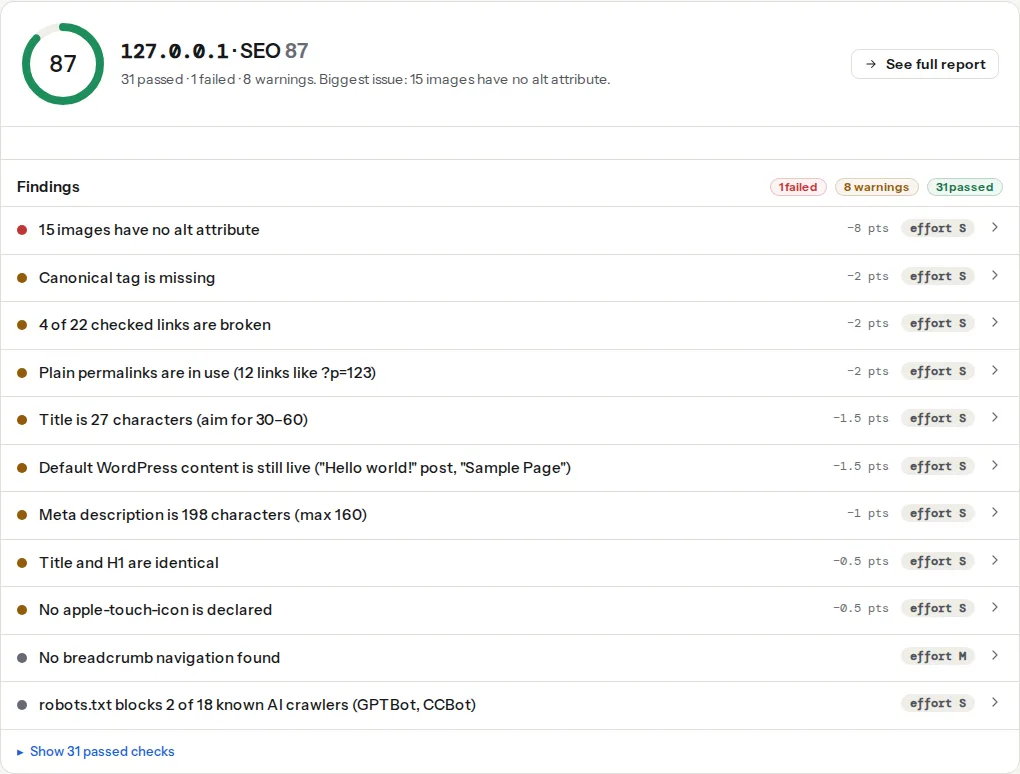
Read the share with the page in mind. A cookie banner, a chat widget and a "recently viewed" strip add a few dozen words after JavaScript on any site, and that is fine. The number to act on is when the words that make the page rank, the H1, the product description, the article body, are among the ones only the renderer found.
The next two findings show the head-tag side of the same problem. They read the raw HTML, so a canonical or a robots meta tag injected by JavaScript is reported as missing, exactly as Google's first pass would treat it.
> **Check: The page can be indexed.** To appear in search, a page must return HTTP 200, carry no noindex directive and be allowed in robots.txt. If any of the three fails, the page is invisible to searchers.
>
> 1. Open the technical detail to see which condition fails, then fix that one; the individual findings above have the steps.
> 2. After the fix, request indexing in Google Search Console to speed things up.
> **Check: Canonical tag is present.** Without a canonical URL, search engines may index duplicate versions of this page (with and without trailing slash, with UTM parameters) and split its ranking signals.
>
> 1. Add in .
> 2. In WordPress, Yoast or Rank Math add this automatically — check it is not disabled for this page.
## Step by step
### 1. See what a crawler sees
Three views, from fastest to most authoritative:
**The raw HTML.** In a terminal:
```bash
curl -sL https://example.com/products/red-runner/ | grep -c "Red Runner"
```
If the product name does not appear even once, nothing on the page is in the HTML. Compare with the browser: in Chrome, open DevTools, press Ctrl/Cmd+Shift+P, type "Disable JavaScript", then reload. What remains is what every non-rendering crawler gets.
**The report.** Run the SEO audit and open the JavaScript finding's technical detail for the two word counts.
**Google itself.** Search Console → URL Inspection → paste the URL → Test live URL → View tested page. The HTML tab is the rendered HTML Google produced; the Screenshot tab shows whether it rendered the content or a spinner; More info lists page resources that could not be loaded, which is where blocked APIs and failed fetches show up.
### 2. Find which of the four patterns you have
**Content behind a client-side fetch.** The HTML ships an empty container; a script calls `/api/products/red-runner` and fills it. Fails for Google when the API is slow, needs a cookie or a token, is blocked in robots.txt, or is geo-restricted (Googlebot crawls mostly from US addresses). Check `robots.txt` for `Disallow: /api/` and check the API from a fresh incognito window.
**Links without `href`.** Google follows `` and nothing else. `