`, an `
`, stray text), the parser closes the head at that point. Every `
` and `
` after it is read as part of the body. Google's documentation on [valid page metadata](https://developers.google.com/search/docs/crawling-indexing/valid-page-metadata) says it stops reading the head at the first invalid element, so a canonical, a robots meta or an `og:image` after that point can be ignored.
- **Content that moves.** A block element inside a `
` closes the paragraph early. Text or elements placed directly inside a `
` but outside a cell are moved out and shown above the table. Headings and paragraphs can end up outside the section or article they were written in.
- **Relationships that break.** Two elements with the same `id` mean ``, `aria-labelledby`, `aria-describedby` and `#anchor` links point at whichever comes first. The form field with the duplicate loses its label for screen reader users.
- **Rendering modes that change.** Without a doctype, browsers switch to quirks mode, where box sizing, table font sizes and some line heights follow 1990s rules.
## How getReport checks it
> **Free tool:** [Free SEO audit](https://getreport.app/tools/seo-audit): Every on-page and technical SEO check in one run: title and description, headings, canonical, robots and sitemaps, indexability, links, images and mobile readiness — each with a fix.
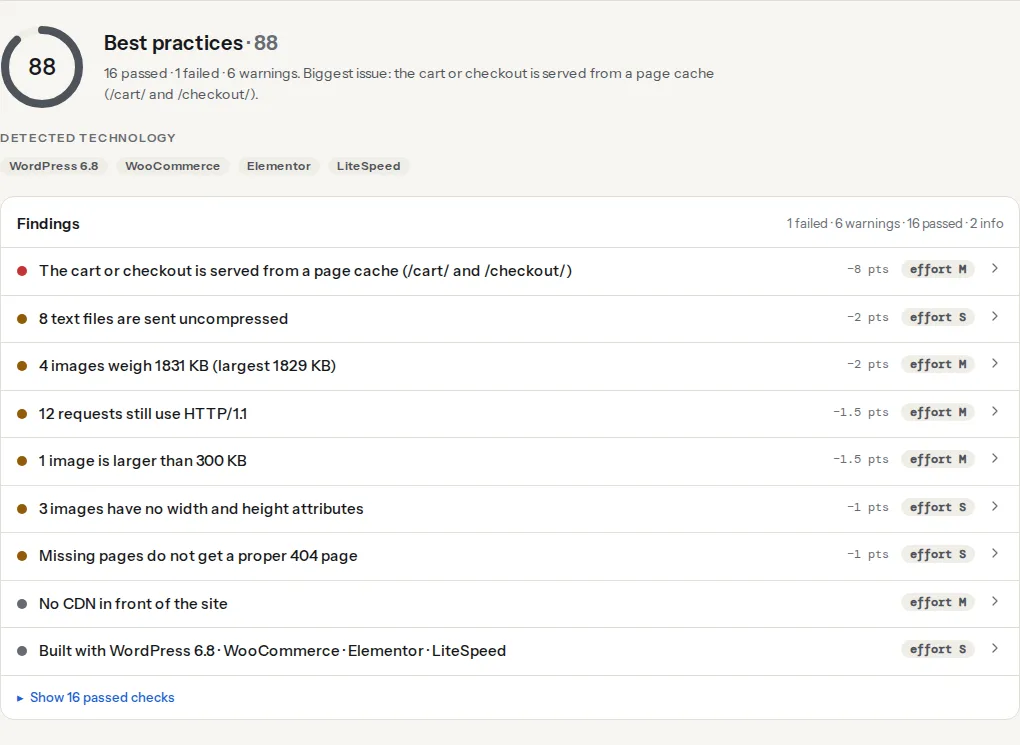
getReport checks the errors with the largest effect as separate findings rather than as one validator count. The SEO audit covers the viewport tag; the doctype and charset checks are in the Best practices module of the full report, one click from the tool.
> **Check: Doctype is present.** Without , browsers render in quirks mode and layouts can differ between browsers.
>
> 1. Put as the very first line of the document.
The doctype check reads the start of the HTML the server sent. If `` is not the first thing there (a byte-order mark and whitespace are allowed), it asks the rendered page whether the browser found a doctype at all. Only a page with no doctype gets the warning. A legacy HTML 4 or XHTML doctype normally passes too, even though some of them still put the browser in quirks or limited-quirks mode; step 2 shows how to tell.
> **Check: Character encoding is declared early.** Browsers need to know the encoding before they read the text. When it is missing or declared late, accented letters such as č, ć and š can appear as garbage and the page re-renders.
>
> 1. Put ` children in ``/`` | Screen readers announce wrong item counts | Fix in the template |
| Content directly in `` | Moved above the table | Fix in the template |
| `` or `` inside ` ` | Unpredictable clicks, confusing for assistive tech | Fix when touched |
| Duplicate attribute | The second one is dropped | Fix when touched |
| More than one visible `` | Landmark navigation lands on the first | Fix when touched |
| Obsolete attributes, `type` on scripts and styles, trailing slashes | Nothing | Ignore |
| Unknown attributes from frameworks | Nothing | Ignore |
### 2. Fix the document-level errors
The first three lines of every page decide the rendering mode and the encoding. In your base template (`header.php`, `theme.liquid`, a layout component):
```html
Page title
```
Keep the `lang` value accurate, since screen readers pick their pronunciation from it ([language attributes and screen readers](https://getreport.app/guides/language-attributes-and-screen-readers)), and never add `user-scalable=no` or `maximum-scale=1` to the viewport tag ([why pinch zoom must stay on](https://getreport.app/guides/zoom-and-viewport-never-disable-pinch-zoom)).
``, `<meta>`, `<link>`, `<script>`, `<style>`, `<base>`, `<noscript>` and `<template>` belong in `<head>`. The usual intruders are tracking snippets: the `<noscript><iframe>` part of the Tag Manager snippet belongs right after `<body>`, not in the head, and a pixel's `<img>` fallback likewise. Plugins that print a `<div>` from a `wp_head` hook do the same damage. After a fix, the validator should no longer report "Element … not allowed as child of element head" and the Elements panel in DevTools should show your canonical and Open Graph tags inside `<head>`.
### 4. Fix duplicate ids
Search the validator output for "Duplicate ID". The usual sources are a component rendered twice (a search form in the header and again in the mobile menu, both with `id="search"`), copy-pasted blocks and sliders that clone slides. Make each id unique or remove ids nothing references:
```html
<!-- Before: two fields, one label target -->
<label for="email">Email</label><input id="email" type="email">
<!-- … footer newsletter … -->
<label for="email">Email</label><input id="email" type="email">
<!-- After -->
<label for="contact-email">Email</label><input id="contact-email" type="email">
<label for="newsletter-email">Email</label><input id="newsletter-email" type="email">
```
This matters more for accessibility than for anything else: a screen reader announces the second field without its label.
### 5. Fix structure that moves content
"Stray end tag `div`" or "End tag `div` seen, but there were open elements" usually means one template opens a wrapper and another closes it, often across an `if` branch. Match every opening tag with its closing tag in the same file and the same branch:
```html
<!-- Before: the wrapper only opens when there is a sidebar, but always closes -->
{% if sidebar %}<div class="with-sidebar">{% endif %}
…
</div>
<!-- After -->
{% if sidebar %}<div class="with-sidebar">{% else %}<div>{% endif %}
…
</div>
```
Lists take only `<li>` children (plus `<script>` and `<template>`); wrap extra markup inside the `<li>`. Tables need their content inside `<td>` or `<th>`. A `<p>` cannot contain `<div>`, `<ul>`, headings or another `<p>`; use a `<div>` as the outer element instead.
### 6. Leave the noise alone
These errors and warnings change nothing a visitor or a crawler can notice:
- `type="text/javascript"` and `type="text/css"` (unnecessary, harmless).
- Trailing slashes on void elements, `<br />` and `<img … />`.
- Obsolete presentational attributes such as `border="0"` or `align="center"`: move them to CSS when you touch the template, not before.
- Framework attributes such as `v-if`, `@click`, `x-data` or `ng-…`, and hyphenated custom elements. (`data-…` attributes are valid already.)
- A `<div>` inside an `<a>`: valid since HTML5, as long as the link contains nothing interactive and its parent allows the `<div>`.
### 7. Validate in CI
For a static or server-rendered site, run the Nu checker on the built HTML so structural errors do not come back:
```bash
# Once: the checker as a dev dependency (needs Java 11+)
npm install --save-dev vnu-jar
# In CI, after the build: errors only, HTML files only
java -jar node_modules/vnu-jar/build/dist/vnu.jar --errors-only --skip-non-html dist/
```
It exits with a non-zero status when it finds errors. Start with the templates that matter most and add the rest once they are clean.
## Platform notes
### WordPress
The classic editor and older themes run content through `wpautop`, which wraps lines in `<p>`. A shortcode that outputs a `<div>` then ends up inside a paragraph, producing a stray `</p>` and an empty paragraph. Shortcode authors fix it by returning block markup without surrounding line breaks; site owners can put the shortcode in its own Shortcode block in the block editor. Page builders produce deeply nested but mostly valid markup; that is a [DOM size](https://getreport.app/learn/dom-size) problem, not a validation one. Duplicate ids are common with header and mobile-menu widgets that print the same form twice.
### Shopify
Liquid conditionals that open a tag in one branch and close it outside the branch are the main source of misnesting. Sections and app blocks that each print their own `<style>` or `<link>` inside the body are allowed and not worth fixing.
### Sites built with JavaScript
When a framework builds the page in the browser, the source the validator fetches may be an almost empty shell. Validate the rendered DOM as well: in the console, run `copy('<!doctype html>\n' + document.documentElement.outerHTML)` and paste the result into the validator's text input. `outerHTML` does not include the doctype, which is why the snippet adds it.
## Verify
- The validator lists no errors from the "fix now" rows of the triage table on your main templates.
- The report's doctype and charset findings read "Doctype is present" and "Character encoding is declared early".
- In DevTools, the Elements panel shows every `<meta>` and `<link>` inside `<head>`, and `document.compatMode` returns `"CSS1Compat"`.
## Common mistakes
- **Chasing zero errors.** A day spent removing `type` attributes changes nothing. Fix the rows that change the document and stop.
- **Validating the source when JavaScript rewrites the page.** The validator sees the shell, not what visitors get. Validate the rendered DOM too.
- **Fixing framework noise.** Removing `v-if` or `x-data` to please the validator breaks the page. Leave them.
- **Ignoring duplicate ids.** They look harmless in the list and quietly break labels and ARIA references. Search for them first.
- **Moving the charset below other tags.** A plugin that inserts a long comment or script before `<meta charset>` can push it past the first 1,024 bytes. Keep it the first element in `<head>`.