# Hreflang return links — why Google ignores your language tags
> hreflang only works when every language version points back at every other one. Learn how return links fail, how to check all of them at once, and how to generate the tags so they never drift again.
Updated 2026-09-25 · Technical SEO · HTML version: https://getreport.app/guides/hreflang-return-links
hreflang is a contract between pages. The English page says "the German version of me is /de/", and the German page must say "the English version of me is /en/". If one side is missing, Google treats the pair as unconfirmed and picks whichever version it likes, which is often the wrong country and the wrong currency. This guide explains the contract, shows how to check every return link from outside the way Google does, and how to set the tags up so they stop drifting.
## Quick answer
- Every page in a language set lists **every version, including itself**, with `` in the `` (or the equivalent `xhtml:link` entries in the sitemap).
- Codes are ISO 639-1 language, optionally with an ISO 3166-1 region: `en`, `en-GB`, `de-AT`. Not `uk`, not `english`, not `en_GB`.
- Add one `x-default` per set for the page visitors get when you serve none of their languages.
- Every `href` must answer HTTP 200 directly. A 404 or a redirect drops that alternate from the set.
- Run the [hreflang checker](https://getreport.app/tools/hreflang-checker); the table shows each alternate's status and whether it links back.
## Why return links matter
Google's rule is simple: if page A says B is its alternate, and B does not say A is its alternate, the annotation is ignored. There are two reasons. One is spam: without the rule, anyone could declare your pages as "their" alternates. The other is ambiguity: if B has its own hreflang set that does not include A, which set is right?
The practical effect is that a half-finished hreflang setup works about as well as none. A site with 40 language versions where the German team forgot the return links to French will see French searchers land on German pages, and nothing in Search Console says why.
Sets break silently because the versions are edited by different people. The English page is updated by marketing, the German one by the local agency, and each side's template prints the tags it knows about. Checking return links from outside, page by page, is the only way to see the whole matrix.
## How getReport checks it
> **Free tool:** [Hreflang checker](https://getreport.app/tools/hreflang-checker): Validate the hreflang tags of a page and fetch every alternate to confirm it links back. Invalid codes, missing self-reference, dead alternates and broken return links, in one table.
The checker fetches the page and reads every `` in it. That gives the first finding, which validates the set as written on the page:
> **Check: hreflang tags are complete and valid.** hreflang tells Google which language or country version to show each searcher. A missing self-reference or an invalid code makes the whole set ignored, so visitors land on the wrong version.
>
> 1. Use valid codes (language, optionally a region; for example "en", "en-GB", "de-AT") and at most one "x-default".
> 2. Include this page's own URL in its hreflang set, and list the same set on every version.
Then it fetches up to 50 of the alternates (the page's own URL is skipped) and parses *their* hreflang tags, looking for a link back to the page it started from (or to its canonical). That gives the two findings that only an outside check can produce:
> **Check: Every hreflang alternate links back to this page.** hreflang only works when every version lists every other version, including itself. An alternate that does not point back makes Google ignore the pair, so visitors get the wrong language.
>
> 1. On each alternate page, add a for this page and for itself.
> 2. Generate the tags from one list (CMS, plugin or the XML sitemap with xhtml:link) so every page carries the same set.
> **Check: Every hreflang alternate returns HTTP 200.** An alternate that answers 404 or redirects is dropped from the hreflang set, and the whole set can be ignored. Old language versions are often removed without updating the tags.
>
> 1. Point each hreflang entry at a live URL that answers 200 directly (no redirect).
> 2. Remove entries for language versions you no longer publish.
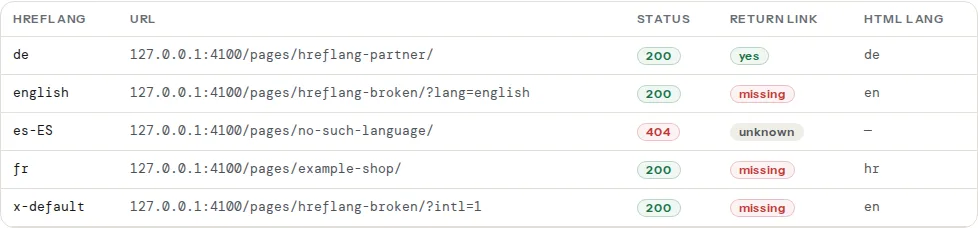
The table lists each alternate with the language code, the URL, its HTTP status, whether the return link exists and the `lang` attribute of its `` element, which is a quick way to spot a `de` alternate that actually serves English:
## Step by step
### 1. Pick one page per template, not the home page only
hreflang is usually generated by a template, so one product page, one category page and one article are enough to find template bugs. Run the checker on each. The home page often has a hand-written set that is correct while the templates are not.
### 2. Read the "Return link" column first
- **yes**: the contract holds for that pair.
- **missing**: the alternate answered 200 but its hreflang set does not include this page. Open the alternate's source and look for the tag; usually the whole set is missing there, or it lists a different URL for this language (a trailing slash, `www`, http instead of https).
- **unknown**: the alternate did not answer 200 as HTML, so its tags could not be read. Fix the status first (next step).
### 3. Fix the statuses
An alternate that answers 404 was removed or never existed; delete the entry or point it at the live URL. An alternate that redirects (301/302) is technically reachable, but Google drops it; point the tag at the final URL. The [redirect checker](https://getreport.app/tools/redirect-checker) shows the final URL of any address.
### 4. Fix the codes
The first finding lists invalid codes. The usual ones:
| Written | Problem | Correct |
| --- | --- | --- |
| `uk` | country code used as language | `en-GB` |
| `en_GB` | underscore | `en-GB` |
| `english` | word instead of code | `en` |
| `sr-Latn-RS` | script tags are fine but need the region last | `sr-Latn-RS` is valid; `sr-RS-Latn` is not |
| `x-default` twice | one per set | keep one |
Language codes are case-insensitive, but keep them lowercase for the language and uppercase for the region; it makes diffs readable.
### 5. Add the self-reference
Every page lists itself. A German page carries `` pointing at its own URL. Templates that build the list "from the other languages" forget this, and Google then treats the set as incomplete. The first finding reports "no entry points to this page" when the self-reference is missing.
### 6. Generate the tags from one source
Hand-written tags drift within weeks. Generate them from the one place that knows the mapping between versions: the CMS's translation relation, a spreadsheet exported at build time, or the sitemap.
For a static site, a small helper that prints the set from a map:
```html
```
```js
// build step: one map, every page prints the same set
const versions = { en: '/en/shoes/', de: '/de/schuhe/', hr: '/hr/cipele/' };
const base = 'https://example.com';
const tags = Object.entries(versions)
.map(([lang, path]) => ``)
.concat(``)
.join('\n');
```
In WordPress, WPML and Polylang print the set from the translation relation and include the self-reference; TranslatePress does too. If you also use Yoast or Rank Math, make sure only one of them outputs hreflang (both have a switch), or you get duplicate entries.
### 7. Or put the set in the sitemap
For large sites the sitemap is the cleaner place: one `` per version with `xhtml:link` children listing the whole set. Google reads either; do not do both unless they are generated from the same source.
```xml
https://example.com/en/shoes/
```
The `urlset` needs `xmlns:xhtml="http://www.w3.org/1999/xhtml"` in that case. The [sitemap validator](https://getreport.app/tools/sitemap-validator) checks the file itself; sitemap-based hreflang return links are part of the crawl milestone.
## Platform notes
**WordPress.** WPML: WPML → Languages → "Hreflang links" on, and check "Skip languages that have no translation" is what you want. Polylang prints the tags by default. If a page has no translation in a language, that language must not appear in the set for that page (the checker would show a 404 or a redirect to the home page).
**Shopify.** Shopify Markets prints hreflang for each market/language automatically. Custom domains per market must all be verified, or the tags point at a domain that redirects.
**Static sites.** Astro, Hugo and Next.js i18n routing each have a documented way to emit alternates; the important part is that each page's set is generated from the same routing table, so the self-reference and the return links are guaranteed.
## Verify
- The checker's return-link column reads "yes" for every alternate and "self" for the page itself.
- Every status is 200; no redirects in the table.
- Run it on one page per template and one page per language: a return link failing only for one language means that language's template is different.
- In Search Console, International targeting shows no "no return tags" errors after the next crawl (it can take a few weeks).
## Common mistakes
- **Pointing the alternates at the home page** when a translation does not exist. Google treats that as a wrong alternate, and it also breaks the return link.
- **Mixing `www` and non-`www`, or http and https**, between the tags and the canonical. The return link must match the canonical URL of the target exactly.
- **Two plugins printing the set** (SEO plugin plus translation plugin): duplicates and, worse, disagreeing URLs.
- **`x-default` pointing at a language selector that redirects** by IP. The x-default page must answer 200 too.
- **Forgetting hreflang on pagination and filters**; each paginated URL is its own page and needs its own set, or none at all.
- **Using hreflang to fix duplicate content.** hreflang and canonical solve different problems; a canonical pointing from `/de/` to `/en/` tells Google to drop the German page, which then cannot rank in Germany.