# Google AI Mode: what it is and how your site gets into it
> What Google AI Mode is, where it works and how to avoid it, then the site-owner side: how it picks sources, the controls that work and how to measure it.
Updated 2026-11-02 · Technical SEO · HTML version: https://getreport.app/guides/google-ai-mode
Google AI Mode is a conversational search mode inside Google Search that answers your question with an AI-written response, built by running many related searches over Google's index at once and linking the pages it used. For site owners, the important fact is that AI Mode reads the same index as classic Google Search: a page that is indexed and allowed to show a snippet can be linked, and the controls that work are Search controls, not AI crawler rules. If you came for the ranking side of AI Overviews, our [guide to Google AI Overviews](https://getreport.app/guides/google-ai-overviews-seo) goes deeper; this page is the map of AI Mode itself, and of the questions around it.
## Quick answer
- **What it is:** a chat-style mode of Google Search, running on Google's Gemini models, that writes one answer from many searches and shows links beside the text. It is free and needs no subscription.
- **Where:** as of October 2026, Google says AI Mode is available in more than 200 countries and territories and close to 100 languages. You can also move into it from an AI Overview by asking a follow-up.
- **How to avoid it:** do not pick the AI Mode tab, or use the Web filter on the results page; there is no account-wide off switch in Google Search as of October 2026.
- **For site owners, there are no extra requirements:** a page must be indexed and eligible for a snippet. No special markup, no llms.txt, no AI version of the page.
- **The controls are Search controls:** the Search generative AI setting in Search Console, `nosnippet`, `data-nosnippet`, `max-snippet` and `noindex`. Blocking Google-Extended in robots.txt does not remove you from AI Mode; we show why with a test below.
- **Measure it** in Search Console's Generative AI performance report (impressions only); the clicks sit inside the normal Web totals and arrive in analytics as Google organic.
## What is Google AI Mode?
AI Mode is Google Search answering in prose. Instead of ten blue links, you get a written answer that pulls together several sources, with links to those sources shown next to the parts they support. You can then ask a follow-up ("which of those ship to Austria?") and AI Mode keeps the context of the conversation, the way a chat assistant does. It accepts typed questions, voice and images.
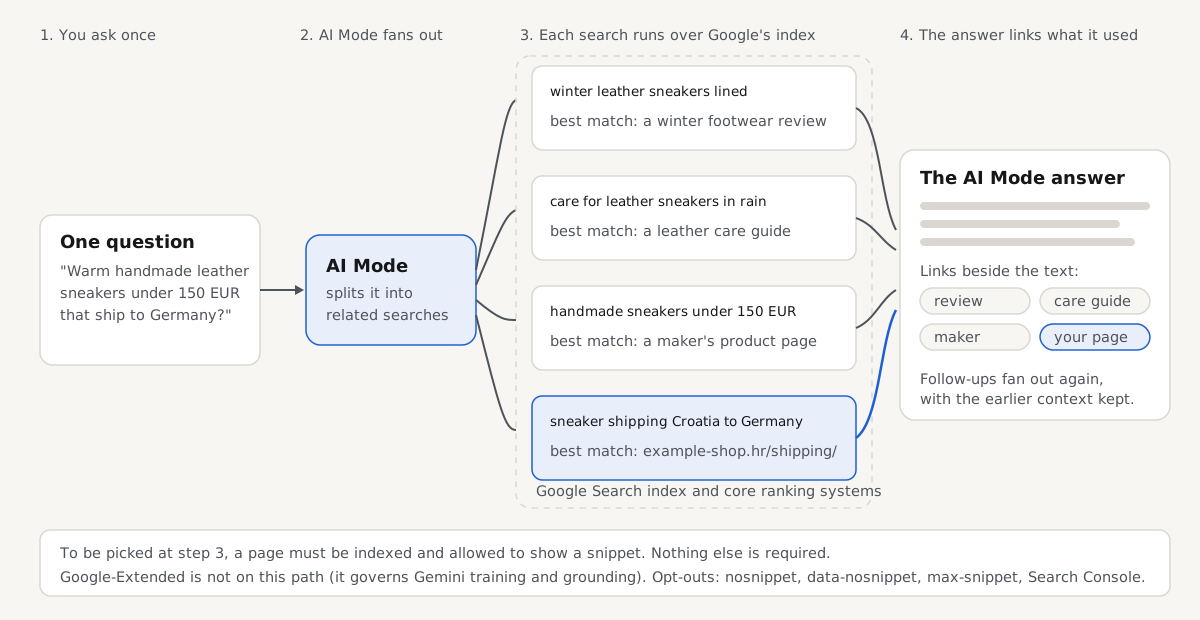
Google's documentation for site owners names two techniques. Retrieval: the model grounds its answer in pages it finds in the Search index rather than answering from memory. And **query fan-out**: for a complex question, AI Mode runs several related searches across subtopics at once, then combines what it found. In the diagram, a question about warm handmade sneakers that ship to Germany becomes separate searches about linings, leather care, price and shipping, and each can surface a different page.
Google launched AI Mode as a Search Labs experiment in March 2025, opened it to everyone in the United States at Google I/O in May 2025, and expanded it country by country after that. At I/O in May 2026, Sundar Pichai said AI Mode had passed one billion monthly users in its first year, and Google said Gemini 3.5 Flash had become its default model worldwide.
## Where is AI Mode available, and how do you open it?
Availability moves fast, so read this as a snapshot from Google's announcements, dated October 2026:
- **October 2025:** Google added more than 35 languages and over 40 countries and territories, bringing AI Mode to more than 200 countries and territories in total.
- **February 2026:** Google added 53 languages in one release, its largest language expansion so far.
- **May 2026 (I/O):** Google joined AI Overviews and AI Mode into one flow: you can ask a follow-up straight from an AI Overview and continue in AI Mode with the context kept, on desktop and mobile, worldwide.
Newer additions, such as the agent features previewed at I/O 2026, have arrived first for paid Google AI Pro and Ultra subscribers; the core AI Mode answer is free.
To open AI Mode, use any of these:
1. **On a results page**, select **AI Mode** in the row of tabs under the search box (next to All, Images and News).
2. **Go to google.com/ai** in any browser, which opens AI Mode directly.
3. **In the Google app** on Android or iPhone, tap AI Mode next to the search bar.
4. **From an AI Overview**, ask a follow-up question in the box under the Overview; the conversation continues in AI Mode.
## How do you turn AI Mode off, or avoid it?
You mostly avoid AI Mode by not choosing it: it is a tab, not the default results page. As of October 2026, Google Search has no setting that removes AI Mode from your account everywhere. What exists:
- **The Web filter.** On any results page, choose **Web** in the tabs (sometimes under More). It shows text links only, with no AI Overview and no AI Mode answer. Adding `udm=14` to a Google search URL selects the same filter, and some people set `https://www.google.com/search?q=%s&udm=14` as a custom search engine in their browser to make it permanent.
- **The Search Labs toggle.** Google's help page describes switching AI Mode off under Search Labs → Manage for accounts that use the Labs version; most accounts now have AI Mode outside Labs, where the toggle does not apply.
- **History and personalisation.** You can delete AI Mode conversations from the AI Mode history panel or from your Google Account's activity page, and turn off Personalize Search in your account. This changes what is saved and how answers are tailored, not whether AI Mode exists.
## AI Mode vs AI Overviews: what is different?
AI Overviews and AI Mode read the same index and follow the same rules for site owners, which is why Google documents them together. For the person searching, they behave differently:
| | AI Overviews | AI Mode |
| --- | --- | --- |
| Where it appears | A block at the top of some normal results pages | A separate tab or page (google.com/ai) |
| When it appears | Only when Google's systems decide it helps | Whenever you choose it |
| Shape of the answer | A short summary, with classic results below | A full written answer, often longer, with links beside the text |
| Follow-up questions | Ask one to continue in AI Mode | Built in: a conversation with context |
| Searches behind it | May use query fan-out | Uses query fan-out for complex questions |
| Eligibility for your pages | Indexed and snippet-eligible | Same |
| Opt-out controls | Search generative AI setting, snippet directives | Same |
| Search Console | Generative AI performance report, impressions only | Same report, counted together |
One difference is not in the table: Google says the two features may use different models and techniques, so the responses and links they show will vary. Appearing in an AI Overview for a question does not mean you appear in AI Mode for it, or the reverse.
## How does AI Mode pick and link its sources?
AI Mode retrieves pages from Google's index using Google's core ranking and quality systems, and fan-out changes which pages get a chance. Because one question becomes several searches, a page only needs to best answer one part of it, which is how the shipping page in the diagram gets linked for a question mostly about shoes. The model then writes the answer and places links next to the statements they support.
Three practical consequences follow from Google's documentation:
1. **Ranking still decides.** A page that ranks for none of the fan-out searches is not retrieved, so it cannot be linked.
2. **Specific beats general.** Fan-out searches are narrower than the question a person typed. A page that answers one sub-question plainly (delivery to Germany in 2 to 4 working days, free over 80 EUR) has a sharper chance than a broad page that mentions everything once.
3. **Links are not positions.** Your page is either among the links shown or not, and that can change between runs and follow-ups.
For shops and local businesses, Google's guide adds one more input: up-to-date Merchant Center and Business Profile data can help products and services show in AI responses, so those feeds matter alongside your pages.
## Can you rank in Google AI Mode?
You can be linked in AI Mode, and the honest route there is ordinary SEO done well. Google's guide to its generative AI features, updated through 2026, says there are no additional technical requirements: a page has to be indexed and eligible to show a snippet in Google Search, and that is all. It also lists what you do not need: structured data is not required for AI features, Google Search ignores llms.txt and similar AI text files, and splitting pages into "chunks" or rewriting them in a special AI style is unnecessary. Creating a page for every variation of a question can be treated as scaled content abuse.
What helps is what helps any page: indexable URLs, main content in the HTML, headings that state the question, answer-first paragraphs, and content only you can publish, such as your prices and measurements. Our [guide to ranking in Google AI Overviews](https://getreport.app/guides/google-ai-overviews-seo) works through those steps one by one with the checks for each, and since both features share eligibility, everything in it applies to AI Mode too. For the wider picture beyond Google, the [pillar guide to generative engine optimization](https://getreport.app/guides/generative-engine-optimization) covers ChatGPT, Perplexity and the rest.
If you want an llms.txt for assistants outside Google, our [llms.txt generator](https://getreport.app/tools/llms-txt-generator) drafts one from your sitemap; it changes nothing in AI Mode.
## Which controls work in AI Mode, and which do not?
AI crawler rules feel like the obvious lever and are not. AI Mode is part of Google Search and is governed by Search controls:
| Control | Where you set it | What it does in AI Mode |
| --- | --- | --- |
| Search generative AI setting | Search Console → Settings | Exclude removes the whole property from AI Overviews, AI Mode and generative AI in Discover; the default is Include |
| `nosnippet` | Robots meta tag or `X-Robots-Tag` header | The page cannot be used as a direct input for AI Overviews or AI Mode; it also loses its normal text snippet |
| `data-nosnippet` | HTML attribute on an element | That element's text is not quoted; the rest of the page stays usable |
| `max-snippet:[n]` | Robots meta tag | Caps how much text can be used, in characters |
| `noindex` | Robots meta tag or header | The page leaves Google Search entirely, AI Mode included |
| Google-Extended | robots.txt | No effect on AI Mode; it controls Gemini training and grounding in Gemini apps and Vertex AI |
| Disallow for Googlebot | robots.txt | Stops crawling for all of Search; AI Mode loses the page with everything else |
The Search Console setting arrived with the reporting changes Google announced in June 2026 and reached all sites worldwide by 31 August 2026. Google says excluding a site is not used as a ranking signal for regular results, so your blue links are unaffected; you give up impressions and visits from the AI features. It works per property, not per page, and does not decide whether Google may train models on your content; that stays with Google-Extended.
For anything finer than a whole site, `data-nosnippet` is the precise tool: it keeps a promotion or a disclaimer out of quotes while the page keeps its snippet. `nosnippet` is blunt, because it also removes the text under your blue link.
## Test it yourself: what Google-Extended and snippet rules really change
We ran these on our fixture of the example-shop.hr demo shop, served locally at `localhost:4101`, on 2026-10-16. You can run the same commands against your own domain.
**1. Google-Extended is a rule name, not a visitor.** First, the shop's robots.txt as served:
```text
$ curl -s http://localhost:4101/robots.txt
User-agent: *
Disallow: /cart/
Sitemap: http://localhost:4101/sitemap_index.xml
```
Now fetch a product page twice, once with Googlebot's user agent and once with the string Google-Extended, and compare the responses:
```text
$ for ua in "Mozilla/5.0 (compatible; Googlebot/2.1; +http://www.google.com/bot.html)" "Google-Extended"; do
curl -s -A "$ua" http://localhost:4101/shop/sava-low/ | sha256sum | cut -c1-16; done
83c3c81f088ea5c5
83c3c81f088ea5c5
```
Identical bytes, as on most servers. The real point is that no request from Google ever carries the second string: Google documents Google-Extended as a robots.txt product token with no user agent of its own. Googlebot does the fetching; Google-Extended only says how Google may use what was fetched, so you will never see it in an access log.
**2. Blocking Google-Extended leaves Googlebot, and so AI Mode, untouched.** We added a Google-Extended group to a local copy of the shop's robots.txt and asked Python's standard robots.txt parser what each token may fetch:
```text
# robots.txt (local copy, group appended)
User-agent: Google-Extended
Disallow: /
$ python3 -I robots_check.py robots.txt
Googlebot /shop/sava-low/ allowed
Googlebot /cart/ blocked
Google-Extended /shop/sava-low/ blocked
Google-Extended /cart/ blocked
```
`robots_check.py` is six lines: it loads the file with `urllib.robotparser` and calls `can_fetch()` for each token and path. Googlebot is still allowed on the product page, so it stays indexed and eligible for AI Mode; the block only reaches Gemini training and grounding.
**3. Snippet controls are visible in the HTML and headers.** This is how to see whether a page has opted out of being quoted. A product page, then the shop's tag archive:
```text
$ curl -sI http://localhost:4101/shop/sava-low/ | grep -i '^x-robots-tag' || echo "(no X-Robots-Tag header)"
(no X-Robots-Tag header)
$ curl -s http://localhost:4101/shop/sava-low/ \
| grep -oiE ']*>|data-nosnippet[^>]*>[^<]*|max-snippet:[0-9-]+' \
|| echo "(no snippet controls in the HTML)"
(no snippet controls in the HTML)
$ curl -s http://localhost:4101/tag/sale/ | grep -oiE ']*>'
```
The product page has no controls, so it can be quoted in AI Mode. The tag archive carries `noindex`, so it is out of Search and AI Mode, as intended for a thin archive. To keep one passage out of quotes, we added a `data-nosnippet` block to a local copy of the shipping page. Google supports the attribute on `span`, `div` and `section` elements, so wrap the text in one of those:
```html
Free EU shipping over €80, delivery in 2 to 4 working days, tracking by email.
Black Friday: shipping is free on every order until 30 November.
```
```text
$ grep -oiE ']*>|data-nosnippet[^>]*>[^<]*|max-snippet:[0-9-]+' shipping-nosnippet.html
data-nosnippet>Black Friday: shipping is free on every order until 30 November.
```
The page keeps its snippet and eligibility; only the promotion is marked as not quotable. This shows what you send; how Google honours it is documented in its robots meta tag reference.
## How to check your own site for AI Mode
Run the checks in order, because each one gates the next:
1. **Is the page indexed?** Search Console → URL Inspection. An unindexed page cannot be retrieved by any fan-out search.
2. **Can Googlebot crawl it?** A Disallow that catches Googlebot, often through the `*` group, removes the page from Search and AI Mode.
3. **Is it allowed a snippet?** Look for `nosnippet` or `max-snippet:0` with the commands above. Where it hides differs by platform: on WordPress, in the SEO plugin's advanced robots settings per post or post type; on Shopify, in `theme.liquid` or an app's meta tags; behind nginx, Apache or Cloudflare, in a rule that adds an `X-Robots-Tag` header.
4. **Is the Search Console setting on Include?** Settings → Search generative AI.
5. **Is the main text in the HTML?** Googlebot renders JavaScript later and with a budget; most other AI crawlers do not render at all.
Our free check covers the crawler and rendering side in one run: what your robots.txt says to 18 AI user agents, Google-Extended among them, grouped by purpose, whether text only appears after JavaScript, and whether your llms.txt is valid.
> **Free tool:** [AI crawlers check: GPTBot, ClaudeBot and llms.txt](https://getreport.app/tools/ai-crawler-check): See what your robots.txt tells 18 AI crawlers, such as GPTBot, ClaudeBot and PerplexityBot, whether your llms.txt is valid and what needs JavaScript. Free.
The full getReport report runs the indexing basics on every page. A passing result for AI Mode looks like this: the page can be indexed, robots.txt allows it for search engines, and the visible text is present without JavaScript. Whatever the AI crawler card says about Google-Extended does not change that result.
> **Check: The page can be indexed.** To appear in search, a page must return HTTP 200, carry no noindex directive and be allowed in robots.txt. If any of the three fails, the page is invisible to searchers.
>
> 1. Open the technical detail to see which condition fails, then fix that one; the individual findings above have the steps.
> 2. After the fix, request indexing in Google Search Console to speed things up.
> **Check: robots.txt allows this page.** A Disallow rule stops search engines from crawling this page, so they cannot read its content or see any updates. The page can still appear in results as a bare URL with no description.
>
> 1. Remove or narrow the Disallow rule in robots.txt so this URL is allowed for all crawlers.
> 2. If the page should stay out of search, allow crawling and use a noindex tag instead; a blocked page cannot be de-indexed.
> **Check: The visible text is present without JavaScript.** Google renders JavaScript later and with a budget, so text that only appears after scripts run can be indexed late or not at all. Other search engines and link previews may never see it.
>
> 1. Serve the main content in the HTML (server-side rendering or static generation) and use JavaScript only to enhance it.
> 2. Check the difference in the technical detail; menus and widgets are fine, headlines and body copy are not.
If the rendering card shows text added by JavaScript, the [JavaScript SEO audit](https://getreport.app/tools/js-rendering-check) compares the raw and rendered page field by field. The fix pages on [indexability](https://getreport.app/learn/indexability) and [robots directives](https://getreport.app/learn/robots-directives) explain each finding in plain terms.
## How to measure AI Mode in Search Console
Search Console has two places that matter, and they show different things.
**The Generative AI performance report** (Performance → Generative AI) counts impressions: how often links to your pages appeared in AI Overviews or AI Mode, by page, country, device and date. Google announced it on 3 June 2026 and completed the global rollout on 31 August 2026. AI Overviews and AI Mode are counted together, and Discover's generative features have a separate view. A small site may see no rows until it has enough AI impressions.
**What it does not show:** queries, clicks, click-through rate and position. You can learn, for example, that your shipping page was shown in AI answers 1,200 times last month, but not for which questions, and not how many people clicked.
**The clicks sit in the normal Performance report.** Google states that clicks and impressions from AI Overviews and AI Mode are included in the overall Web search type totals, with no filter to separate them. So a page can gain AI impressions while its click line looks flat; the AI clicks are already inside it.
A workable routine: once a month, compare the pages in the Generative AI report with the pages you want to appear, and after a change watch that page's trend rather than the site total. [What AI visibility is and how to measure it](https://getreport.app/guides/what-is-ai-visibility) covers the sources outside Google.
## What does traffic from AI Mode look like?
A click on a link in an AI Mode answer arrives like any other Google click: a google.com referrer, counted as Google organic in Google Analytics and most other tools. That was not always true. In May 2025, links in AI Mode briefly carried a `noreferrer` attribute that made visits look like direct traffic; Google called it a bug and removed it within days. If your analytics showed an odd jump in direct traffic in late May 2025, that is the likely reason.
Expect fewer clicks per impression than a classic result, because the answer often satisfies the question, and visitors who do click arrive further along, wanting the detail, the price or the checkout. Google has published no click-through figures for AI Mode, so judge the visits by what they do. Since AI Mode clicks cannot be separated, the reliable signal is per page: a page that gains AI impressions and holds its Google organic conversions is doing its job.
## Which AI SEO tools measure what?
AI search tools do four different jobs. Access checkers read your robots.txt, headers and HTML to tell you whether AI crawlers may fetch your pages and can read them. Rendering checkers compare the server's HTML with the page after JavaScript, which decides what non-rendering AI crawlers see. Prompt trackers run a fixed list of questions through AI engines on a schedule and record who is mentioned or linked. Log and referral analysers count what AI systems actually fetched and who arrived from them.
Only the first two jobs produce facts about your site. Prompt trackers produce samples, since answers vary by location, account, model and day. Ask any tool which of the four it does, on what sample, and what it cannot see.
## Is ChatGPT SEO different from Google SEO?
Mostly in access, less in content. ChatGPT search combines third-party search providers with OpenAI's own crawlers, so your robots.txt has to allow OAI-SearchBot and ChatGPT-User, rules that Google never reads. A December 2024 crawler analysis by Vercel and MERJ found OpenAI's crawlers do not run JavaScript, so a page that works in Google because Googlebot renders it can be blank to ChatGPT.
The content side converges: answer-first pages with specific facts and dates get quoted by every engine. The other difference is measurement: ChatGPT has no console like Search Console, so you rely on referral visits and server logs.
## LLM SEO: training data or retrieval?
A language model can know about your site in two ways, and they need different work. Training data is what the model learned before its cutoff, from crawls such as Common Crawl and from operators' own training crawlers; it is slow, cumulative and mostly out of your hands beyond allowing or blocking those crawlers. Retrieval is what the model looks up at question time, through a search index, and that is where AI Mode, ChatGPT search and Perplexity get their links.
Retrieval is the lever for a site owner: it responds in weeks, links back and follows rules you can check. Training mainly shapes how a model describes your category and brand when it answers without searching.
## How do you measure LLM visibility from your own data?
You can measure a good part of it without buying a prompt panel, from data you already own. Server logs show on-demand fetches by user-triggered agents such as ChatGPT-User, Claude-User and Perplexity-User: each one means a real person's question led an assistant to that page at that moment. Analytics shows AI referral visits from chatgpt.com, perplexity.ai, claude.ai and copilot.microsoft.com, with the landing pages they chose. And the citations themselves are visible in engines that show their sources.
Together they show which pages assistants fetch, which send visitors, and how both trend after a change. Google is the exception: AI Mode fetches come from Googlebot and its visits arrive as Google organic, so for Google the Search Console report is the source.
## How do you track AI Overview and AI Mode appearances?
There are two complementary methods. Search Console's Generative AI report gives Google's own count of your impressions per page, complete but with no queries. Rank trackers that record AI Overviews and AI Mode run your chosen queries on a schedule and note whether an AI answer appeared and which sites it linked: they show the query, but only for the questions you give them and only as one sample per location and device.
Use Search Console for totals and a tracker for the few queries that matter most, and never add the two numbers together.
## How do you find and correct what AI says about your brand?
Start by asking the main assistants what a buyer would ask about you (prices, delivery, how you compare) and note every claim that is wrong or outdated. Most errors trace back to a source: an old page of yours, a stale directory listing, or a review site with last year's prices.
Correcting means fixing those sources, not the answer: dated facts on your own pages, corrected directories and profiles, current Merchant Center and Business Profile data for Google. Retrieval-based answers follow within weeks; what a model learned in training changes only with its next version.
## How we tested
The getReport team ran every command on this page on 2026-10-16 against our local fixture of the example-shop.hr demo shop (`localhost:4101`, the same fixture our tool examples use), with curl 8.5.0 and Python 3.11's `urllib.robotparser`. The Google-Extended group and the `data-nosnippet` block were added to local copies of the fixture's robots.txt and shipping page; the live fixture was not changed. Facts about AI Mode's availability, the Search Console setting and the Generative AI report were checked in October 2026 against Google's pages and announcements listed under Sources; where our sandbox could not load a Google page directly, we confirmed the detail through Google's published summaries and reporting that quotes them.
What we did not test: we did not query AI Mode or any AI engine, we did not observe Google applying `data-nosnippet` or the Search Console setting (that is Google's documented behaviour, not our measurement), and we have no AI Mode click data. Python's robots.txt parser is not Google's, though for these simple groups the outcome matches Google's documentation.
## Questions people ask
### Is Google AI Mode free to use?
Yes. AI Mode is part of Google Search and costs nothing; you do not need a Google One or Gemini subscription to ask questions or follow up. Google has released some newer additions, such as the agent features previewed at I/O 2026, first to paid Google AI Pro and Ultra subscribers, but the core AI Mode answer with its links is free wherever AI Mode is available, which as of October 2026 is more than 200 countries and territories.
### Can you turn off AI Mode in Google Search?
Not with one account-wide switch, as of October 2026. AI Mode only opens when you pick its tab, go to google.com/ai or follow up from an AI Overview, so a normal search does not start in it. For results without any AI layer, choose the Web filter on the results page, or add udm=14 to the search URL. Accounts using the Search Labs version can switch it off under Search Labs, Manage.
### Is AI Mode the same thing as Gemini?
No, although it runs on Gemini models. AI Mode is a mode of Google Search: it searches Google's index for every answer and links the pages it used, and it is governed by Search rules and Search Console. The Gemini app is a separate assistant with its own settings. That split is why robots.txt's Google-Extended token affects Gemini's use of your content but not AI Mode.
### Does blocking Google-Extended keep my pages out of AI Mode?
No. Google-Extended is a robots.txt token that controls whether Google may use your content to train Gemini models and to ground answers in Gemini apps and Vertex AI. AI Mode is part of Google Search and reads pages that Googlebot crawled, so a Google-Extended block leaves you in it. To leave AI Mode, use the Search generative AI setting in Search Console, or nosnippet and data-nosnippet for pages and passages.
### Do clicks from AI Mode show up in Google Analytics?
Yes, as ordinary Google organic traffic with a google.com referrer, so you cannot separate them from classic search clicks. A brief bug in May 2025 stripped the referrer and made AI Mode visits look direct; Google removed it within days. In Search Console, the clicks are part of the Web search type totals, and the Generative AI report shows only impressions, so per-page trends are the best signal you have.
### Does AI Mode show different links than AI Overviews?
Often, yes. Google says AI Overviews and AI Mode may use different models and techniques, so the answers and the links they show for the same question can differ. AI Mode also tends to run more searches per question, which gives more pages a chance. Both use the same index and the same eligibility rules, so being indexed with a snippet makes you a candidate for both, without guaranteeing either.
### Does Google AI Mode remember my searches?
Yes, when you are signed in: AI Mode saves your conversations in an AI Mode history panel on the left of the page, so you can return to a thread. You can delete single conversations there, or manage and auto-delete them from your Google Account's activity page like other Search history. Turning off Personalize Search in your account limits how answers are tailored to you, but does not stop AI Mode itself.
## Sources
- [AI features and your website, Google Search Central](https://developers.google.com/search/docs/appearance/ai-features) (accessed October 2026)
- [Introducing Search generative AI performance reports in Search Console, Google Search Central Blog](https://developers.google.com/search/blog/2026/06/gen-ai-performance-reports) (3 June 2026)
- [Robots meta tag, data-nosnippet and X-Robots-Tag specifications, Google Search Central](https://developers.google.com/search/docs/crawling-indexing/robots-meta-tag) (accessed October 2026)
- [Google's common crawlers and the Google-Extended token, Google Search Central](https://developers.google.com/search/docs/crawling-indexing/google-common-crawlers) (accessed October 2026)
- [Get AI-powered responses with AI Mode in Google Search, Google Search Help](https://support.google.com/websearch/answer/16011537) (accessed October 2026)
- [AI Mode is now available in more languages and locations, The Keyword](https://blog.google/products-and-platforms/products/search/ai-mode-expands-languages-locations/) (October 2025)
- [Google Search's I/O 2026 updates, The Keyword](https://blog.google/products-and-platforms/products/search/search-io-2026/) (May 2026)