# Custom 404 pages that help: status codes, content and the check
> A good 404 page keeps the visitor on your site and tells search engines the page is gone. What to put on it, how to make sure it returns a real 404, and how getReport tests yours with a random URL.
Updated 2026-09-25 · Best practices · HTML version: https://getreport.app/guides/custom-404-pages-that-help
Every site has missing pages: a mistyped address, a product that sold out, a link from a forum post in 2019. What the visitor sees next decides whether they stay. A good [custom 404 page](https://getreport.app/learn/custom-404) takes an hour to build and turns a dead end into a detour; a bad one sends people back to the search results. This guide covers what the page should say, the status code it must return, and how to check both.
## Quick answer
- Return a real **HTTP 404** (or 410) for unknown URLs. Not a 200 with "not found" text, and not a redirect to the home page.
- Keep the site's header and navigation, say plainly that the page is missing, and offer a search box, the most useful links and a contact route.
- Keep it light: bots hit 404s constantly, so a heavy page wastes your server's time.
- Point the server's error handler at a local path (`error_page 404 /404.html;`), never a full URL, or the 404 becomes a 302.
- Track 404 hits with the path, then fix the links that cause them.
## Why a custom 404 page matters
A visitor who lands on a missing page arrived with intent: they clicked a link, typed an address or followed a search result. The server's default "Not Found" page, white with one line of text, gives them nowhere to go. Your own 404 page with the menu, a search box and three good links gives them a way to finish what they came for.
For search engines, the status code is what counts. A 404 tells Google the URL does not exist, and Google drops it from the index after recrawling. A page that says "not found" but answers 200 is a **soft 404**: Google has to guess, keeps crawling the URL, and may keep it in results. A redirect of every missing URL to the home page is treated the same way. Both waste crawl budget on pages that no longer exist; [soft 404s: what they are and how to fix them](https://getreport.app/guides/soft-404s-what-they-are-and-how-to-fix-them) covers the diagnosis.
A 404 page is not a sign of a broken site; a site with no 404s is one that redirects everything. What matters is that each missing URL gets an honest answer and that your own links do not point at them.
## How getReport checks it
> **Free tool:** [Broken link checker](https://getreport.app/tools/broken-link-checker): Check up to 150 links on a page: internal and external, with the status code, redirect target, anchor text and response time of each. Dead pages, server errors and redirect chains, listed and ready to fix.
The 404 check runs in every full report, in the Best practices module. During the browser render, the report requests one random path on the same origin (it looks like `/getreport-404-probe-` followed by 12 random hexadecimal characters) without following redirects, and reads the status and the body:
- **Pass**: the answer is HTTP 404 *and* the body is longer than 1,500 characters *and* it is not a bare server page with a title of "Not Found" or "404 Not Found".
- **Warning**: any other status (200, 301, 302, 410, 500) or a 404 that is the server's default page.
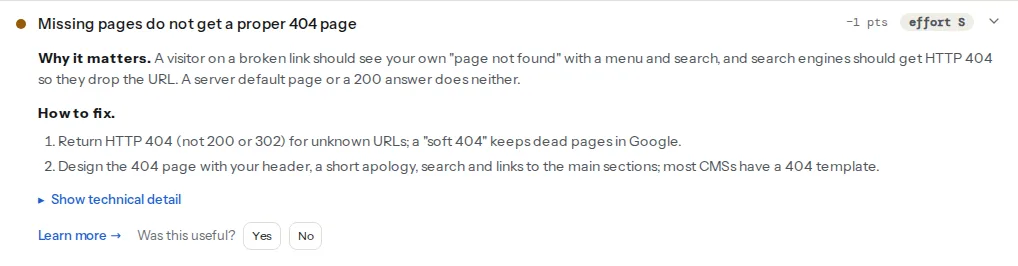
> **Check: Missing pages get a proper 404 page.** A visitor on a broken link should see your own "page not found" with a menu and search, and search engines should get HTTP 404 so they drop the URL. A server default page or a 200 answer does neither.
>
> 1. Return HTTP 404 (not 200 or 302) for unknown URLs; a "soft 404" keeps dead pages in Google.
> 2. Design the 404 page with your header, a short apology, search and links to the main sections; most CMSs have a 404 template.
The technical detail says what came back, for example "GET of a random path returned HTTP 200; custom page: no". A 410 also gets a warning here: it is a correct answer for a page you removed on purpose, but for a URL that never existed, 404 is the expected one.
The size test is a proxy: it tells a real page from a one-line server default, not a good page from a poor one. The rest of this guide is about the part a check cannot judge.
The other half of the job is making sure your own site does not send people to missing pages. The [broken link checker](https://getreport.app/tools/broken-link-checker) lists every link on a page that answers 4xx, 5xx or nothing, and the [sitemap validator](https://getreport.app/tools/sitemap-validator) status-checks up to 25 URLs listed in your sitemap:
> **Check: Broken links.** A link to a 404 page is a dead end for visitors and a wasted crawl for search engines. Old campaign or product pages are the usual cause.
>
> 1. Update or remove each link listed in the technical detail; redirect the missing pages if they still get visits.
> 2. In WordPress, a plugin such as Broken Link Checker finds these site-wide.
> **Check: Sitemap URL status.** A sitemap should list only pages that answer 200. Redirects, 404s and noindex pages in it waste crawl budget and make Google trust the file less.
>
> 1. Remove deleted pages from the sitemap and list the final URL of redirected pages.
> 2. Most CMS plugins do this automatically; if you generate the file yourself, rebuild it from the live URL list before publishing.
## Step by step
### 1. Check what your site answers today
Run a report on any page and open the Best practices finding. To check by hand, request a made-up URL and read the status line:
```bash
curl -sI https://example.com/this-page-does-not-exist-123 | head -n 1
# Good: HTTP/2 404
# Wrong: HTTP/2 200 (soft 404)
# Wrong: HTTP/2 301 (redirect to the home page)
```
Try one path deep in a folder too (`/blog/2019/missing-post/`), because some servers and CMS routes handle nested paths differently.
### 2. Write the content
Short beats clever. A 404 page that works has:
- **A plain heading**: "We can't find that page". No blame ("you typed it wrong"); the broken link is usually someone else's.
- **One sentence of explanation**: it may have moved or been removed.
- **A search box**, labelled, that searches your site.
- **Three to six links** to the pages people most often want: the main categories, the shop, the blog, contact. Pick them from your analytics, not from the menu.
- **A contact route** for people who need a specific document or order.
- **The site's normal header and footer**, so the visitor knows they are still in the right place.
Leave out sliders, video backgrounds and large illustrations. Bots request missing URLs all day (old sitemaps, scanners probing for `/wp-login.php` on non-WordPress sites), so the 404 page may be one of the most-served pages you have. It should be cheap to render.
### 3. Suggest the page they probably wanted
The missing URL often contains the words the visitor was after: `/products/blue-running-shoe-2023/`. A small script on the 404 page can turn those words into a search link:
```html
Were you looking for ?
```
For `/products/blue-running-shoe-2023/` it shows "Were you looking for products blue running shoe?", linked to the search results. Change `/?s=` to your site's search address (`/search?q=` on Shopify).
WordPress already does a server-side version: when a URL matches the start of an existing post's slug, it redirects there instead of showing the 404. That is usually helpful; if it sends people to the wrong post, the `do_redirect_guess_404_permalink` filter switches it off.
### 4. Make the server return 404 with your page
The error handler must serve your page *as* the error, from a local path.
**nginx**, in the `server` block:
```nginx
error_page 404 /404.html;
location = /404.html {
internal; # the page itself is not reachable as /404.html with a 200
}
```
**Apache**, in the virtual host or `.htaccess`:
```apache
ErrorDocument 404 /404.html
```
The trap in both: a full URL. `error_page 404 https://example.com/404.html;` in nginx and `ErrorDocument 404 https://example.com/404.html` in Apache make the server send a redirect (302) to that page, which then answers 200. The visitor sees the same page; search engines see a redirect to a live page, a soft 404. Always use a path starting with `/`.
Link the 404 page's CSS, scripts and images with root-relative paths (`/assets/site.css`, not `assets/site.css`). The page is shown at every missing address, and a relative path resolves differently at `/a/b/c/` than at `/`, so the styles 404 too.
### 5. Choose 404, 410 or a redirect per URL
The default for unknown URLs is 404. For pages you removed, the choice is per URL: redirect when there is a close replacement, 410 when it is gone for good, 404 otherwise. [404 vs 410 vs redirect](https://getreport.app/guides/404-vs-410-vs-redirect-what-to-do-with-removed-pages) goes through the cases. Two rules apply everywhere: no blanket redirect of missing pages to the home page, and no `noindex` on the 404 page, which is harmless but unnecessary because the status already says it all.
Keep the cache lifetime of 404 responses short (minutes, not days). A CDN that caches a 404 for a week hides a page you publish at that address tomorrow.
### 6. Measure 404 hits and fix the causes
A 404 page that nobody measures hides the broken links that feed it. Send an analytics event with the path and the referring page, so you can see which links cause the most misses:
```html
```
Then close the loop, once a month:
- The broken link checker on your key pages, for links you control.
- The sitemap validator, for missing pages still listed in the sitemap.
- Search Console → Indexing → Pages → "Not found (404)", for URLs Google found somewhere. The URL inspection shows where it was linked from.
- The log analyser on a month of server logs, which lists the 404s each bot keeps requesting. A 404 hit a thousand times by Googlebot is a link or a sitemap entry worth fixing.
A referrer that is your own site means a broken internal link: fix it at the source, as in [how to find and fix broken links](https://getreport.app/guides/find-and-fix-broken-links). A referrer elsewhere with real traffic deserves a redirect.
## Platform notes
### WordPress
Classic themes render `404.php` from the theme folder; copy it to a child theme before editing. Block themes have a 404 template in Appearance → Editor → Templates, edited like any page, with a search block ready to drop in. WordPress returns a real 404 for both. Some caching plugins cache 404 responses with a lifetime setting of their own; keep it short.
### Shopify
The theme's 404 template is edited in the theme editor, and Shopify returns a real 404 status. The search form links to `/search?q=`, so the suggestion script above works with that change.
### Squarespace and Wix
Both let you replace the default "page not found" with a page you design in the editor, and both keep the 404 status. Add the search and the key links there; there is no server config to touch.
### Netlify, Vercel and static sites
On Netlify, a `404.html` in the publish directory is served for every missing path with a 404 status. On Vercel, a static `404.html` in the output works the same way, and Next.js uses its `not-found` page (App Router) or `pages/404` (Pages Router). Static site generators (Hugo, Astro, Eleventy) all build a `404.html` from a template; the host serves it.
## Verify
- The report's Best practices module shows "Missing pages get a proper 404 page".
- `curl -sI` on two made-up URLs, one at the root and one nested, prints a 404 status line, not 200 or 301.
- The 404 page loads with its styles at a deep path such as `/a/b/c/d/`.
- The analytics event appears with the path after you visit a missing URL.
## Common mistakes
- **A 404 page that returns 200.** Common with single-page apps and page builders that render "not found" as normal content. Search engines treat it as a soft 404. Fix the route so the server sends 404.
- **Redirecting every missing URL to the home page.** Visitors lose context, and Google treats it as a soft 404 anyway. Redirect only pages with a real replacement.
- **Assets that 404 on the 404 page.** Relative paths break at nested URLs, leaving an unstyled page. Use root-relative paths.
- **A custom 404 in one language only.** A German visitor on `/de/missing/` gets an English page. Serve the 404 in the language of the folder, with that language's navigation.
- **A heavy 404 page.** Sliders, video and five tracking scripts on a page bots hit thousands of times a day. Keep it as light as a text page.