# Core Web Vitals for e-commerce: product and category pages

> Where shops fail LCP, CLS and INP on product pages, category grids and checkout, with the fix for each template, the WooCommerce and Shopify settings behind them, and how to measure per template.

Updated 2026-09-25 · Speed & Core Web Vitals · HTML version: https://getreport.app/guides/core-web-vitals-for-e-commerce-product-and-category-pages

A shop has three templates that matter and each fails Core Web Vitals in its own way. Product pages lose LCP to the gallery and INP to the add-to-cart button; category pages lose LCP to image grids and CLS to filters; checkout loses INP to payment and fraud scripts. Fixing "the site" does not work because the causes differ. This guide takes the three templates one at a time, names the usual cause, and gives the fix with the WooCommerce or Shopify setting behind it.

## Quick answer

| Template | Usual failure | First fix |
| --- | --- | --- |
| Product page | LCP on the gallery image; INP on add-to-cart; CLS from reviews and related-products carousels | Main image as a plain `<img>` with `fetchpriority="high"` and correct `sizes`; reserve space for reviews and badges |
| Category page | LCP on the first grid image; CLS when filters re-render; long tasks from sort and infinite scroll | Eager-load the first row only, lazy-load the rest; paginate; debounce filter requests |
| Cart and checkout | INP on every field from payment SDKs, fraud tools and chat; cart fragments on every page | Load payment scripts only on checkout, deferred; remove cart fragments elsewhere |
| All templates | Oversized images, web fonts, third parties | Responsive images, one font family preloaded, delay non-critical scripts until interaction |

Measure each template separately with the [Core Web Vitals checker](https://getreport.app/tools/core-web-vitals); the home page is the least representative page in a shop.

## Why the three templates fail differently

Google evaluates Core Web Vitals per URL where there is enough traffic and otherwise per group of similar URLs, which in Search Console shows up as "URL groups" such as `/product/…` and `/category/…`. A shop with fast product pages and slow category pages fails on the category group, and the home page score tells you nothing about either.

The templates also carry different weight. A product page is where the money is decided, and it is the most complex page in the shop: gallery, variants, price logic, reviews, cross-sells, sticky add-to-cart bar, plus every app or plugin that wants to be seen at the moment of purchase. Category pages carry the most search traffic and the most images per view. Checkout is the one page where a 300 ms frozen tap after "Place order" costs an order outright, and it is where third parties cluster.

## How getReport checks it

> **Free tool:** [Core Web Vitals checker](https://getreport.app/tools/core-web-vitals): LCP, INP and CLS for your page from real Chrome users, plus the lab values and the exact element or script responsible. Pass or fail against Google’s thresholds.

The check reads the field data for the URL from the Chrome UX Report (28 days, 75th percentile) and runs Lighthouse on a throttled phone for the lab diagnosis. The panel shows both side by side; the LCP element line under the lab table names the image or text block that decided the metric.
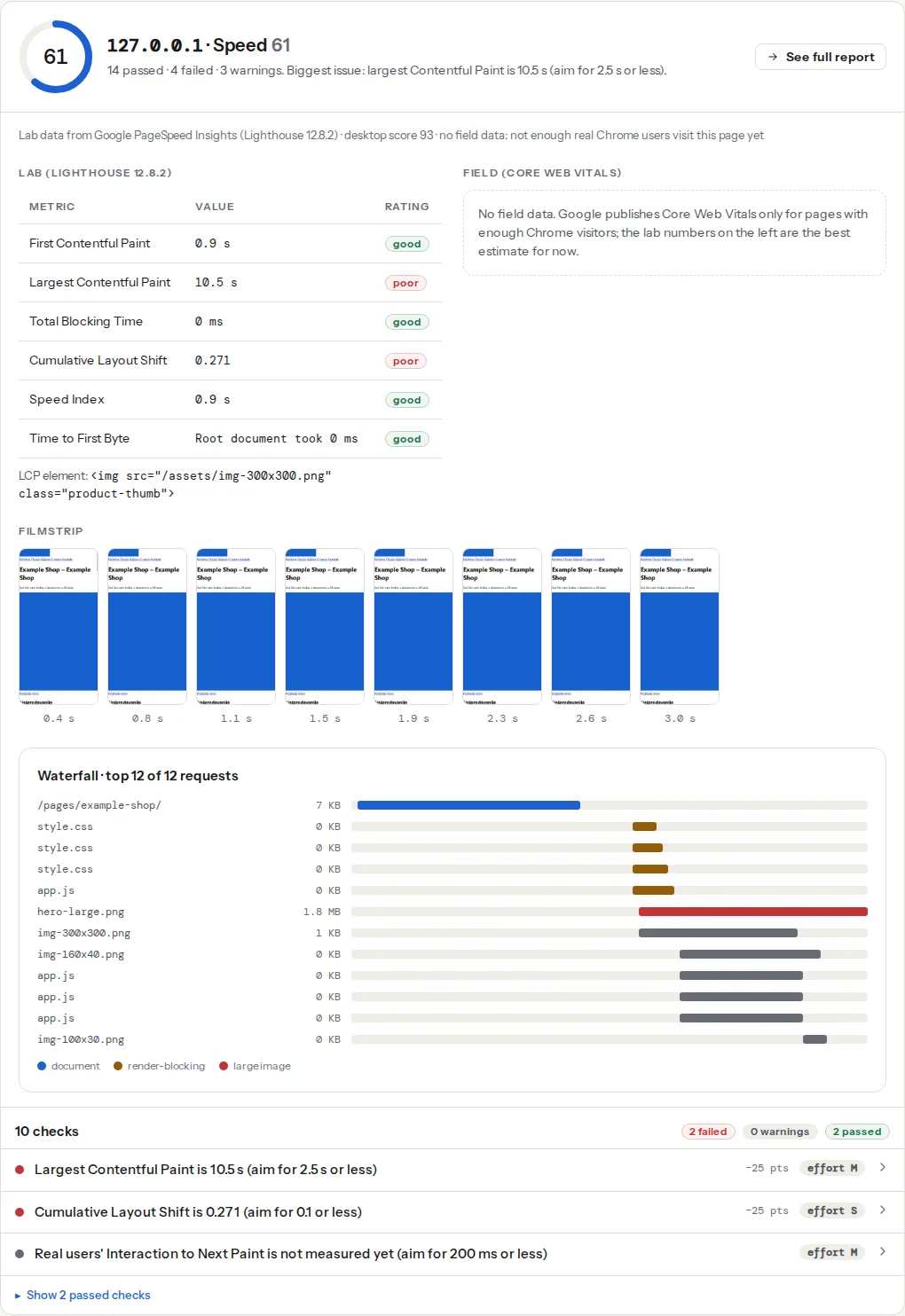
![The Core Web Vitals panel for a shop's product page: the lab table with Largest Contentful Paint and Cumulative Layout Shift rated poor, the LCP element line naming the product image, and the field bars for LCP, INP and CLS beside it](https://getreport.app/guides/img/core-web-vitals-for-e-commerce-product-and-category-pages/vitals.webp "Field bars are what Google uses; the lab row and the LCP element line tell you what to change on this template.")

> **Check: Largest Contentful Paint.** LCP is when the biggest thing on screen — usually the hero image or headline — finishes loading. Visitors judge "is this site slow?" on it, and Google uses it for ranking.
>
> 1. Find the LCP element (named in your report) and make it lighter, earlier or both — a compressed WebP/AVIF, sized to the screen, without lazy loading.
> 2. Preload it with <link rel="preload" as="image"> or add fetchpriority="high" on the <img>.
> 3. Cut what comes before it — render-blocking CSS/JS and slow server responses push LCP back.

> **Check: Cumulative Layout Shift.** CLS measures how much the page jumps around while loading — the button that moves just as someone taps it. It is one of Google's three Core Web Vitals.
>
> 1. Give every <img>, <video>, ad slot and embed explicit width and height (or aspect-ratio) so space is reserved before it loads.
> 2. Preload the main web font and use font-display optional, or swap with a size-adjusted fallback font, so text does not reflow.
> 3. Never insert banners or content above existing content after load.

> **Check: Interaction to Next Paint.** INP measures how quickly the page reacts when someone taps or clicks. Lab tools cannot simulate it, so this comes from real Chrome users; slow responses feel like a frozen page.
>
> 1. Break up long JavaScript tasks and defer third-party scripts so the main thread is free when people interact.
> 2. Respond to input visually first (a pressed state, a spinner), then do the heavy work.
> 3. Reduce DOM size and avoid layout-heavy work inside click handlers.

INP exists only in field data, so a product page with few Chrome visitors shows no INP bar; the lab's Total Blocking Time row is the stand-in and moves for the same reasons.

> **Check: Images are sized for how they are displayed.** Sending a 2000 px photo to a 400 px slot wastes most of the bytes. Responsive images let the browser pick the right size for each screen.
>
> 1. Add srcset and sizes to <img> so phones get small versions; most CMSs generate the sizes for you.
> 2. Resize the originals to the largest size you actually display.

The image sizing finding lists the images served larger than they are displayed. On a category grid it is usually every thumbnail, because the theme requests the full product image for a 300 px slot.

For WooCommerce stores, the [WooCommerce checker](https://getreport.app/tools/woocommerce-checker) adds the cart-fragments request, cached cart and checkout pages, and Product schema to the same report.

## Step by step

### Product pages

**1. Make the main image a plain `<img>` with the right priority.** Most gallery scripts wrap the main image in a slider that hides it until the script runs, or load it as a CSS background; both delay LCP. The first image should be in the HTML as the first slide, visible without JavaScript, with dimensions and responsive sizes:

```html
<img
  src="https://getreport.app/media/jacket-800.jpg"
  srcset="/media/jacket-400.jpg 400w, /media/jacket-800.jpg 800w, /media/jacket-1200.jpg 1200w"
  sizes="(min-width: 1024px) 50vw, 100vw"
  width="800" height="1000"
  fetchpriority="high"
  decoding="async"
  alt="Waxed cotton jacket, olive, front view">
```

`sizes` matters as much as `srcset`: a gallery that takes half the width on desktop and the full width on phones tells the browser exactly that, so a phone downloads the 400 px or 800 px file, not the 1200 px one. [Responsive images](https://getreport.app/guides/responsive-images-srcset-and-sizes) explains how to write the value from your CSS. Never lazy-load this image; `loading="lazy"` belongs on slides two onwards and on the thumbnails.

**2. Defer the gallery script.** Zoom, lightbox and slider libraries can load with `defer` and initialise after the first paint; the first image is already visible. If the theme hides the gallery until initialisation (a common pattern to avoid a flash of stacked images), give the container a fixed `aspect-ratio` so the space is reserved and the hide/show does not shift anything.

**3. Reserve space for everything that arrives late.** Review stars from a reviews app, trust badges, a "low stock" notice, the sticky add-to-cart bar, a related-products carousel: each one is injected by a script after the page has rendered and pushes the content below it down. Reserve the space in CSS:

```css
/* Reviews widget mounts here after its script loads */
.product-reviews { min-height: 320px; }

/* Badge row: fixed height whether or not badges load */
.trust-badges { height: 48px; }

/* Related products: reserve the carousel's height before it renders */
.related-products { min-height: 420px; }
```

The CLS finding lists the elements that moved with their shift scores; start from the largest.

**4. Make add-to-cart respond before it works.** INP measures the time from the tap to the next frame the browser paints. A handler that validates variants, updates the mini-cart, fires three analytics events and opens a slide-out cart in one go can take 400 ms on a phone. Paint first, then do the work:

```js
addToCartButton.addEventListener('click', async (event) => {
  event.preventDefault();
  addToCartButton.classList.add('is-adding');   // pressed state: paints on the next frame
  addToCartButton.disabled = true;

  await new Promise((r) => setTimeout(r, 0));     // yield so the frame can be painted

  const response = await fetch('/cart/add', { method: 'POST', body: new FormData(form) });
  updateMiniCart(await response.json());          // the heavy part runs after the paint
  addToCartButton.classList.remove('is-adding');
  addToCartButton.disabled = false;
});
```

The `setTimeout(…, 0)` yield is the whole trick: it lets the browser paint the pressed state before the fetch and the DOM update. Analytics events go after the update, not before.

**5. Lazy-load below-the-fold carousels.** Related products, recently viewed, "complete the look": their images take `loading="lazy"`, and their scripts can initialise when the section scrolls into view (`IntersectionObserver`) rather than on load.

### Category pages

**1. Eager-load the first row, lazy-load the rest.** The LCP element on a category page is one of the first two to four product images. Those get `fetchpriority="high"` on the first and no `loading` attribute on the rest of the row; every image below takes `loading="lazy"`. A grid where all 48 thumbnails are eager competes for bandwidth with the ones that count.

**2. Serve thumbnails at thumbnail size.** The image sizing finding shows the waste directly. A 300 px grid slot with a 1200 px file is four times the pixels and about ten times the bytes. WooCommerce generates the sizes if the theme declares them (see Platform notes); Shopify's `image_tag` filter generates `srcset` from the `widths` you pass.

**3. Paginate, or make "load more" a real link.** Infinite scroll grows the DOM with every batch, and each batch of 24 products adds hundreds of nodes and a dozen image decodes on the main thread; by page four the sort dropdown takes 500 ms to open. Real pagination keeps each page small and gives Google a URL per page. If the design needs infinite scroll, cap it, and render a "Load more" button that also links to `?page=2` so both crawlers and keyboard users have a path. [Pagination after rel=prev/next](https://getreport.app/guides/pagination-after-rel-prev-next) has the SEO side.

**4. Debounce filters and reserve the grid's height.** A filter sidebar that re-fetches the grid on every checkbox change fires several requests in a row and re-renders the grid each time, which is both an INP problem (long handlers) and a CLS problem (the grid collapses to zero height while loading). Debounce the requests and keep the container's height during the swap:

```js
let timer;
filterForm.addEventListener('change', () => {
  clearTimeout(timer);
  timer = setTimeout(async () => {
    grid.style.minHeight = `${grid.offsetHeight}px`;  // keep the height while replacing
    grid.setAttribute('aria-busy', 'true');
    const html = await (await fetch(`${location.pathname}?${new URLSearchParams(new FormData(filterForm))}`)).text();
    grid.innerHTML = new DOMParser().parseFromString(html, 'text/html').querySelector('.product-grid').innerHTML;
    grid.removeAttribute('aria-busy');
    grid.style.minHeight = '';
  }, 250);
});
```

**5. Keep sort and filter state out of the LCP path.** Scripts that read the URL, restore filter state and re-sort the grid on load should run after the images have been requested (`defer`), not inline in `<head>`.

### Cart and checkout

**1. Load payment SDKs on checkout only, and deferred.** Stripe.js, PayPal's SDK, Klarna, Apple Pay detection: each is 100–300 KB of JavaScript that runs on the main thread. On product and category pages they do nothing for the visitor. Some providers recommend loading their script on every page for fraud signals; if you follow that advice, load it with `defer` after the LCP image and measure its cost in the third-party finding. On checkout itself, load them `defer` so the form renders first.

**2. Remove chat, A/B testing and heatmaps from checkout.** Every one of them registers input listeners and observers on the form fields. A visitor typing a card number on a page with a session-recording script feels every keystroke lag; that is INP.

**3. Stop cart fragments on non-cart pages (WooCommerce).** The `wc-ajax=get_refreshed_fragments` request fires on every page load to refresh the mini-cart count, bypasses the page cache and delays the page for a number most pages do not show. The [cart fragments guide](https://getreport.app/guides/woocommerce-cart-fragments-the-ajax-call-on-every-page) has the snippet and the plugin settings.

**4. Never cache the cart or checkout.** A page cache in front of checkout shows one visitor another's basket and breaks the payment form. The WooCommerce checker fetches `/cart/` and `/checkout/` and reads their cache headers for exactly this.

### Measure per template

- In Search Console → Core Web Vitals, open the mobile report and read the URL groups: it tells you which template fails and on which metric, from the same field data as the panel here.
- Run the checker on one representative URL per template: a product with reviews and variants, a category with filters, the checkout with an item in the cart (log the URL from your own browser; the tool fetches it as an anonymous visitor, so an empty cart page is what it will see).
- Use the [Core Web Vitals history](https://getreport.app/tools/cwv-history) for the origin to see whether a theme update, an app install or a plugin update moved the numbers, week by week.

## Platform notes

### WooCommerce

- **Product image sizes.** Under Appearance → Customize → WooCommerce → Product Images, set the thumbnail width and cropping the grid actually uses (many themes declare their own sizes and hide this panel). After changing sizes, regenerate thumbnails, or existing products keep serving the old files.
- **Gallery features.** Zoom, lightbox and slider are theme-declared (`add_theme_support('wc-product-gallery-zoom')` and friends). Each is a script; remove the ones the design does not use from the theme's `functions.php`.
- **Delay scripts until interaction.** WP Rocket's "Delay JavaScript execution" and LiteSpeed Cache's "Load JS Deferred" with delay both hold non-critical scripts until the first tap or scroll; exclude the gallery, the variation script and the add-to-cart handler so they stay responsive.
- **Cart fragments and cached checkout** are the two WooCommerce-specific findings in the report; both have settings-page fixes.
- **Plugin cost.** Every plugin that enqueues a script on every page costs INP on every template. The WordPress Doctor's plugin cost table in the report lists them by weight; the [WooCommerce store checklist](https://getreport.app/guides/woocommerce-store-checklist) works through it.

### Shopify

- **Theme sections.** In Online Store 2.0 themes the product media gallery is a section with settings for image ratio and loading; set the first media item's loading to eager (the theme's `image_tag` call with `preload: true` and `fetchpriority: 'high'`) and let the rest lazy-load. In Liquid:

```html
{{ product.featured_image | image_url: width: 1200 | image_tag:
   widths: '400, 800, 1200',
   sizes: '(min-width: 1024px) 50vw, 100vw',
   preload: true,
   fetchpriority: 'high' }}
```

- **Apps.** Reviews, upsell, wishlist, currency and chat apps each add scripts to every page, and their theme app extensions often inject markup after load (CLS). Audit the installed apps against the third-party finding and remove the ones nobody uses; for the rest, ask whether the app supports loading on product pages only.
- **Checkout** is Shopify's own and you cannot add scripts to it outside checkout extensibility, which keeps it fast by design; the pixels you add under Customer events run in a sandbox.

### Magento

Merged and bundled JavaScript (Stores → Configuration → Advanced → Developer) reduces requests but often produces one 2 MB bundle that blocks every template; measure before enabling it. Themes built on the Hyvä approach ship far less JavaScript than Luma-based ones and are the largest single INP improvement available on the platform.

## Verify

- The LCP element line names the main product image on product pages and one of the first-row images on category pages, not a logo, a slider placeholder or a background.
- The CLS finding lists no elements from reviews, badges or carousels, and lab CLS is under 0.1 on all three templates.
- The third-party finding on a product page does not include payment SDKs, and on checkout it lists only the payment provider.
- Search Console's Core Web Vitals report moves the URL groups from "poor" to "good" within a month; the history tool shows the same crossing for the origin.

## Common mistakes

- **Optimising the home page and stopping.** Symptom: home page scores 90, the shop still fails in Search Console. Fix: test one URL per template and fix the template.
- **Lazy-loading the gallery's first image.** Symptom: LCP over 4 s with the product image as the element. Fix: remove `loading="lazy"` from the first slide, add `fetchpriority="high"`.
- **Filters that re-render the grid with no reserved height.** Symptom: CLS on category pages from the grid element. Fix: keep `min-height` during the swap; debounce the requests.
- **Payment and fraud scripts on every template.** Symptom: INP over 200 ms on product pages that have no form to submit. Fix: checkout only, deferred.
- **Reviews app injecting stars after load.** Symptom: CLS from the reviews container on every product page. Fix: `min-height` on the container, or a server-rendered rating that the app replaces in place.
