# Canonicals across domains: syndication, mirrors and republishing
> When one article lives on two domains, learn which case needs a cross-domain canonical, which needs noindex and which needs a redirect, with Google's current syndication advice and code.
Updated 2026-09-25 · Technical SEO · HTML version: https://getreport.app/guides/canonicals-across-domains-syndication
A canonical tag that points at another domain is the one SEO instruction that hands your ranking to someone else on purpose. Used in the right place, it keeps a syndicated article from competing with the original. Used in the wrong place, it quietly de-indexes a site. This guide sorts the cases where content legitimately exists on two domains, gives the rule and the code for each, explains what Google changed about syndication in 2023, and shows how to read the canonical checker's result when the canonical crosses a domain boundary.
## Quick answer
| Situation | What to do on the copy | Not this |
| --- | --- | --- |
| Your article syndicated to a partner | Ask for `noindex` on their copy and a visible link to yours; a canonical to your URL as a second best | Nothing, or a canonical only |
| Your article republished on Medium | Import it so Medium sets the canonical to your original | Paste it in |
| Someone else's content on your site (with permission) | Canonical to their URL, or `noindex` | Self-referencing canonical |
| A mirror domain (same site, second domain) | 301 the whole domain to the main one | Canonical tags |
| An old domain after a move | 301 every URL to its new address | Canonical tags |
| A staging or dev copy | Password, plus `noindex` as a backstop | A canonical to production |
| http/https, www/non-www variants | Redirects | Canonical tags |
Run the [canonical checker](https://getreport.app/tools/canonical-checker) on the copy: a canonical that crosses to another host fails the check by design, so the failure is expected on a syndicated copy and a bug on anything else.
## Why cross-domain canonicals matter
Google indexes one version of a piece of content and picks it by a mix of signals: redirects, the canonical tag, which URL is in the sitemap, which one has more links, which one it saw first. When two domains publish the same text and neither says anything, Google chooses, and it often chooses the bigger domain. A small publisher whose articles go out on a large partner's site can find the partner outranking them for their own headlines.
The [canonical tag](https://getreport.app/learn/canonical-tags) is your vote in that choice, and Google describes it as a strong hint rather than a command. It works across domains, which is what makes syndication workable at all. It is also weaker than a redirect, which is why every case where you control both sides (a mirror, an old domain, a protocol variant) should use a redirect instead: a redirect removes the duplicate; a canonical only labels it.
## How getReport checks it
> **Free tool:** [Canonical tag checker](https://getreport.app/tools/canonical-checker): See which URL a page declares as its canonical, whether that URL answers 200, and whether redirects, the www version and the trailing slash agree with it. Duplicate content, solved in one look.
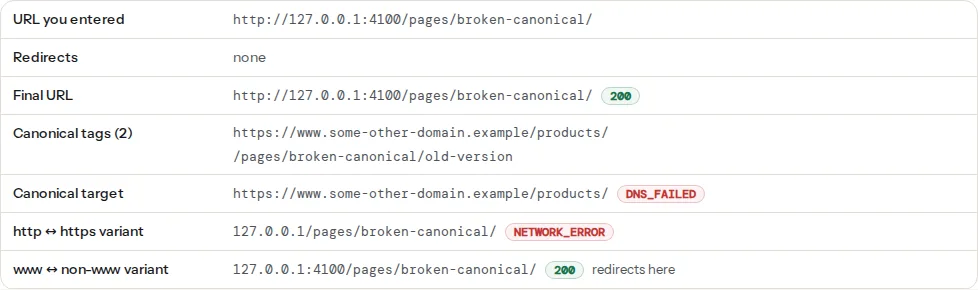
The checker fetches the page, reads every ``, and requests the canonical URL to see what it returns. The "Canonical chain" table lays it out: the URL you entered, any redirects on the way, the final URL with its status, the canonical tags found (with a count), the canonical target with its status and, if it redirected, where it landed, then the http and www variants:
> **Check: Canonical tag is present.** Without a canonical URL, search engines may index duplicate versions of this page (with and without trailing slash, with UTM parameters) and split its ranking signals.
>
> 1. Add in .
> 2. In WordPress, Yoast or Rank Math add this automatically — check it is not disabled for this page.
> **Check: Canonical tag points to a valid URL.** The canonical tag asks Google to index that URL instead of this one. If it points to another site, appears twice or leads to an error page, your ranking signals are given away or ignored.
>
> 1. Point the canonical at this page's own clean URL (same scheme and host, no tracking parameters), and make sure it returns 200.
> 2. Keep exactly one canonical tag; if a plugin and the theme both add one, disable one of them.
> **Check: og:url matches the canonical URL.** Facebook counts likes and shares per og:url. When it differs from the canonical URL, the counts split between two addresses and the card may link to the wrong version of the page.
>
> 1. Set og:url to exactly the canonical URL of this page, without tracking parameters.
> 2. In WordPress, Yoast and Rank Math derive it from the canonical automatically; check for a hard-coded value in the theme.
What `canonical-self-or-valid` accepts, exactly, in the order it tests:
1. More than one canonical tag on the page: fail ("appears N times").
2. An empty, unparseable or non-http(s) `href`: fail.
3. A canonical on a **different host** than the page: fail ("points to another host"), without fetching it.
4. A canonical equal to the page's own final URL: pass ("self-referencing" in the table).
5. A canonical on the same host but another path: the target is requested with a `HEAD` request, redirects followed. A final 200 passes and the table shows where it landed; a 404, 410, 5xx or no answer fails.
Point 3 is the one that matters for this guide. The tool cannot know whether a cross-host canonical is a syndication arrangement or a hijacked plugin, so it treats every one as a failure that needs a human decision. On a partner's copy of your article, that failure is the correct state; on your own site, it is the most expensive mistake on this page.
The social check compares `og:url` with the canonical (or with the final URL when there is no canonical), ignoring the scheme, a trailing slash and host case, but not the query string. On a syndicated copy that carries a canonical to the original, `og:url` should be the copy's own URL, so this finding will warn; that is a known trade-off, and share counts for the copy matter less than the index decision.
## Step by step
### 1. Your article on a partner's site
Until 2023, the standard request to a syndication partner was "please add a canonical to our URL". Google's [canonicalization documentation](https://developers.google.com/search/docs/crawling-indexing/canonicalization) now says that if you want your copy to be the one that ranks, the syndicating site should block indexing of its copy with `noindex`, and that a canonical is not recommended for this because syndicated copies are usually not identical to the original, which makes the hint unreliable. Ask for three things, in this order of importance:
```html
```
And in the visible text: "This article first appeared on example.com" with a normal link. The `noindex` keeps the copy out of the index; the canonical costs nothing and helps other systems; the visible link is what readers and other search engines follow. If the partner will only do one, ask for `noindex`.
### 2. Your article republished on Medium, Substack or LinkedIn
**Medium**: use the import tool (Stories → Import a story) instead of pasting. An imported story carries a canonical link to the original; a pasted one competes with it.
**Substack**: there is no way to set a canonical on a post, so a full copy competes with your site. Publish a summary with a link, or accept that the newsletter archive may outrank the original.
**LinkedIn articles**: no canonical either. Post an excerpt, three or four paragraphs, ending in a link to the full piece. The excerpt is different enough not to be a duplicate and does its job as a teaser.
### 3. Someone else's content on your site
A guest post that also lives on the author's blog, a partner's press release, a manufacturer's product description used with permission. Either canonical to the source or `noindex` the page. Canonical when you want the page to exist for visitors but not compete; `noindex` when it also should not pass any signals. What you must not do is give it a self-referencing canonical and hope: the original usually wins, and your copy becomes a page Google ignores.
In WordPress, the canonical field is per post: Yoast SEO → the post's SEO box → Advanced → Canonical URL; Rank Math → the post's Rank Math box → Advanced → Canonical URL. Paste the source's full https URL.
### 4. A mirror domain
Two domains serving the same site (`example.com` and `example.net`, or a brand's old and new name) should not both answer 200. Redirect the whole secondary domain, keeping the path, so every URL has exactly one address:
```nginx
# nginx: the mirror domain redirects everything to the main one
server {
listen 80;
listen 443 ssl;
server_name example.net www.example.net;
return 301 https://example.com$request_uri;
}
```
```apache
# Apache, in the mirror's .htaccess
RewriteEngine On
RewriteCond %{HTTP_HOST} ^(www\.)?example\.net$ [NC]
RewriteRule ^ https://example.com%{REQUEST_URI} [L,R=301]
```
A canonical instead of a redirect leaves two crawlable copies, two sets of links to reconcile, and a tag the mirror's CMS will eventually overwrite.
### 5. An old domain after a move
Same rule as a mirror, and more urgent: the redirect is how the old domain's links transfer. A canonical from old to new is not honoured in the way a 301 is, and Search Console's Change of Address tool requires the redirects to be in place. The [site migration checklist](https://getreport.app/guides/site-migration-checklist-domain-https-cms) has the full sequence.
### 6. Staging and dev copies
A canonical from `staging.example.com` to `example.com` is the wrong tool twice: Google still crawls the copy, and the day the staging site is cloned to production the canonical comes with it, pointing at itself. Staging needs HTTP authentication so nothing can fetch it, and `noindex` as a backstop for the day someone removes the password:
```nginx
# nginx: staging behind a password, with noindex on everything it serves
server {
server_name staging.example.com;
auth_basic "Staging";
auth_basic_user_file /etc/nginx/.htpasswd;
add_header X-Robots-Tag "noindex, nofollow" always;
# …
}
```
[Staging sites: testing changes before they go live](https://getreport.app/guides/staging-sites-testing-changes-before-they-go-live) covers the platforms.
### 7. Protocol and host variants
`http://`, `https://`, `www.` and bare are four addresses for one site, and the canonical checker's last two rows show what each does. They are the clearest case of "redirect, do not canonical": a canonical on the `http://` copy still leaves an insecure page online. [Trailing slashes, www and https: pick one](https://getreport.app/guides/trailing-slashes-www-and-https-pick-one) has the redirects for each server.
### 8. Read what Google decided
Canonicals conflict more often than people expect: your copy says A, the partner's copy says B, the sitemap lists both. Google resolves it and tells you. In Search Console, URL Inspection shows "User-declared canonical" (your tag) and "Google-selected canonical" (its decision) for any URL on a property you own. Inspect both copies when you can; when the other domain is not yours, inspect your own and search Google for the exact title in quotes to see which URL appears.
If Google selected the partner's copy despite your tag, the partner's page is usually more different from yours than you thought (added intro, different headline) or has more links. The `noindex` request in step 1 is the fix; a canonical cannot win that argument alone.
## Platform notes
### WordPress
Yoast and Rank Math print a self-referencing canonical on every page and expose the per-post field described in step 3. A theme or page builder that prints its own tag produces two canonicals, which fails the check before anything else is considered; the finding says how many were found. For a whole-site mirror, the redirect belongs at the server or the host's panel, not in a plugin: a plugin only runs after WordPress has already served the mirror's copy of the page.
### Shopify
Shopify prints self-referencing canonicals and cannot be told to canonicalise a product to another domain from the admin. A second domain connected to the same store redirects to the primary domain automatically (Settings → Domains), which is the correct behaviour for a mirror.
### Static sites
The canonical comes from the site's configured base URL. A deploy preview or a mirror built from the same source will print the production URL as its canonical, which is right for a preview and wrong for a mirror that should redirect instead. Keep mirrors at the DNS or host level (Netlify's `_redirects`, Vercel's `redirects` in `vercel.json`, Cloudflare's redirect rules) so they never build a copy at all.
## Verify
- On your original: the canonical checker shows one tag and "self-referencing".
- On a syndicated copy you control: one tag pointing at your original, the "points to another host" failure, and `noindex` in the page source.
- On a mirror or old domain: the "Redirects" row shows a single 301 to the main domain, and the final URL is on the main domain with a self-referencing canonical.
- In Search Console, URL Inspection on your original shows the Google-selected canonical equal to the user-declared one; a search for the headline in quotes shows your URL first.
## Common mistakes
- **A canonical to a URL that redirects.** The tag is weakened and the redirect adds a hop. Point at the final URL; the chain table shows where a target lands.
- **A canonical to a 404.** The original was moved or deleted and the copies were not updated. The check fails with the status; fix the target or the tag.
- **A canonical to a different language.** `example.fr/article/` pointing at `example.com/article/` tells Google to drop the French page. Each language canonicalises to itself; hreflang connects them.
- **Relying on a canonical for a domain move.** Links do not transfer, the old site stays crawlable, and Change of Address will not accept it. Redirect.
- **Expecting a canonical alone to protect a syndicated original.** Since 2023 Google's advice is `noindex` on the copy; the canonical is a supplement.
- **Two canonical tags.** A theme and a plugin both printing one. The check fails on the count before it looks at either URL; keep the plugin's.