# Canonical tags explained, with every mistake we see
> The canonical tag decides which URL Google ranks when the same content lives at several addresses. This guide covers what it should say, how redirects and www variants interact with it, and the six mistakes that quietly give your rankings away.
Updated 2026-09-25 · Technical SEO · HTML version: https://getreport.app/guides/canonical-tags-explained
Most pages are reachable at more than one address: with and without `www`, with and without a trailing slash, over http and https, with `?utm_source=` on the end, through a category path and a flat path. Google sees each as a candidate and chooses one to index. The canonical tag is how you make that choice yourself, so that links, shares and ranking signals land on one URL instead of being split. This guide explains what a correct canonical looks like, how it interacts with redirects, and the mistakes that show up in most reports.
## Quick answer
- Every indexable page carries exactly one `` in ``, pointing at its own clean URL: absolute, https, your preferred host, no tracking parameters.
- Duplicates (the `?utm` version, the print version, a syndicated copy) point their canonical at the original.
- The canonical URL must answer **200 directly**. A canonical that redirects or 404s is a weak hint at best.
- Redirects, the `www` choice and the trailing slash must agree with the canonical, or Google gets two different answers.
- Run the [canonical checker](https://getreport.app/tools/canonical-checker): it shows the chain from the URL you typed to the URL Google should index.
## Why the canonical matters
Google groups duplicate URLs into a cluster and picks a representative. Without a canonical, the pick is based on redirects, internal links, the sitemap and guesswork, and it can change. With one, you name the representative, and everything the duplicates earn (links from other sites, social shares) is credited to it.
The cost of getting it wrong is silent. A canonical that points at another page tells Google "index that one instead of me": the page drops out of the index and its content ranks under the other URL, or not at all. A canonical that redirects is treated as a hint Google may ignore. Two canonical tags from a theme and a plugin usually get both ignored.
## How getReport checks it
> **Free tool:** [Canonical tag checker](https://getreport.app/tools/canonical-checker): See which URL a page declares as its canonical, whether that URL answers 200, and whether redirects, the www version and the trailing slash agree with it. Duplicate content, solved in one look.
The canonical checker runs a normal report and shows the SEO findings about canonicals, redirects and host consistency, plus a "Canonical chain" table that walks from the entered URL to the URL Google should index:
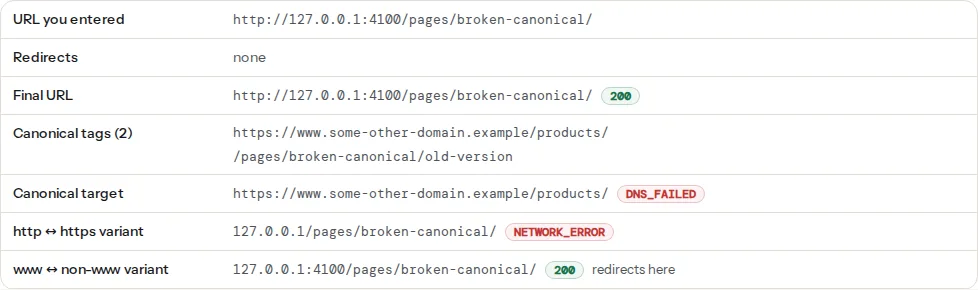
The findings behind it:
> **Check: Canonical tag is present.** Without a canonical URL, search engines may index duplicate versions of this page (with and without trailing slash, with UTM parameters) and split its ranking signals.
>
> 1. Add in .
> 2. In WordPress, Yoast or Rank Math add this automatically — check it is not disabled for this page.
> **Check: Canonical tag points to a valid URL.** The canonical tag asks Google to index that URL instead of this one. If it points to another site, appears twice or leads to an error page, your ranking signals are given away or ignored.
>
> 1. Point the canonical at this page's own clean URL (same scheme and host, no tracking parameters), and make sure it returns 200.
> 2. Keep exactly one canonical tag; if a plugin and the theme both add one, disable one of them.
> **Check: Only one of www and non-www serves the page.** When the www and non-www addresses both return the page, search engines see two copies of every URL and split links and rankings between them.
>
> 1. Pick one host as canonical and 301-redirect the other to it, keeping the path (most hosts and CDNs have a one-click setting for this).
> 2. Make sure the canonical tag on every page uses the chosen host.
> **Check: Internal links use trailing slashes consistently.** /shop/ and /shop are two different URLs to a search engine. Linking to both styles creates duplicate pages and splits their signals.
>
> 1. Choose one style (with or without trailing slash) and redirect the other to it with a 301.
> 2. Update internal links and the sitemap to use the chosen style everywhere.
## What a correct canonical looks like
For the page `https://example.com/shoes/runner-x/`, the head contains:
```html
```
Rules that follow from that one line:
- **Absolute.** `href="https://getreport.app/shoes/runner-x/"` is accepted by Google but breaks when the page is served from a mirror or a scraper copies it; write the full URL.
- **Self-referencing on the original.** The page points at itself. That is not redundant; it protects against parameter and host variants.
- **One tag.** The first is used when there are several, and "several" usually means a theme and an SEO plugin both printing one, sometimes with different values.
- **Same as the final URL.** If `/shoes/runner-x` (no slash) redirects to `/shoes/runner-x/`, the canonical says `/shoes/runner-x/` too.
- **Matches `og:url`** and the sitemap entry, so every signal names the same address.
## Step by step
### 1. Run the checker on the URL people actually use
Type the address as it appears in a link or an ad, including the query string if that is how visitors arrive. The chain table starts from what you typed and shows every redirect. If the entered URL redirects three times before the page, that is a separate problem: see [Redirects without chains](https://getreport.app/guides/redirects-without-chains).
### 2. Read the "Canonical target" row
- **self-referencing**: correct for an original page.
- **another URL with status 200**: fine for a deliberate duplicate; wrong for a page you want to rank. Open the target and ask whether it should really be the indexed version.
- **another URL with a redirect or 404**: fix the canonical to the final, live URL.
- **none**: add the tag.
### 3. Check the http and www variants
The last two rows request the other scheme and the other host. Each should either "redirect here" (301 to the canonical) or not exist. "Serves its own copy" means both variants answer 200 with the same content; Google now has two pages with one canonical, which works but wastes crawls, and it breaks the moment one of them prints a different canonical. Add the redirects at the server:
```nginx
# nginx: http → https and www → bare, in one place
server {
listen 80;
server_name example.com www.example.com;
return 301 https://example.com$request_uri;
}
server {
listen 443 ssl http2;
server_name www.example.com;
return 301 https://example.com$request_uri;
}
```
```apache
# Apache .htaccess
RewriteEngine On
RewriteCond %{HTTPS} off [OR]
RewriteCond %{HTTP_HOST} ^www\. [NC]
RewriteRule ^ https://example.com%{REQUEST_URI} [L,R=301]
```
### 4. Make the trailing slash consistent
Pick one style for directory-like URLs and redirect the other. The finding lists mixed styles on the page's own links. Most CMSs have a setting; nginx's `try_files` and Apache's `DirectorySlash` handle the redirect for real directories.
### 5. Remove tracking parameters from the canonical, not from the URL
`?utm_source=newsletter` on a link is fine; the page's canonical must still be the clean URL. Most SEO plugins do this automatically. If yours prints the parameters into the canonical (usually a custom template that uses the current URL), strip the query string when building the tag.
### 6. Fix duplicate tags
View the page source and search for `rel="canonical"`. Two hits mean two generators. In WordPress, disable the theme's canonical output (theme options or `remove_action('wp_head', 'rel_canonical')` in a child theme) and let the SEO plugin print it. Keep the one that is correct on the most pages.
## Special cases
**Pagination.** Page 2 of a category canonicalises to itself (`/shoes/page/2/`), not to page 1. Pointing all pages at page 1 hides the products on later pages.
**Filtered and sorted views.** `?sort=price` shows the same products in another order: canonical to the unsorted URL. A filter that changes *which* products appear (`?color=red`) is a different page and may deserve its own canonical, if you want it indexed.
**Syndication.** If another site republishes your article, they set their canonical to your URL. If you republish on Medium or LinkedIn, set the canonical there to your original.
**Language versions.** Each language canonicalises to itself; hreflang connects them. A canonical from `/de/` to `/en/` tells Google to drop the German page. See [Hreflang return links](https://getreport.app/guides/hreflang-return-links).
**AMP, print and PDF versions.** They point at the HTML original.
## Platform notes
**WordPress.** Yoast and Rank Math print a self-referencing canonical on every page and let you override it per post (Advanced tab). A common failure is a page-builder template or a theme also printing one. Another is the Site Address (Settings → General) still on `http://` or `www.` after a move, which makes every canonical point at the redirecting variant.
**Shopify.** Shopify prints canonicals automatically; products reachable under collection paths (`/collections/shoes/products/runner-x`) canonicalise to `/products/runner-x`, which is correct. Do not override it in the theme.
**Static sites.** Set the canonical from the site's base URL in config, not from the request; a build served from a preview domain otherwise prints the preview URL.
## Verify
- The chain table shows "self-referencing" for original pages and "redirects here" for both variants.
- Exactly one canonical tag per page.
- `og:url` equals the canonical (the social module's finding).
- In Search Console, the URL Inspection tool shows "User-declared canonical" equal to "Google-selected canonical".
## Common mistakes
- **Canonical to the home page on every page.** A template that hard-codes the site URL. Every page tells Google to index the home page instead.
- **Canonical to the http or www variant** after moving to https. The canonical points at a redirect on every page.
- **Relative canonical with a wrong base.** `href="shoes/runner-x/"` resolves differently on `/shop/` and `/shop/shoes/`.
- **Canonical on a `noindex` page pointing at an indexable page.** Contradictory signals; pick one: either noindex the duplicate or canonicalise it.
- **Canonical from a paginated page to page 1.** Hides everything after page 1.
- **Changing the canonical to fix a ranking problem.** The canonical says "this is the same content"; it is not a redirect and does not move rankings from one page to another.