# Apache .htaccess for an A grade: headers, redirects, caching
> A tested .htaccess, built section by section, that gives an Apache or LiteSpeed site one-hop redirects, security headers, compression, cache lifetimes and no exposed files.
Updated 2026-09-25 · Other platforms · HTML version: https://getreport.app/guides/apache-htaccess-for-an-a-grade
On shared hosting, `.htaccess` is often the only configuration you can touch, and it can do more than most people use it for: one clean redirect to your final address, a full set of security headers, compression, cache lifetimes and a lock on the files bots look for first. This guide builds the file section by section, says where each part goes relative to WordPress's own block, and ends with the checks that prove it works. Every snippet here was run on Apache 2.4. Allow 45 minutes, and keep a copy of the current file before you start.
## Quick answer
- One `RewriteRule` sends every `http://` and `www` request to `https://example.com` in a single 301.
- `Header always set` for HSTS, CSP (report-only first), `X-Content-Type-Options`, `X-Frame-Options`, `Referrer-Policy` and `Permissions-Policy`. `always` covers error pages and redirects too.
- `AddOutputFilterByType` with `BROTLI_COMPRESS` and `DEFLATE` for text types only.
- `mod_expires` for lifetimes by type, plus `immutable` on hashed file names.
- `ErrorDocument 404`, `Options -Indexes`, and deny rules for dotfiles and backups.
- Everything goes **above** `# BEGIN WordPress`. A typo returns 500 for the whole site, so test on a copy first, then run the [security headers checker](https://getreport.app/tools/security-headers).
## Why .htaccess matters on shared hosting
Apache reads `.htaccess` on every request, from the folder being served and each parent, so a change is live the moment you save. That is what makes it the tool of choice on hosts where you cannot edit the server configuration or restart anything. The modules that matter here, `mod_rewrite`, `mod_headers`, `mod_deflate` and `mod_expires`, are enabled on almost every shared host; `mod_brotli` is on many.
Some things are out of reach. TLS protocol versions, ciphers and HTTP/2 are set in the server configuration, which belongs to the host. If the report says the server still accepts TLS 1.0, or that the page loads over HTTP/1.1, no line in `.htaccess` changes that; ask the host, or put a CDN in front. The same goes for the `Server` header's version number: `ServerTokens Prod` only works in the main configuration.
The rest is yours, and it adds up. A typical untouched shared-hosting site loses points for a two- or three-hop redirect chain, five missing headers, uncompressed CSS and JavaScript, and images without a cache lifetime. All of that is fixed by about 60 lines in one file.
## How getReport checks it
> **Free tool:** [Security headers checker](https://getreport.app/tools/security-headers): Check HSTS, CSP, X-Frame-Options, Referrer-Policy, Permissions-Policy and cookie flags on any site. Free, no signup, with a fix for every missing header.
The headers checker grades the final response after redirects, so a header set in `.htaccess` counts exactly like one set by the host. The [redirect checker](https://getreport.app/tools/redirect-checker) follows the URL you enter hop by hop, and also requests the `http://` version and the other www variant to see whether they reach your final host. The report counts the hops from the URL you typed: one redirect passes, two or more is a warning.
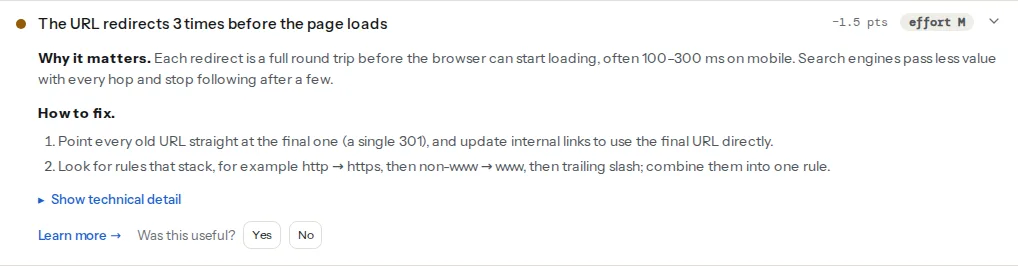
> **Check: The URL loads without a redirect chain.** Each redirect is a full round trip before the browser can start loading, often 100–300 ms on mobile. Search engines pass less value with every hop and stop following after a few.
>
> 1. Point every old URL straight at the final one (a single 301), and update internal links to use the final URL directly.
> 2. Look for rules that stack, for example http → https, then non-www → www, then trailing slash; combine them into one rule.
> **Check: Strict-Transport-Security header is set.** HSTS tells browsers to always use HTTPS for your site, so after the first visit a typed address or an old http:// link never starts on an unencrypted connection. Only the preload list covers the very first visit.
>
> 1. Send the header: Strict-Transport-Security: max-age=31536000; includeSubDomains.
> 2. Start with a shorter max-age (e.g. 86400) if you are not sure every subdomain supports HTTPS.
> **Check: Text files are compressed.** HTML, CSS and JavaScript shrink by 70–90% with gzip or Brotli. Sending them uncompressed wastes visitors' data and seconds, especially on mobile.
>
> 1. Enable Brotli (or gzip) for text types in your server, hosting panel or CDN; Cloudflare and most hosts have it as one switch.
> 2. Check the files in the technical detail; third-party ones need the vendor to fix it.
> **Check: Static files have a cache lifetime.** Without a cache lifetime, every visit downloads the same logo, CSS and scripts again. Returning visitors should get them from their browser in 0 ms.
>
> 1. Send Cache-Control: public, max-age=31536000, immutable for versioned images, CSS, JS and fonts.
> 2. Most caching plugins and CDNs set this for you; check the "browser cache" or "edge TTL" setting.
Compression and caching come from a full page load in Chromium: every text response is checked for a `Content-Encoding`, and every script, stylesheet, image and font for a positive `max-age`, `immutable` or a future `Expires` date. The `.env` and `.git/HEAD` paths are requested directly, and so are up to three asset folders the page uses, to catch an "Index of /" listing.
## Step by step
The file is `.htaccess` in the site's document root (often `public_html/`). Replace `example.com` with your final host. Each block below goes in the order shown.
### 1. One redirect to the final address
The chain in the screenshot usually comes from two or three separate rules ([redirects](https://getreport.app/learn/redirects) explains what each hop costs): one for HTTPS, one for www, one for the slash. Each fires, redirects, and the next request hits the next rule. The fix is one rule with two conditions:
```apache
RewriteEngine On
RewriteCond %{HTTPS} off [OR]
RewriteCond %{HTTP_HOST} !^example\.com$ [NC]
RewriteRule ^ https://example.com%{REQUEST_URI} [L,R=301]
```
In words: if the request is not HTTPS, **or** the host is anything other than `example.com`, send it to `https://example.com` with the same path. The query string is kept automatically. `http://www.example.com/page?x=1` now arrives at `https://example.com/page?x=1` in one hop. If you prefer www as the final host, write `www.example.com` in both places.
Behind Cloudflare, a load balancer or a host's proxy, Apache may see every request as plain HTTP even when the visitor used HTTPS, which turns this rule into an endless loop. In that case, test the header the proxy sets instead:
```apache
RewriteCond %{HTTP:X-Forwarded-Proto} !https [OR]
RewriteCond %{HTTP_HOST} !^example\.com$ [NC]
RewriteRule ^ https://example.com%{REQUEST_URI} [L,R=301]
```
On WordPress, leave trailing slashes to WordPress: the permalink structure decides, and WordPress redirects the other form itself. On a static site with folder-style URLs, Apache adds the slash to directories on its own (`DirectorySlash`), so no rule is needed. [Trailing slashes, www and HTTPS](https://getreport.app/guides/trailing-slashes-www-and-https-pick-one) covers the choice.
### 2. Security headers
```apache
Header always set Strict-Transport-Security "max-age=31536000; includeSubDomains"
Header always set Content-Security-Policy-Report-Only "default-src 'self'; script-src 'self'; style-src 'self' 'unsafe-inline'; img-src 'self' data: https:; font-src 'self'; connect-src 'self'; frame-ancestors 'self'; base-uri 'self'; form-action 'self'; object-src 'none'"
Header always set X-Content-Type-Options "nosniff"
Header always set X-Frame-Options "SAMEORIGIN"
Header always set Referrer-Policy "strict-origin-when-cross-origin"
Header always set Permissions-Policy "camera=(), microphone=(), geolocation=(), payment=()"
Header always unset X-Powered-By
Header unset X-Powered-By
```
`Header set` without `always` only applies to successful responses. A 404 page, a 500 error or the redirect from step 1 then goes out without HSTS or framing protection. With `always`, every response carries them.
`SAMEORIGIN` rather than `DENY` because WordPress's customizer previews the site in a frame on the same domain. The CSP starts in report-only mode, which the check counts as present, so you can watch the browser console for a week before switching the header name to `Content-Security-Policy`. [Security headers from zero to A](https://getreport.app/guides/security-headers-from-zero) explains each header.
`X-Powered-By: PHP/8.1.2` is added by PHP, and depending on how the host runs PHP it lands in either of Apache's two header tables, so the file removes it from both. The clean fix is `expose_php = Off`, which only works in `php.ini` or the host's PHP settings panel, not in `.htaccess`.
### 3. Compression
```apache
AddOutputFilterByType BROTLI_COMPRESS text/html text/css text/plain text/xml text/javascript application/javascript application/json application/xml application/rss+xml application/manifest+json image/svg+xml
AddOutputFilterByType DEFLATE text/html text/css text/plain text/xml text/javascript application/javascript application/json application/xml application/rss+xml application/manifest+json image/svg+xml
```
A browser that asks for Brotli gets Brotli, one that only asks for gzip gets gzip, and nothing is compressed twice. List both JavaScript types: newer servers send `.js` as `text/javascript`, older ones as `application/javascript`, and a type missing from the list goes out uncompressed. Leave images, fonts, video and archives out; they are compressed already.
### 4. Cache lifetimes
```apache
ExpiresActive On
ExpiresDefault "access plus 0 seconds"
ExpiresByType text/html "access plus 0 seconds"
ExpiresByType text/css "access plus 1 year"
ExpiresByType text/javascript "access plus 1 year"
ExpiresByType application/javascript "access plus 1 year"
ExpiresByType font/woff2 "access plus 1 year"
ExpiresByType image/avif "access plus 1 week"
ExpiresByType image/webp "access plus 1 week"
ExpiresByType image/jpeg "access plus 1 week"
ExpiresByType image/png "access plus 1 week"
ExpiresByType image/svg+xml "access plus 1 week"
ExpiresByType image/x-icon "access plus 1 week"
Header set Cache-Control "public, max-age=31536000, immutable"
```
`mod_expires` writes both an `Expires` date and the matching `Cache-Control: max-age`, so older and newer caches agree. A year for CSS and JavaScript is safe when their URLs change on every edit, which WordPress does with `?ver=` and build tools do with a hash in the file name. If yours do neither, use a week. The `FilesMatch` block adds `immutable` to hashed names like `app.3f9a1c2b.js`, so browsers do not even revalidate them. HTML gets `max-age=0`: stored, but checked on every visit.
### 5. The 404 page and the files nobody should see
```apache
ErrorDocument 404 /404.html
Options -Indexes
RedirectMatch 404 /\.(?!well-known/)
Require all denied
Require all denied
```
`ErrorDocument` must be a path on your own site. A full URL (`https://example.com/404.html`) makes Apache send a redirect instead of a 404, and the report's custom-404 check, which requests a random path without following redirects, fails. WordPress renders its own 404 through `index.php`; the line matters for static sites and folders outside WordPress.
`Options -Indexes` stops Apache from listing a folder's contents when it has no index file. `RedirectMatch 404` answers every path that starts with a dot, `.env`, `.git/`, `.htpasswd`, with a plain 404, while leaving `/.well-known/` reachable for certificate renewals and `security.txt`. The `FilesMatch` block refuses `wp-config.php` and the backup and dump files that editors and migration tools leave behind; WordPress still reads `wp-config.php` from disk, it just cannot be downloaded. The `xmlrpc.php` block is for WordPress sites that do not use Jetpack or the mobile apps, which need it.
### 6. Where WordPress's block goes
WordPress writes its own section between `# BEGIN WordPress` and `# END WordPress` and rewrites it whenever permalinks are saved. Anything you put inside is lost. Anything you put below it runs too late: the block's last rule sends every request that is not a real file to `index.php`, and a redirect placed after it would redirect `index.php` itself. So the order is: your blocks 1 to 5, then the WordPress block, unchanged:
```apache
# BEGIN WordPress
# The directives (lines) between "BEGIN WordPress" and "END WordPress" are
# dynamically generated, and should only be modified via WordPress filters.
# Any changes to the directives between these markers will be overwritten.
RewriteEngine On
RewriteRule .* - [E=HTTP_AUTHORIZATION:%{HTTP:Authorization}]
RewriteBase /
RewriteRule ^index\.php$ - [L]
RewriteCond %{REQUEST_FILENAME} !-f
RewriteCond %{REQUEST_FILENAME} !-d
RewriteRule . /index.php [L]
# END WordPress
```
Caching and security plugins add blocks of their own at the top (`# BEGIN LSCACHE`, `# BEGIN WP Rocket`). Leave those where they are, and remove any of their options that duplicate your headers or compression.
### 7. Test before you trust it
A syntax error in `.htaccess` does not break one page; it returns "500 Internal Server Error" for every request. `Options` needs the host to allow it (`AllowOverride Options`); if it is not allowed, the result is the same 500. So:
1. Download the current file and keep it as `htaccess-backup.txt`.
2. Upload the new version to a staging copy if you have one, or during a quiet hour if you do not.
3. Check from a terminal:
```bash
curl -sI http://www.example.com/ | grep -i -E "^HTTP|location"
curl -sI https://example.com/ | grep -i -E "strict|content-security|x-content|x-frame|referrer|permissions|x-powered"
# any stylesheet from your page source; this one exists on every WordPress site
curl -sI -H "Accept-Encoding: br, gzip" https://example.com/wp-includes/css/dist/block-library/style.min.css | grep -i -E "content-encoding|cache-control"
curl -s -o /dev/null -w "%{http_code}\n" https://example.com/.env
```
The first should show one `301` to `https://example.com/`; the second all six headers and no `x-powered-by`; the third `br` or `gzip` and a `max-age`; the fourth `404`. If anything returns 500, put the backup back and check the host's error log for the line number.
## Platform notes
### WordPress
Blocks 1 to 5 go above `# BEGIN WordPress`. If a security plugin already sets headers, keep one source: two `X-Frame-Options` values confuse browsers.
### LiteSpeed hosts
LiteSpeed Web Server reads `.htaccess` and understands the rewrite, header and expires directives above, so the same file works. Compression is configured in LiteSpeed itself; check the compression finding rather than relying on the `mod_deflate` block. Its cache plugin writes a block at the top; keep it there.
### Nginx hosts
If the `Server` header says `nginx`, `.htaccess` is ignored completely; nothing in it has any effect. Ask the host where headers and redirects are configured, or see [Nginx configuration for an A grade](https://getreport.app/guides/nginx-configuration-for-an-a-grade).
## Verify
1. **Redirect checker** on all four variants: `http://example.com`, `http://www.example.com`, `https://www.example.com` and `https://example.com`. The first three end on `https://example.com/` in one hop; the last has none.
2. **Security headers checker**: every header finding passes, `X-Powered-By` is gone. The `Server` version is the host's to hide.
3. **HTTP/2 test**: the compression and cache findings pass; the protocol rows show what the host provides.
4. **Full report**: the exposed-files and directory-listing findings pass, and a random missing URL gets your 404 page.
## Common mistakes
- **Two redirect rules that chain.** Symptom: the redirect checker shows `http://www` → `https://www` → `https://`. Fix: one rule with both conditions, as in step 1, and remove the old ones, including a plugin's "force HTTPS" option.
- **`Header set` without `always`.** Symptom: headers present on pages but missing on redirects and error pages. Fix: `Header always set`.
- **Rules below the WordPress block.** Symptom: redirects never fire, or visitors land on `/index.php`. Fix: move them above `# BEGIN WordPress`.
- **Overwriting `mod_expires` with a bare `Cache-Control`.** Symptom: `Cache-Control: public` with no `max-age`, and the cache finding lists the files. Fix: let `mod_expires` set the lifetime, or write the full value with `max-age`.
- **Compressing images.** Symptom: slower responses, no smaller files. Fix: text types only in `AddOutputFilterByType`.